Read a Lead's AI Score, Call Summary and Transcript
In short: A lead's page shows who the person is and whether they agreed to be contacted, the AI score with its reason, your industry's details filled from the calls, and a timeline of every call (summary, outcome, recording, transcript), message, activity and campaign. Call Now calls them at once with your agent.
A step-by-step guide for BookAICall, an AI voice agent platform that makes and answers phone calls for businesses in Hindi, English, Hinglish and other Indian languages. Updated .
Steps
Open Unified CRM and click the lead's row. The top shows the name, phone, email and company, with Call Logs, Callbacks, Email, WhatsApp, Qualify and Call Now.
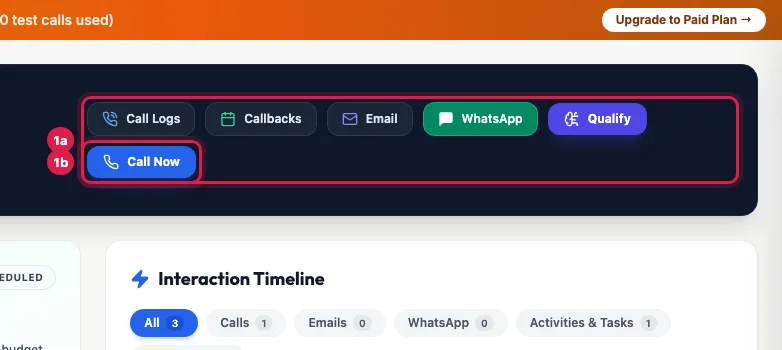
The lead's name and number, and the actions: call logs, callbacks, email, WhatsApp, qualify, call now AI Predictive Score: the score out of 100 and what it means (High Intent above 80, Nurturing, or High Churn Risk below 40), the reason in one or two sentences, and its parts such as intent, timeline and budget fit. A lead with no analysed call shows Not scored yet.
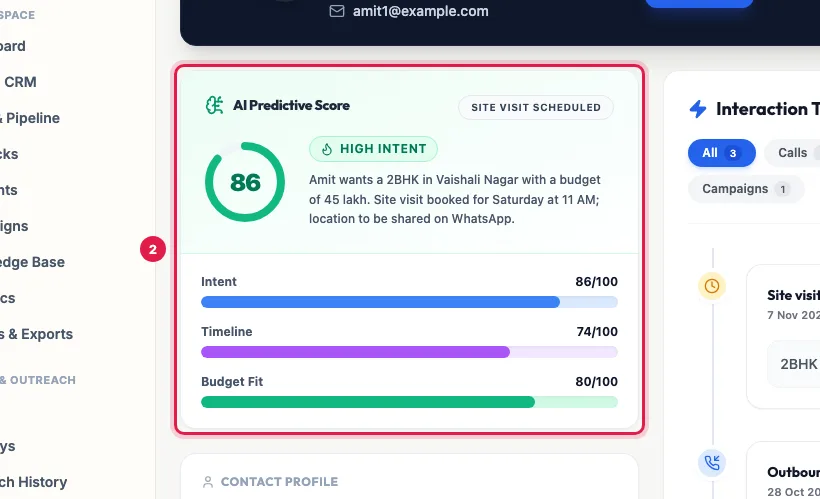
AI Predictive Score: the score, what it means, the reason and its parts Contact Profile: phone, email, Registration / Opt-In Date, Lead Source and your Notes. Below it, your industry's details (for a property business: budget, location, configuration, site visit date), filled in by the calls, and the counters for total calls, completed calls, emails sent and pending activities.
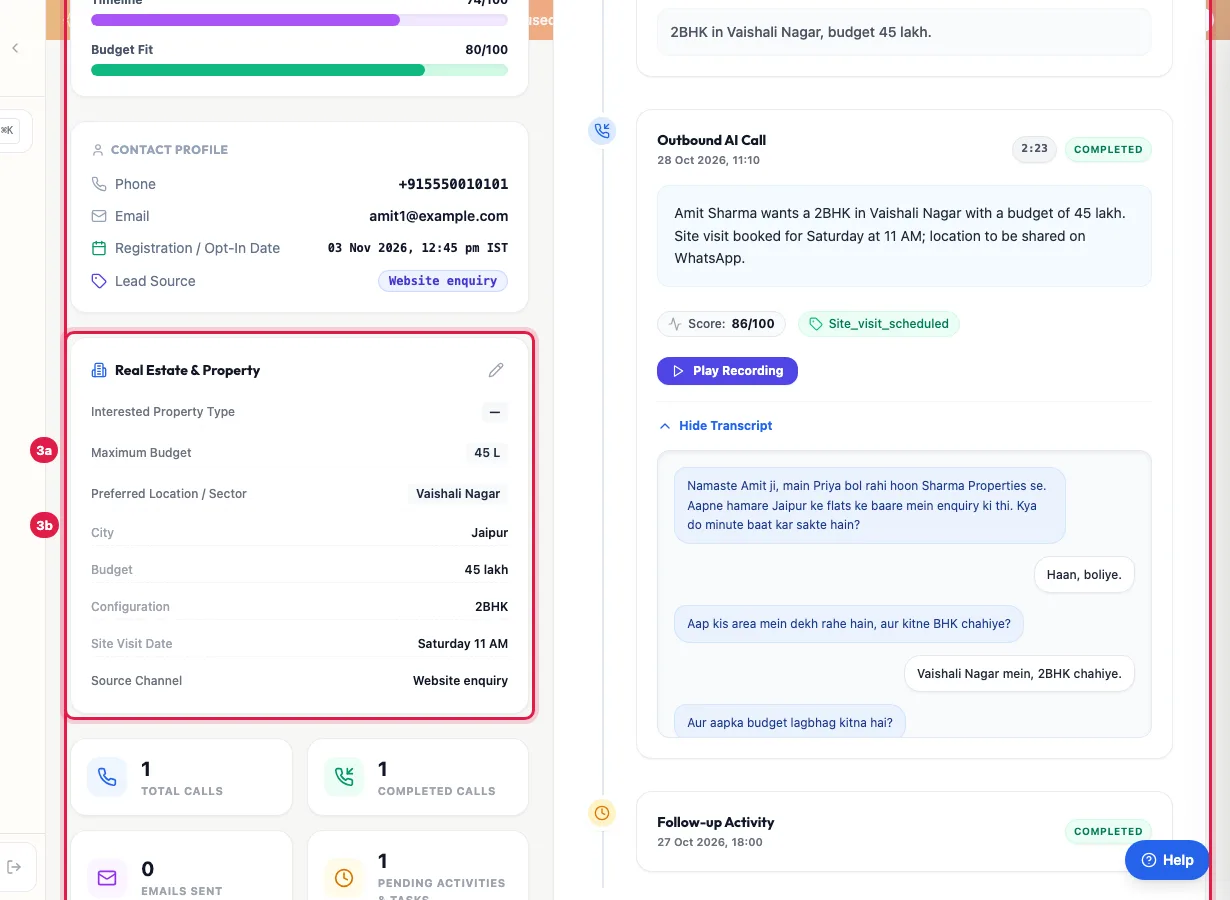
Contact profile and your industry's fields, filled from the calls Interaction Timeline: everything about this lead, newest first, with tabs for All, Calls, Emails, WhatsApp, Activities & Tasks and Campaigns.
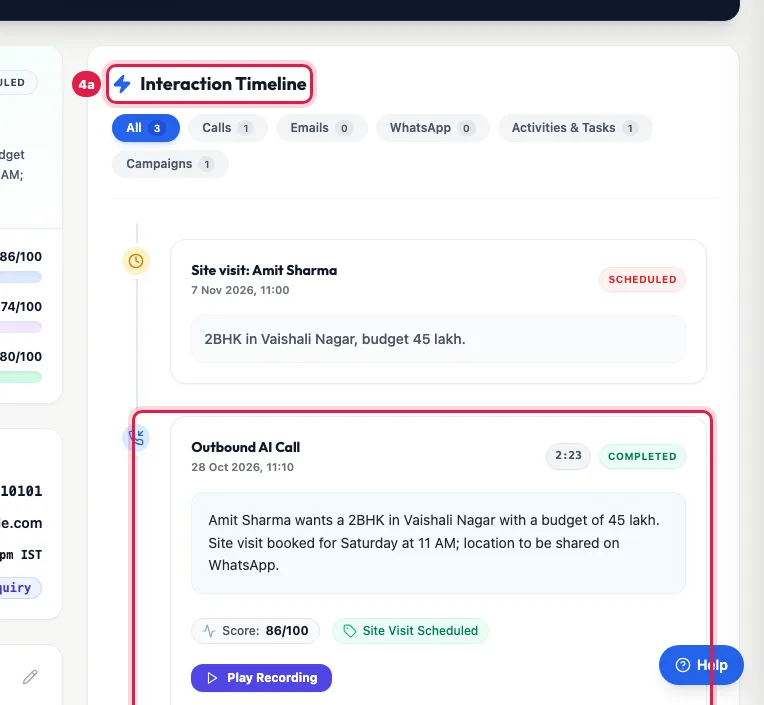
Interaction Timeline: every call, message, activity and campaign, newest first Each call shows its summary, its own score and outcome, the recording (or Play Recording to fetch it) and the transcript, open by default; Hide Transcript folds it.
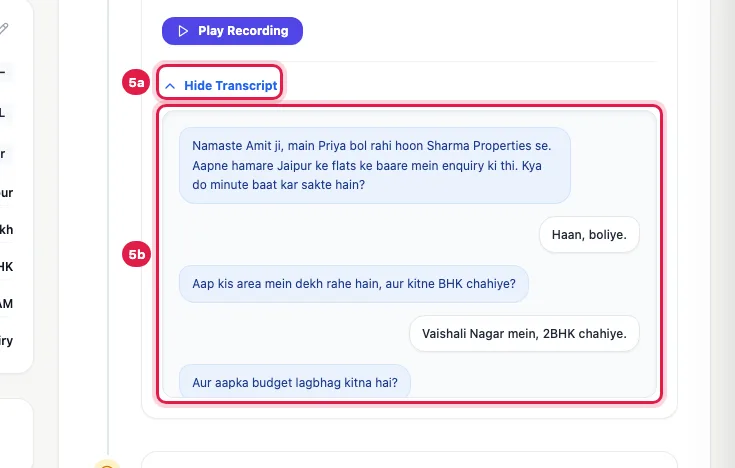
A call's summary, score, outcome, recording and transcript To correct anything, click the pencil on the details card: Edit Lead Details has the name, company, phone, email, Lead Status, Qualification Tier, Internal Notes and your industry's fields. Click Save Changes.
The buttons at the top
- Call Logs and Callbacks jump to the timeline's calls and its activities (callbacks are activities).
- Email opens your email app to the lead; WhatsApp opens a WhatsApp chat with the number in a new tab.
- Qualify asks the AI to score the lead now from its details and history.
- Call Now calls the lead at once with your primary active agent; it works at any hour because you start it yourself. An opted-out lead is not called.
Consent
The CRM list shows Opted In (TRAI) or Opted Out / DND for this lead. To change it, use Edit in the list (Customer Opt-in Verified) or Mark Opt-Out / DND and Grant Opt-In Consent in the 360° Profile panel. An opted-out lead gets no campaign call, campaign WhatsApp or email, or journey; every change is recorded with who made it.
Reading the score
- The score and tier come from the calls: what the person said about need, budget and timing. Each call on the timeline keeps its own score, so an older call does not look like the latest one.
- Intent signals (for example price asked, visit requested) and the AI Outcome with its tier sit under the counters.
- Hot means strong buying intent; call back quickly. High Churn Risk means low interest or a complaint; a person should look at it.
360° Profile or the full page?
360° Profile in the CRM list opens a side panel without leaving the list: profile and notes, calls, outcomes, activities and assets (for example a vehicle or a policy). The full page has the timeline with every message and campaign, and the editor for all fields.
Example: Before a site visit
Before Saturday's visit, the Sharma Properties sales manager opens Amit Sharma's page: score 86, High Intent, 2 BHK in Vaishali Nagar within 45 lakh, visit booked for Saturday 11 AM. He reads the transcript of the last call to see what Amit asked about parking and loans, plays the recording for the tone, and adds a note that Amit's wife will join. The visit starts where the call ended.
Tips
- Read the last call's summary before you call a lead yourself.
- If the AI filled a field wrongly, correct it with the pencil: the next call uses your value.
- Several people can open the same lead; their initials show at the top so you know who else is looking.
Frequently asked questions
Transcript kaha dekhe?
On the lead's page, in the Interaction Timeline: each call shows its transcript under the summary. All calls are also on the CRM's Voice Calls tab.
The recording does not play.
Click Play Recording: it fetches the recording if it was not ready when the page opened. Very short or unanswered calls have none.
What does Qualify do?
It asks the AI to score the lead now from its details and past calls, without a new call.
Which agent does Call Now use?
Your primary active agent. To choose another, use Call AI on the lead's row in Unified CRM.
Why does an old call show a different score?
Each call keeps the score it got; the big score at the top is the lead's latest.
How do I stop calls to this person?
Click Edit on the lead's row in Unified CRM, untick Customer Opt-in Verified and save.
Questions this guide answers
- How does AI lead scoring work on calls?
- Where can I read the transcript of an AI call?
- What does High Intent or High Churn Risk mean on a lead?
- How do I call a lead now from the CRM?
Related guides
- Using the CRM Built into Your AI Calling Agent: Unified CRM is where every lead, call outcome, follow-up and recorded call lives. The list shows each lead's source, consent, groups…
- How to Edit a Lead or Mark It Opted Out in the AI Calling CRM: Unified CRM → Edit at the end of the lead's row changes the name, phone, email, company, source, pipeline stage and the opt-in. Untick…
- Lead Notes: Tell the AI Agent What Was Discussed Before: Each lead has Internal Notes for what your team should know: a visit, a preference, a promise. Add them in Add Lead, on the lead's page…
- How to Listen to AI Call Recordings and Read Transcripts: Every answered AI call is recorded and transcribed. In Unified CRM → Voice Calls, click Play Recording on any call to listen; click…
- How AI Agents Book and Make Callbacks Automatically: When a customer says "call me later", the agent books a callback for the time they asked (or the next good slot) and calls them back then…
- Track Deals from AI Calls in a Sales Pipeline: Deals & Pipeline shows your sales opportunities by stage, as a Kanban board or a table, with the value of open deals, won deals and the…