How to Listen to AI Call Recordings and Read Transcripts
In short: Every answered AI call is recorded and transcribed. In Unified CRM → Voice Calls, click Play Recording on any call to listen; click Available under Transcript (or the lead's name) to read the call's AI summary and full transcript.
A step-by-step guide for BookAICall, an AI voice agent platform that makes and answers phone calls for businesses in Hindi, English, Hinglish and other Indian languages. Updated .
Steps
Open Unified CRM and click the Voice Calls card. Each call shows the direction, number, lead, duration, status, transcript, recording and date.
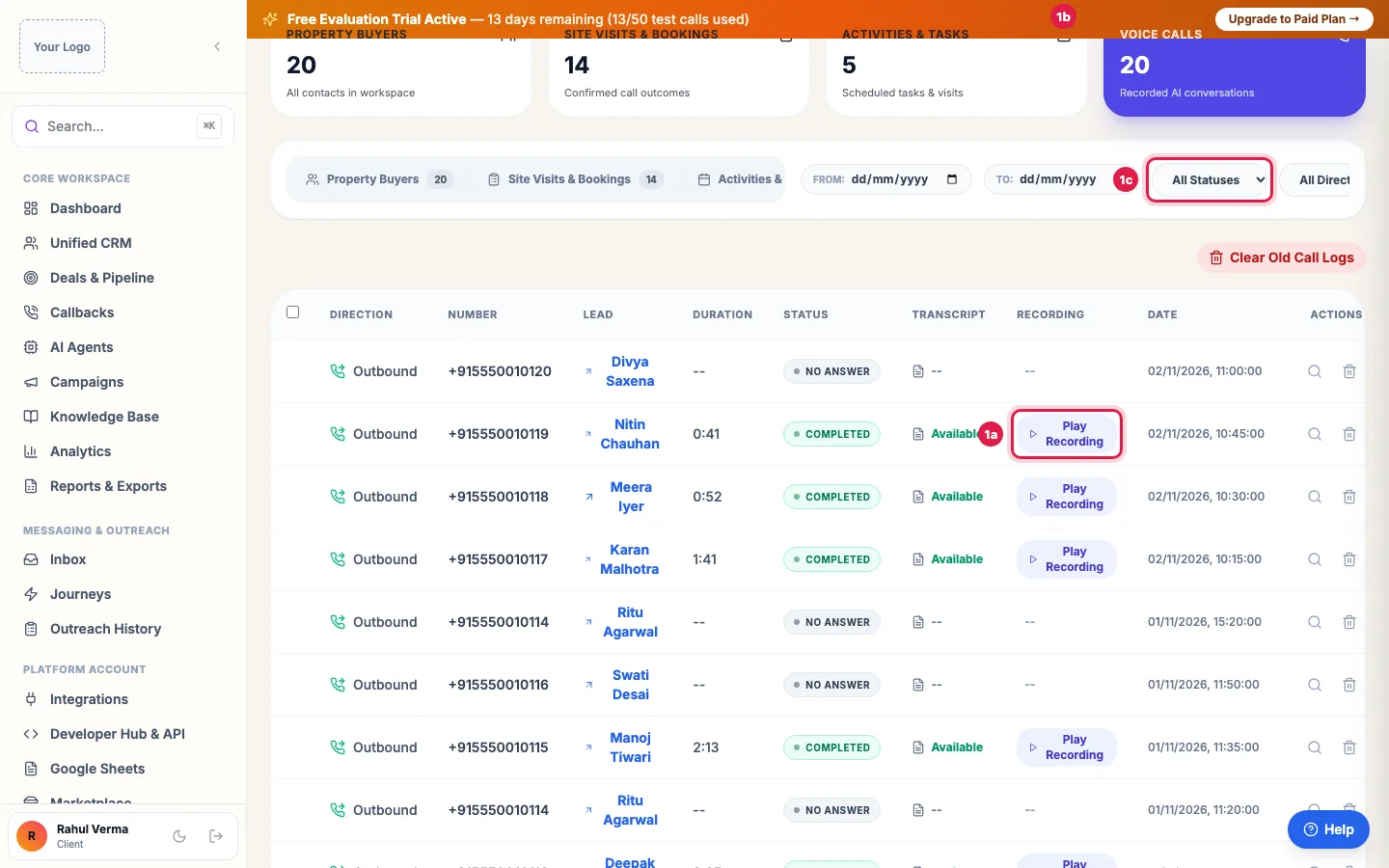
Voice Calls: every call with its length and status; Play Recording plays it here Narrow the list with From: and To: dates, the status (Completed, No Answer, Busy, Failed, Voicemail), the direction (Outbound or Inbound) and, when you have more than one agent, the agent.
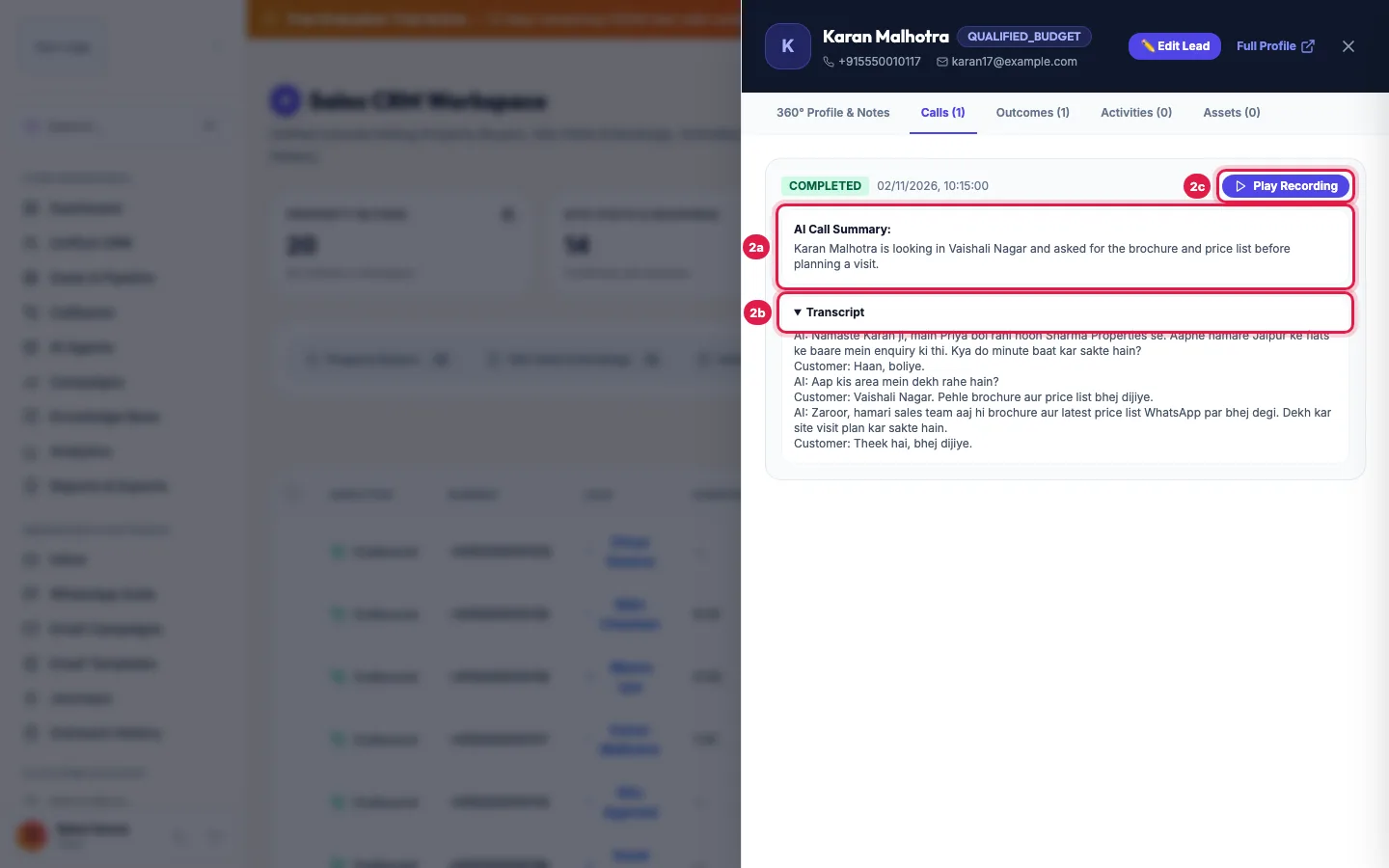
Open the lead and its Calls tab to read the call's summary and transcript Click Play Recording to listen on the page; it changes to Pause while playing. Click it again to stop.
Click Available under Transcript, or the lead's name, to open the lead's panel. Its Calls tab lists every call with the AI Call Summary, Play Recording and the full Transcript (click Transcript to open it).
Click Full Profile at the top of the panel to open the lead's page in a new tab, with every call, note and stage change on one timeline.
What you get for every call
- The recording of the whole conversation, both sides.
- The full transcript, turn by turn, in the language spoken.
- An AI Call Summary: what the person said, what they want and the next step.
- The outcome, sentiment and lead score, which also move the lead's pipeline stage.
- Any details your agent was asked to collect, such as budget, preferred date or city, saved on the lead.
Which calls have a recording
- Answered calls, outbound and inbound, have a recording and a transcript a short while after the call ends.
- Calls that were not answered, busy or failed have none: there was no conversation.
- Calls older than your data retention period (Settings → Data retention) lose the recording, transcript and summary; the call itself and its outcome stay.
Downloading
Export All Call Logs CSV on the Voice Calls card, and the exports in Reports & Exports, give every call with its summary, transcript and a link to the recording. To listen, use Play Recording in the portal.
Example: Checking how the agent handles price questions
The owner of Vardhman Motors wants to hear how the agent answers "What is the on-road price?". In Voice Calls she picks Completed calls from the last two days and plays three calls of three to four minutes. In one transcript the agent quoted the ex-showroom price only, so she adds a line on on-road pricing to the agent's knowledge base and listens to the next day's calls to check.
Tips
- Listen to five calls a day in the first week: it is the fastest way to improve the prompt.
- If a recording does not play at once, wait a minute after the call ends and try again; it is still being saved.
- Use Live Monitor to listen to calls while they happen.
Frequently asked questions
Are all AI calls recorded?
Yes, every answered call is recorded and transcribed, outbound and inbound. Tell callers in your greeting if your policy needs it.
Recording kaise sune?
Unified CRM → Voice Calls → Play Recording on the call. Or open the lead and use Play Recording in its Calls tab.
Why is there no recording for a call?
The call was not answered, busy or failed, or it is older than your data retention period. A call that just ended may need a minute.
Can I read the transcript instead of listening?
Yes. Click Available under Transcript, then Transcript in the lead's Calls tab.
Can I download a recording?
The exports carry a link to each recording, with the transcript and summary. Play recordings in the portal.
How long are recordings kept?
As long as your Data retention setting says (Settings → Data retention). Leave it empty to keep them.
Questions this guide answers
- How do I listen to my AI agent's call recordings?
- Can I read the transcript of an AI call?
- Are AI voice agent calls recorded?
- Why is there no recording for a call?
Related guides
- Using the CRM Built into Your AI Calling Agent: Unified CRM is where every lead, call outcome, follow-up and recorded call lives. The list shows each lead's source, consent, groups…
- Read a Lead's AI Score, Call Summary and Transcript: A lead's page shows who the person is and whether they agreed to be contacted, the AI score with its reason, your industry's details…
- How to Download AI Call Reports in Excel or CSV: Reports & Exports gives you your call data three ways: a ready file for each past day, made every night; an export of any dates with…
- How to Listen to Live AI Calls: Listen, Whisper and Barge: AI Agents → Live Monitor shows your agents and every call in progress, with a live transcript. Click Hear live to listen to a call in your…