How to Download AI Call Reports in Excel or CSV
In short: Reports & Exports gives you your call data three ways: a ready file for each past day, made every night; an export of any dates with filters, in Excel or CSV; and reports that come to you, such as the WhatsApp daily summary. Every file has one row per call with the outcome, summary, transcript and recording link.
A step-by-step guide for BookAICall, an AI voice agent platform that makes and answers phone calls for businesses in Hindi, English, Hinglish and other Indian languages. Updated .
Steps
Open Reports & Exports. 1-Click Daily Archives has one file for each past day with every call of that day, made each night for days older than 7 days. Pick a day and click Download Excel (.xlsx) or Download CSV (.csv) — Opens in Excel, or click Archive Specific Date Now to make the file for a date yourself.
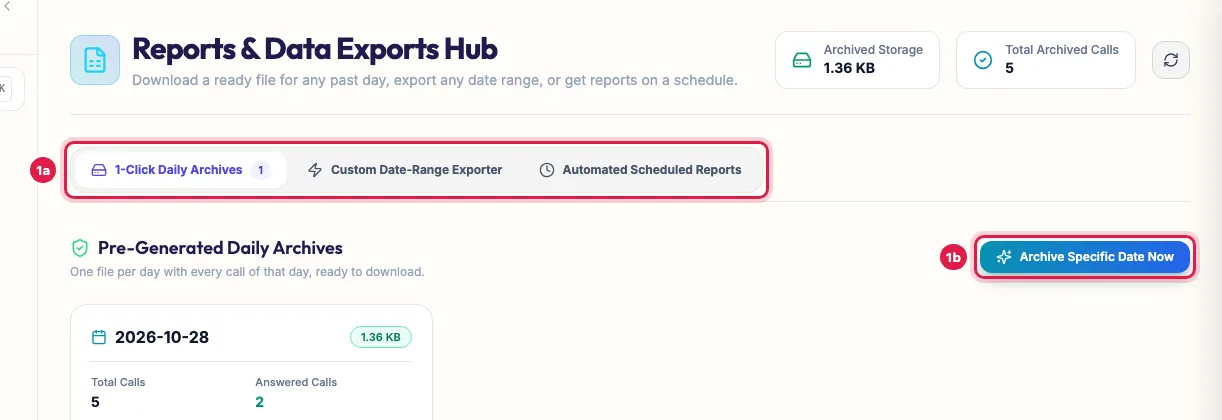
Reports & Exports: a ready file for each past day, or archive a date now To export any dates, open Custom Date-Range Exporter. Pick a Quick Preset (Today, Yesterday, Last 7 Days, Last 30 Days) or the Start Date (IST) and End Date (IST), filter by Voice Agent, Call Status, Direction and Outcome / Disposition, then click Download Excel Report (.xlsx) or Download CSV (.csv).
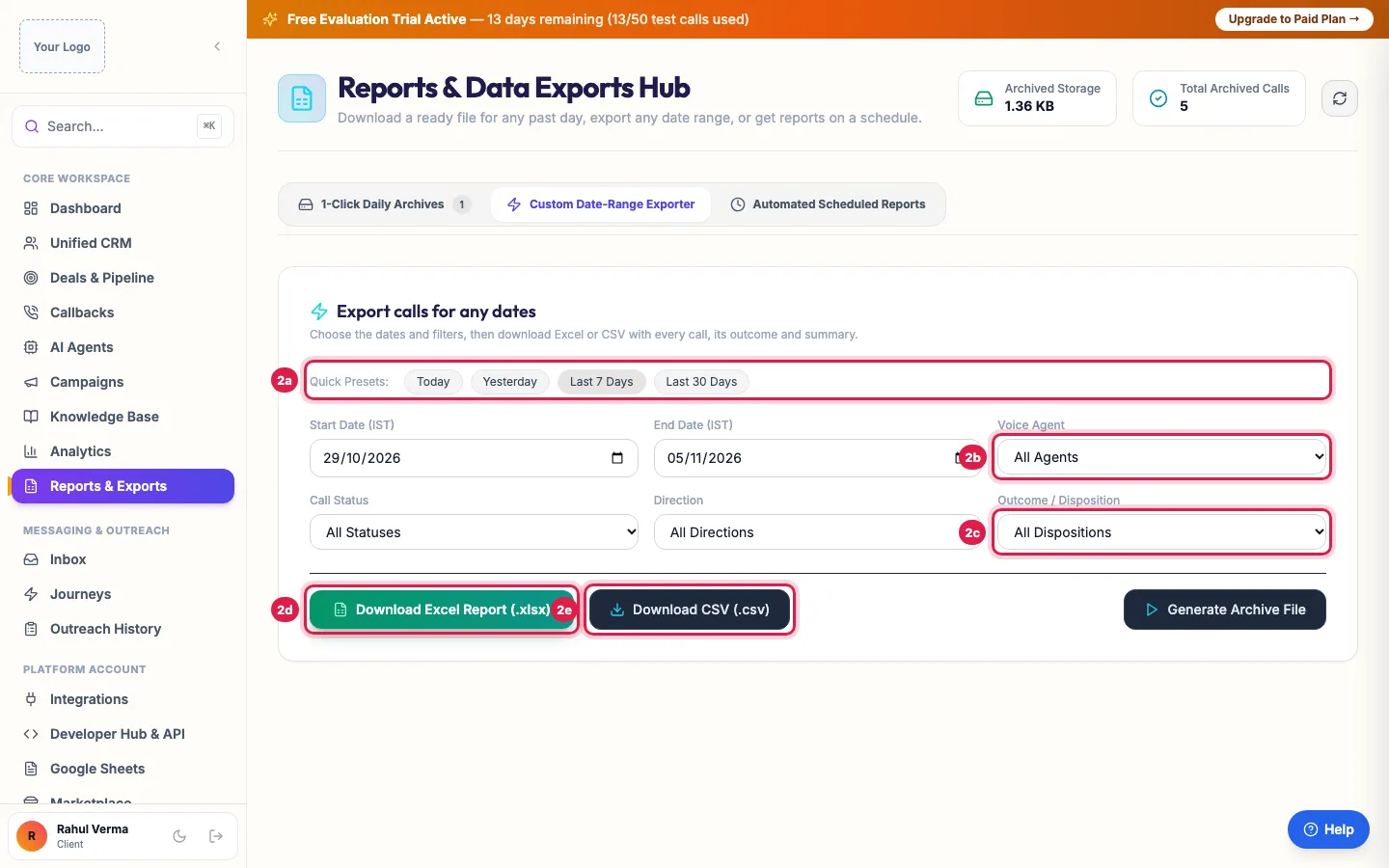
Export any dates: pick the dates and filters, then download Excel or CSV Automated Scheduled Reports shows what comes to you without asking: the WhatsApp daily summary of the day's calls (with the WhatsApp Daily Digest add-on; set the number and the time in Settings → Notifications) and the nightly call archive.
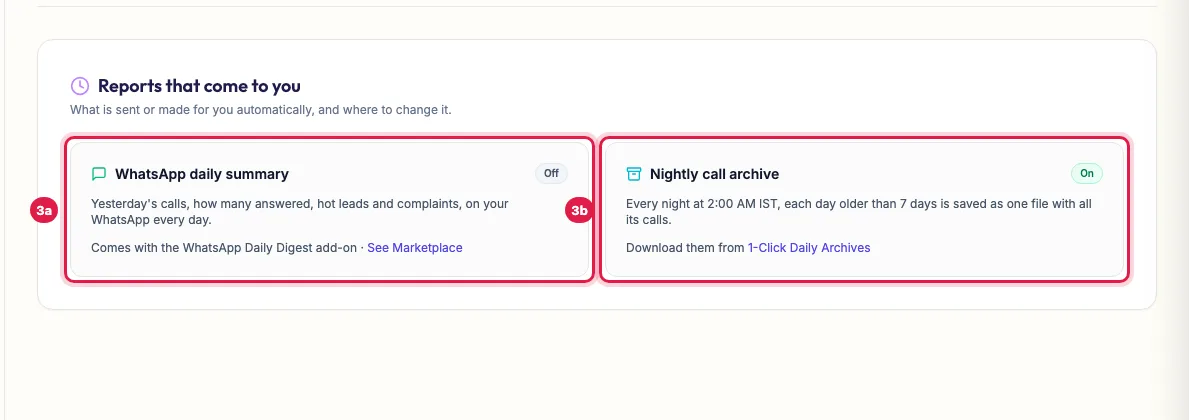
Reports that come to you: the WhatsApp daily summary and the nightly archive
What each export has
One row per call: the date and time (IST), company and contact, the number, caller ID, direction, duration, status, outcome (disposition), agent, sentiment, intent score, qualification tier, any appointment or callback time, the AI summary, the full transcript and a link to the recording.
The filters
- Voice Agent: one agent, or All Agents.
- Call Status: Completed / Answered, No Answer, Busy or Failed.
- Direction: Outbound Calls or Inbound Calls.
- Outcome / Disposition: for example Appointment Scheduled, Callback Requested, Interested, Not Interested, Not Answered, Voicemail or Do Not Call (DND).
- Dates are in Indian time (IST), from the start of the first day to the end of the last.
Big exports
- Above about 65,000 rows, Excel cannot open the file in the browser: the page offers a CSV instead, or the background export.
- Generate Archive File builds the file in the background with a progress bar; click Download File Now when it is ready. Cancel / Reset stops it.
- Each daily archive card also shows that day's Total Calls and Answered Calls, and a compressed copy for large days.
Reports that come to you
- WhatsApp daily summary: the day's calls, how many were answered, interested leads, bookings and complaints, on your WhatsApp every evening at the Scheduled Delivery Time (IST) you set, 8:00 PM unless you change it, to the owner's number and any extra numbers you add. It needs the WhatsApp Daily Digest add-on; the card shows On or Off.
- Nightly call archive: every night at 2:00 AM IST, each day older than 7 days is saved as one file with all its calls.
Example: Monthly MIS for a coaching institute
On the 1st of every month, the admissions head of Bright Future Classes opens Custom Date-Range Exporter, picks Last 30 Days, chooses the Admissions agent and Completed / Answered, and clicks Download Excel Report (.xlsx). The file goes to the director with every answered call's outcome and summary; she filters the Outcome column for Appointment Scheduled to plan the counselling slots, and uses the recording links to review two calls in the weekly team meeting.
Tips
- Recordings and transcripts follow your data retention setting (Settings → Data retention). Call counts and outcomes stay even after recordings are removed.
- Exported files hold your customers' numbers and conversations: keep them inside your team.
- For a single campaign's leads and outcomes, the campaign's own page has its export too.
Frequently asked questions
How do I export AI call logs to Excel?
Open Reports & Exports → Custom Date-Range Exporter, choose the dates and filters, and click Download Excel Report (.xlsx).
Report kaise nikale ek din ka?
In 1-Click Daily Archives, pick the day and download it. For a day in the last 7 days, use Custom Date-Range Exporter with that date as start and end.
Why is there no archive for yesterday?
Nightly archives are made for days older than 7 days. For recent days, use Custom Date-Range Exporter, or Archive Specific Date Now to make one.
Can I get a report every day without downloading?
Yes: the WhatsApp daily summary arrives every evening with the WhatsApp Daily Digest add-on; set the time in Settings → Notifications.
The export says no call logs were found.
No call matches the dates and filters. Widen the dates or set the filters back to All.
Does the export include recordings?
It includes a link to each recording and the full transcript, not the audio files themselves. Play recordings in Unified CRM → Voice Calls.
Questions this guide answers
- How do I export AI call logs to Excel?
- Can I get a daily report of my AI calls on WhatsApp?
- Do AI call exports include transcripts and recordings?
- How do I download call data for a date range?
Related guides
- AI Calling Analytics: Connect Rate, Conversions, Cost per Lead, ROI: Analytics shows how your AI calling performs: total calls, connect rate, opportunity rate and talk time, the funnel from dial to won, what…
- How to Listen to AI Call Recordings and Read Transcripts: Every answered AI call is recorded and transcribed. In Unified CRM → Voice Calls, click Play Recording on any call to listen; click…
- How to Read AI Calling Campaign Results and Export Them: Open the campaign: the top shows how many leads were dialled and answered, the counters show live calls, callbacks and leads not reached…
- How to Export Leads to Excel or CSV: Unified CRM's Export CSV downloads every lead that matches the list's filters (stage, group and search) with its contact details, stage…
- Daily Call Report and Caller Alerts on WhatsApp for Business Owners: With the WhatsApp Daily Digest & Caller Alerts add-on, you get a daily call summary on WhatsApp at the time you choose (8 PM IST by…