How to Export Leads to Excel or CSV
In short: Unified CRM's Export CSV downloads every lead that matches the list's filters (stage, group and search) with its contact details, stage, status, score, groups, dates and TRAI consent. A campaign's Export CSV downloads that campaign's leads, and the Voice Calls tab exports the calls.
A step-by-step guide for BookAICall, an AI voice agent platform that makes and answers phone calls for businesses in Hindi, English, Hinglish and other Indian languages. Updated .
Steps
Open Unified CRM. To export only some leads, choose a stage in All Stages, a group in All Groups, or type in Search.
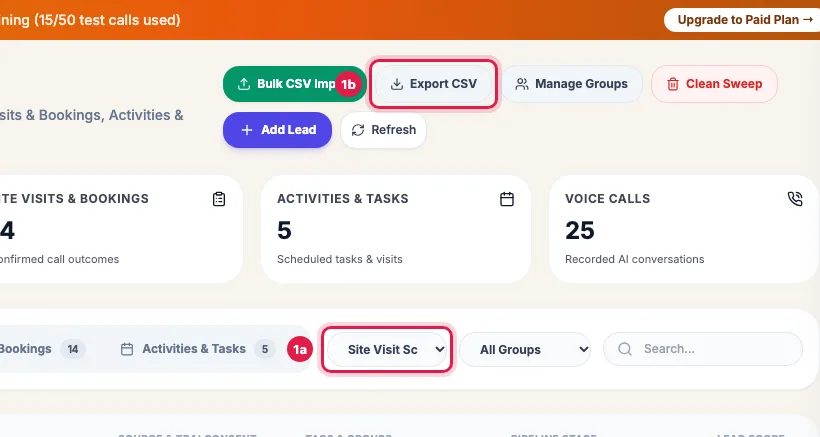
Filter the CRM by stage, group or search, then Export CSV downloads every matching lead Click Export CSV at the top. The file (leads_ followed by the date) has every matching lead, not only the page on screen, and opens in Excel or Google Sheets.
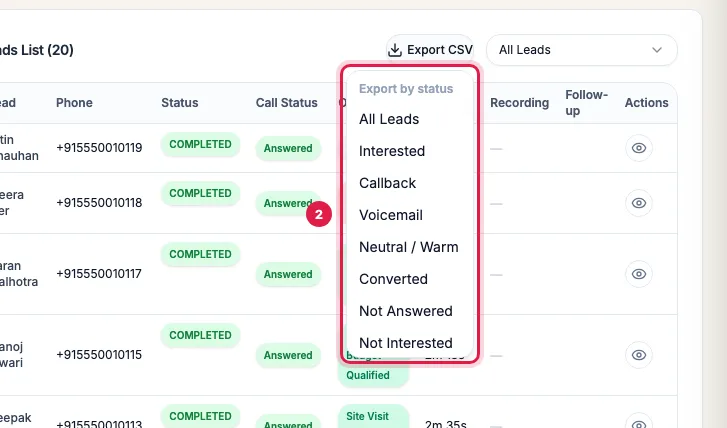
In a campaign, Export CSV downloads all its leads or only those with one outcome For one campaign's leads, open the campaign and click Export CSV above its Leads List: choose All Leads or an outcome such as Interested or Not Answered.
For calls (time, duration, status, recording link and transcript), open the Voice Calls tab and click Export All Call Logs CSV, or use Reports & Exports.
What the leads file holds
- Name, Phone, Email, Company and Source.
- Pipeline Stage and Status.
- Lead Score and Tier (blank until a call is analysed).
- Groups (by name), Created and Last Call (IST).
- TRAI Consent (Opted in or Opted out) and Consent Updated: when the consent last changed.
- Your industry's fields and the notes are not in this file; they are on each lead's page.
Large exports and permissions
- Up to 5,000 leads can be exported at a time. If more match, a message asks you to narrow the list with a stage, group or search, or to ask your account Admin, who can export more.
- Export CSV needs the export permission on your role; an Admin sets it on Team.
- Phone numbers keep their + and country code, and cells that start like a spreadsheet formula are made safe.
Example: A weekly list for the branch team
Every Monday the admissions head of Bright Future Coaching filters Unified CRM by the group "Edu fair - Nov" and the stage Interested, clicks Export CSV and shares the file with the branch counsellors. The TRAI Consent column shows the two parents who asked not to be called, so nobody phones them.
Tips
- Filter first: the file is the list you see, across all pages.
- Keep exported files safe; they hold your customers' contact details.
- To bring changes back in, edit the file and import it with Bulk CSV Import: leads are matched by phone number and updated.
Frequently asked questions
Leads ki list Excel me kaise nikale?
Unified CRM → choose the filters → Export CSV. Open the file in Excel.
It says more than 5,000 leads match.
Narrow the list with a stage, group or search and export in parts, or ask your account Admin to export it.
Can I export one campaign's results?
Yes: open the campaign and use Export CSV above its Leads List, for all leads or one outcome.
Can I see who opted out?
Yes. The TRAI Consent column says Opted in or Opted out, and Consent Updated shows when it changed.
Why is the Lead Score empty for some leads?
They have no analysed call yet.
Can I export transcripts?
Yes, with the calls: Voice Calls tab → Export All Call Logs CSV, or Reports & Exports.
Questions this guide answers
- How do I export leads from the CRM to Excel?
- How do I download a campaign's call results?
- Can I export which leads opted out?
- How many leads can I export at once?
Related guides
- Using the CRM Built into Your AI Calling Agent: Unified CRM is where every lead, call outcome, follow-up and recorded call lives. The list shows each lead's source, consent, groups…
- How to Download AI Call Reports in Excel or CSV: Reports & Exports gives you your call data three ways: a ready file for each past day, made every night; an export of any dates with…
- How to Read AI Calling Campaign Results and Export Them: Open the campaign: the top shows how many leads were dialled and answered, the counters show live calls, callbacks and leads not reached…
- How to Import Leads from Excel or CSV for AI Calling: In Unified CRM click Bulk CSV Import, choose a lead group, upload your CSV or Excel file (or paste rows from Excel), check how each column…
- DND and Opt-outs in AI Calling: Block Numbers and Record Consent: The DND list holds the numbers your AI agents never call: a number joins when the person asks on a call not to be called, replies STOP to…