DND and Opt-outs in AI Calling: Block Numbers and Record Consent
In short: The DND list holds the numbers your AI agents never call: a number joins when the person asks on a call not to be called, replies STOP to a message, a TRAI/UCC complaint is received, or you add it. Every call is checked against it before dialling. Each lead also carries a consent status: a lead marked Opted Out / DND gets no call, WhatsApp or email campaign from you.
A step-by-step guide for BookAICall, an AI voice agent platform that makes and answers phone calls for businesses in Hindi, English, Hinglish and other Indian languages. Updated .
Steps
Open DND. The cards count Total, Active DND, Added by you and UCC Complaints. Show Active DND, Expired or All, pick a Source (Asked on a call, Replied STOP, UCC Complaint, Added by you), or use Search phone....
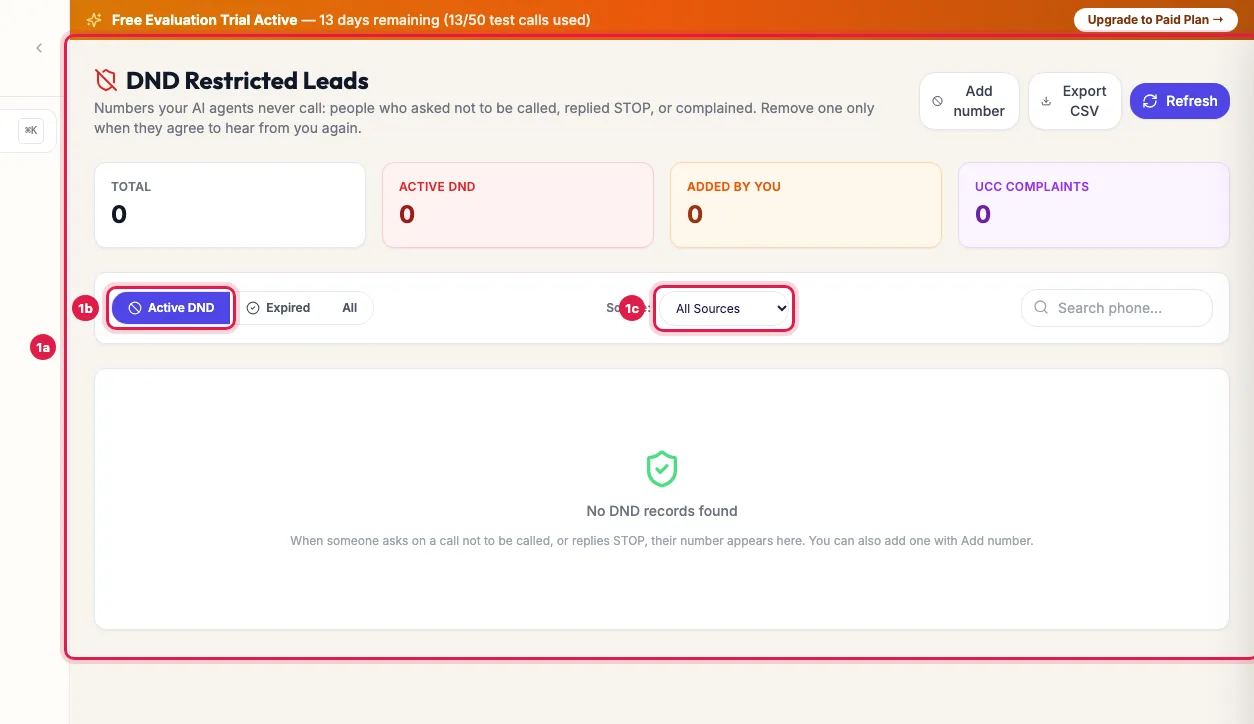
DND: every number your agents will not call, with where it came from To block a number yourself, for example someone who asked by email, click Add number, enter the 10-digit Mobile number and a Reason (optional), and click Add to DND. It is not called again until you remove it.
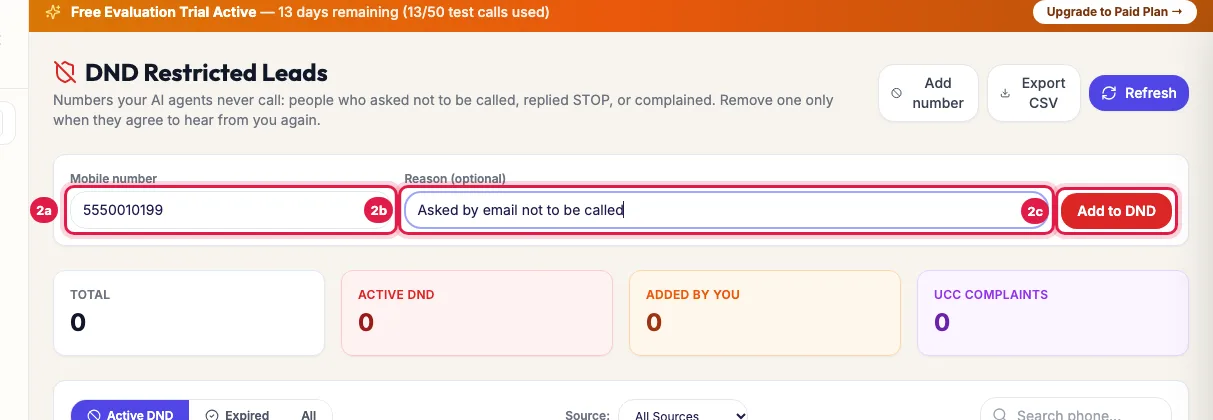
Add number: block a number yourself, with the reason To mark one lead as opted out, open it in Unified CRM and, in its panel's TRAI & UCC Regulatory Compliance Proof card, click Mark Opt-Out / DND, or untick Customer Opt-in Verified (TRAI / UCC Legal Compliance) in Edit Lead. The lead list then shows Opted Out / DND instead of Opted In (TRAI).
If the person later agrees to hear from you again, click Remove DND on the number's row, or Grant Opt-In Consent on the lead. Removing a number lets your agents call it again at once.
Click Export CSV to download the list, for example for your compliance records.
Where numbers come from
- Asked on a call: the AI agent heard the person ask not to be called, and the call's analysis added the number by itself.
- Replied STOP: the person replied STOP to a journey message.
- UCC Complaint: a TRAI/UCC complaint was received about a call to that number. These never expire.
- Added by you: you added it with Add number.
What the DND list blocks
- Every call your agents start: campaign calls, retries and redials, automatic follow-ups, the instant call to a new enquiry, Call AI from the CRM and calls started through the API.
- Journey messages to that number.
- Entries show an Expires date, usually Never. One with a date moves to Expired after it and may be called again.
Consent on each lead
- Each lead has a consent status, shown in the CRM list as Opted In (TRAI) or Opted Out / DND. If nothing has been recorded, the lead counts as opted in.
- Set it in three places: Add Lead, Edit Lead (Customer Opt-in Verified (TRAI / UCC Legal Compliance)) and the lead's panel (Mark Opt-Out / DND or Grant Opt-In Consent).
- A lead marked opted out gets no call you start: a campaign closes it as DND (outcome opted_out) and Call AI refuses it with a message. It gets no WhatsApp or email campaign message and is not enrolled in journeys.
- A conversation the person starts is still answered: if they call your number or write on WhatsApp, the agent replies.
- Every change is logged with who made it, and Export CSV of leads includes TRAI Consent and Consent Updated.
Example: An NBFC handles a borrower who asked not to be called
During an EMI reminder call, a borrower of Sahyog Finance says "Please don't call me again". The call's analysis adds the number to DND as Asked on a call, so tomorrow's reminder campaign skips it. The collections head also clicks Mark Opt-Out / DND on the lead, so no WhatsApp reminder goes either. When the borrower later calls the helpline himself to ask for his statement, the agent answers him as usual.
Tips
- Remove a number only when the person has agreed to hear from you again, and note in the lead how and when they agreed.
- Add numbers from email or in-person requests the same day with Add number.
- Bought or old lists: mark leads whose consent you cannot show as opted out before you call them.
Frequently asked questions
Is AI calling allowed for DND numbers?
Numbers on your DND list are never called by your agents. Call only people who agreed to hear from you, and honour every opt-out.
How do customers opt out of AI calls?
By saying so on a call (the agent's analysis adds them to DND), by replying STOP to a journey message, or by asking you, after which you add the number with Add number.
Number block kaise kare?
DND → Add number → enter the mobile number → Add to DND.
Why was a lead skipped in my campaign?
It is on the DND list or marked Opted Out / DND. The campaign closes it as DND. Check DND and the lead's consent status.
Can an opted-out person still reach us?
Yes. If they call your number or write to you on WhatsApp, the agent answers. Only calls and campaign messages you start are stopped.
What does Opted In (TRAI) mean on a lead?
No opt-out is recorded for that lead, so it may be called. It counts as opted in unless someone marks it opted out.
Does DND here mean the national DND registry?
This list is your own do-not-call list. You must also follow the national rules for the numbers you call; see Calling hours and consent rules.
Questions this guide answers
- Is AI calling allowed for DND numbers?
- How do customers opt out of AI calls?
- How do I block a number from AI calls?
- How do I record TRAI consent for a lead?
Related guides
- AI Calling Hours in India: The 9 AM to 9 PM Rule and Consent: Campaigns and automatic follow-ups call only from 9 AM to 9 PM IST, and only people who agreed to hear from you. A new lead's instant…
- Answer a TRAI / UCC complaint: Step-by-Step Guide: TRAI Complaints shows complaints and deadlines. Click Respond, explain the call and consent, attach proof, and submit before the deadline.
- How to Edit a Lead or Mark It Opted Out in the AI Calling CRM: Unified CRM → Edit at the end of the lead's row changes the name, phone, email, company, source, pipeline stage and the opt-in. Untick…