AI Calling Analytics: Connect Rate, Conversions, Cost per Lead, ROI
In short: Analytics shows how your AI calling performs: total calls, connect rate, opportunity rate and talk time, the funnel from dial to won, what calls cost per call and per outcome, the hours people answer, lead sources, each agent's results and every outcome. Filter by agent, campaign and dates, and download the figures.
A step-by-step guide for BookAICall, an AI voice agent platform that makes and answers phone calls for businesses in Hindi, English, Hinglish and other Indian languages. Updated .
Steps
Open Analytics. Under Multi-Dimensional Analytics Filters choose one or more agents under AI Voice Agent, campaigns under Campaign, and a Timeframe Preset (Today, Yesterday, Last 7 Days, Last 30 Days, This Month, All Time, or Custom Date Range... for your own dates). Every figure on the page follows them.
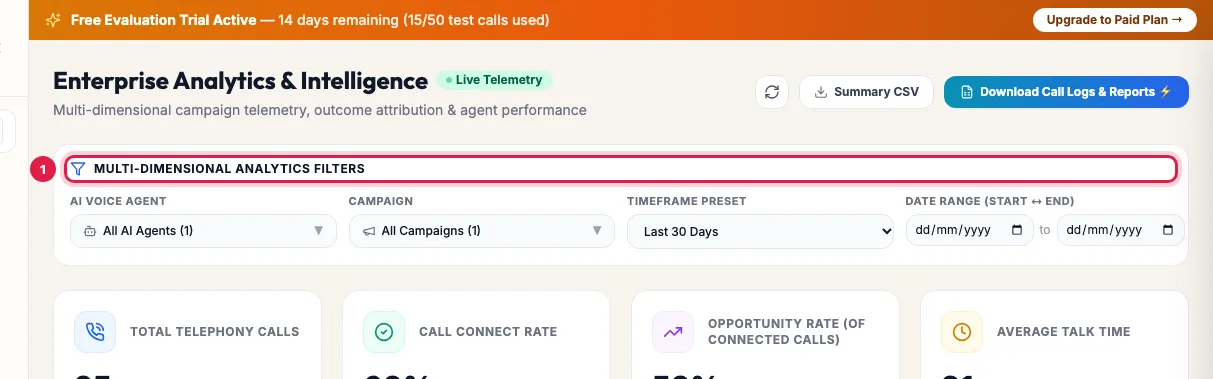
Filters: agent, campaign, timeframe and dates Read the four cards: Total Telephony Calls, Call Connect Rate (the share of calls answered), Opportunity Rate (of connected calls) and Average Talk Time.
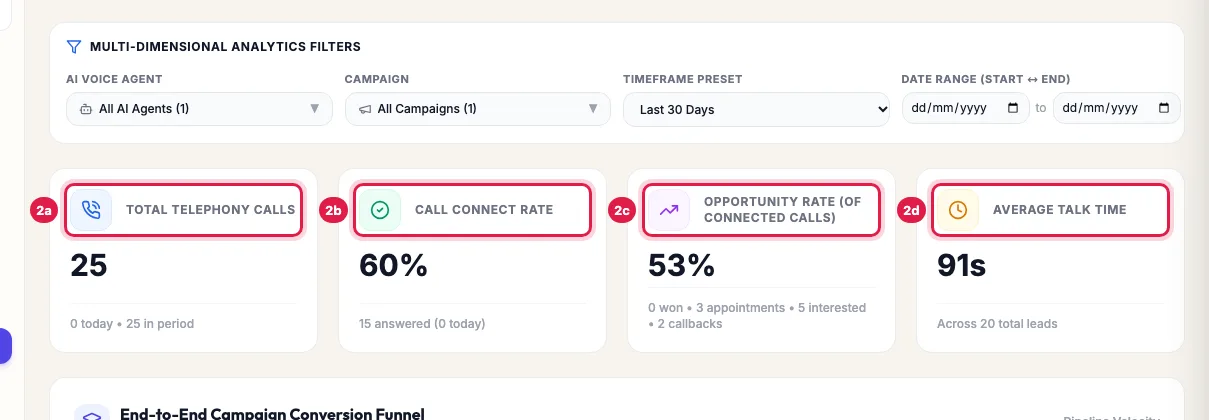
Calls, connect rate, opportunity rate and average talk time End-to-End Campaign Conversion Funnel shows Total Calls Dialled, Connected & Answered, Opportunities (interested, appointments and won) and Converted / Won, so you see where people drop off.
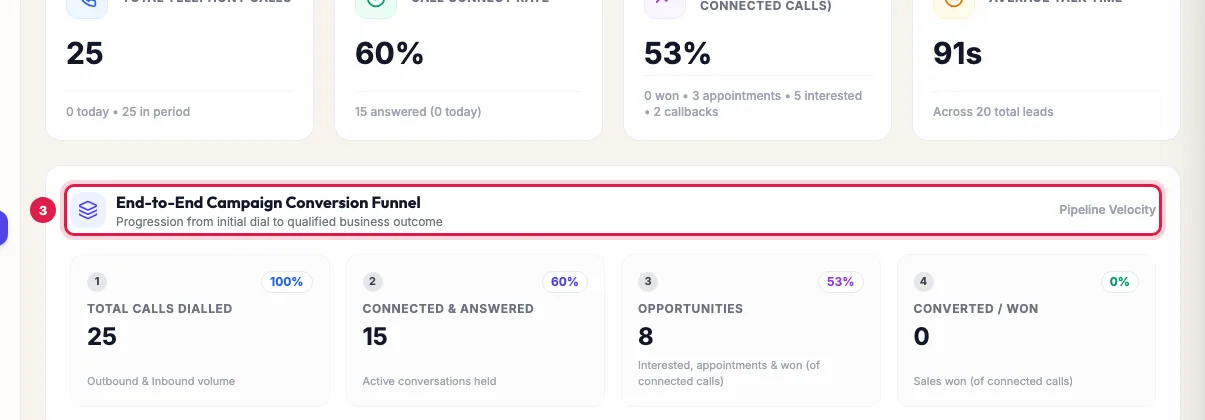
The funnel from calls dialled to answered, opportunities and won Cost per Conversion & Outcome Economics shows Total AI Calling Spend, Cost Per Attempted Call, Cost Per Connected Call and Cost Per Positive Outcome. Pay-As-You-Go (PAYG) uses what was charged to your wallet; Unlimited Monthly Plan spreads your plan fee over the period. Adjust Assumptions sets what a telecaller costs you, to compare.
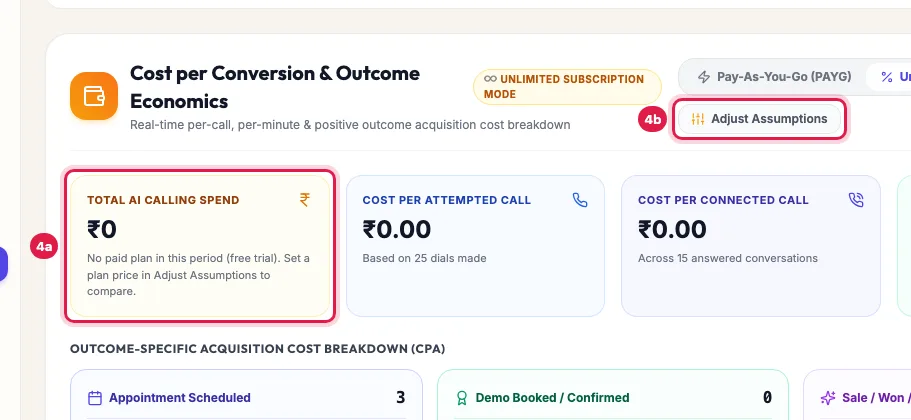
Cost per call and per outcome, and Adjust Assumptions to compare with your telecallers Hourly Call Distribution & Peak Concurrency Monitor (24h IST) shows calls and answers by hour, and how many calls ran at once against your agents' channels, so you can call at the hours people pick up.
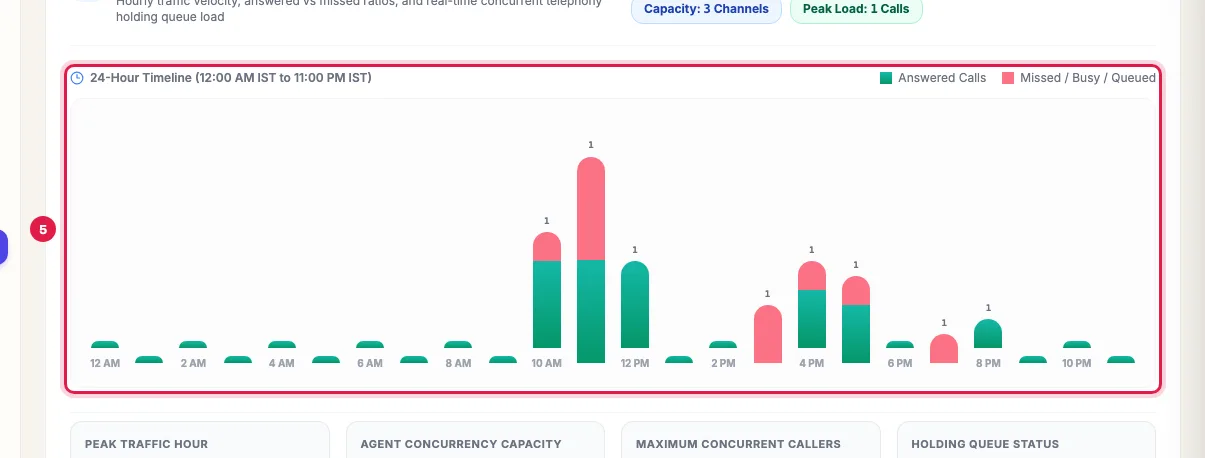
Calls by hour of the day, answered and missed Download the figures with Summary CSV, or click Download Call Logs & Reports for every call with its summary and transcript.
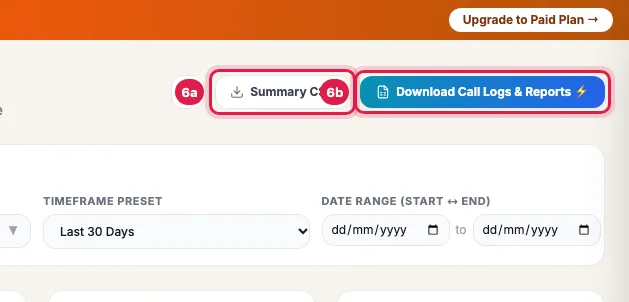
Download the summary or the call logs
What the numbers mean
- Call Connect Rate: answered calls out of all calls in the filter. Calls not answered, busy or failed lower it.
- Opportunity Rate (of connected calls): answered calls whose outcome shows interest, an appointment or a sale, by your agent's outcomes. A callback request counts as a follow-up, not an opportunity.
- Converted / Won: calls whose outcome is a win in your pipeline, such as a booking or a sale.
- Average Talk Time: the mean length of answered calls. Very short calls usually mean the opening needs work.
- Costs: on pay as you go, the real wallet charges for the calls in the filter; on the free trial nothing is charged, so costs show zero.
The other sections
- AI Voice Agents vs. Human Telecaller Workforce: your AI cost next to what a telecaller team would cost for the same calls, by the salary and calls a day you set in Adjust Assumptions.
- AI Predictive Intelligence & Smart Forecasting: Velocity & ETA (how fast running campaigns dial and when they will finish), Revenue Forecast (your won rate over the last 30 days and the conversions to expect per 1,000 connected calls, with a confidence by how many calls it rests on) and Churn Watchlist (leads with 2 or more failed attempts or negative sentiment).
- Call Volume Velocity (Last 7 Days): calls per day.
- Lead Ingestion Channels & Attribution: where your leads came from (sheet, website form, API, import and so on).
- AI Voice Agent Telephony Leaderboard: each agent's calls, completed calls and talk time; Export Calls downloads one agent's calls.
- Granular Call Disposition & Outcomes: every outcome with its count and share; click an outcome to download its calls.
How fresh the figures are
Figures come from your call logs and update as calls finish and are analysed, usually within a minute or two of a call. Click the refresh button at the top to load the latest. Outcomes come from each call's analysis, so a call still being analysed counts as answered but not yet as an opportunity.
Example: Was last week worth it?
Sharma Properties picks Last 7 Days and its Site Visit campaign: 1,200 calls, 54% answered, 96 opportunities including 31 site visits booked. Cost Per Positive Outcome is far below what Adjust Assumptions shows for two telecallers. The hourly chart shows most answers between 10 AM and 12 PM and after 5 PM, so the next campaign is scheduled for those hours, and the Churn Watchlist leads get a WhatsApp follow-up instead of a fourth call.
Tips
- Compare one agent or campaign at a time: mixing an inbound receptionist with an outbound campaign blurs the connect rate.
- A low connect rate with a normal talk time is a list or timing problem; a good connect rate with very short calls is an opening problem.
- Use Custom Date Range... to compare the same weekdays before and after you change a prompt.
Frequently asked questions
What is a good connect rate for AI calls?
It depends on your list: fresh enquiries who asked to be called answer far more often than old or bought data. Compare your own campaigns and hours with each other, and use redial for the unanswered.
Why does cost show zero?
On the free trial nothing is charged. On a monthly plan, choose Unlimited Monthly Plan to spread the plan fee over the period. On pay as you go, zero means no call in the filter was charged.
Can I see results by campaign?
Yes. Pick the campaign under Campaign in the filters, or open the campaign itself for its own results page.
Analytics aur campaign results mein kya fark hai?
Analytics combines all your calls across agents, campaigns and dates. A campaign's page shows only that campaign's calls and leads.
Where are the recordings and transcripts?
In Unified CRM → Voice Calls and on each lead. Analytics shows the numbers; Download Call Logs & Reports gives every call with its summary, transcript and recording link.
Does the forecast promise these results?
No. The Revenue Forecast repeats your own past won rate; with few calls its confidence shows as low.
Questions this guide answers
- How do I measure the ROI of AI calling?
- What is a good connect rate for AI calls?
- What is the best time to call leads in India?
- How much does an AI call cost per lead compared to a telecaller?
Related guides
- How to Download AI Call Reports in Excel or CSV: Reports & Exports gives you your call data three ways: a ready file for each past day, made every night; an export of any dates with…
- How to Read AI Calling Campaign Results and Export Them: Open the campaign: the top shows how many leads were dialled and answered, the counters show live calls, callbacks and leads not reached…
- How to Listen to AI Call Recordings and Read Transcripts: Every answered AI call is recorded and transcribed. In Unified CRM → Voice Calls, click Play Recording on any call to listen; click…
- How to Redial Unanswered Leads in an AI Calling Campaign: Open the campaign and click Redial / Restart Campaign to call again, in the same campaign, the people who did not answer, asked for a…