Track Deals from AI Calls in a Sales Pipeline
In short: Deals & Pipeline shows your sales opportunities by stage, as a Kanban board or a table, with the value of open deals, won deals and the win rate. A call that ends with interest, a booking or a sale opens a deal by itself, valued at the customer's budget when the agent heard one; later calls move it forward or close it as lost. You can add, edit, move and delete deals.
A step-by-step guide for BookAICall, an AI voice agent platform that makes and answers phone calls for businesses in Hindi, English, Hinglish and other Indian languages. Updated .
Steps
Open Deals & Pipeline. The top shows Total Pipeline (the value of open deals), Won (value and count), Win Rate, Active Deals and Avg Deal.
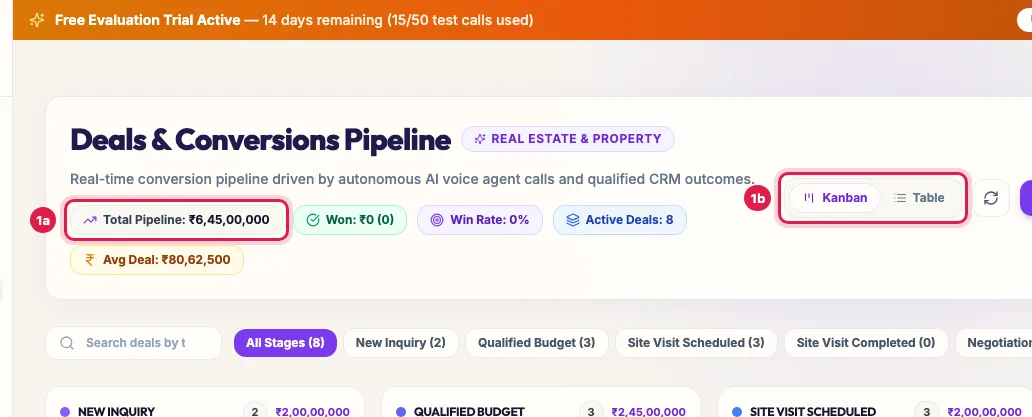
Deals & Pipeline: the value of open deals, won deals, win rate, and the Kanban or Table view Narrow the board with the stage buttons (All Stages and each stage with its count) or Search deals by title, contact, notes. The two icons on the right switch between the Kanban board and the table.
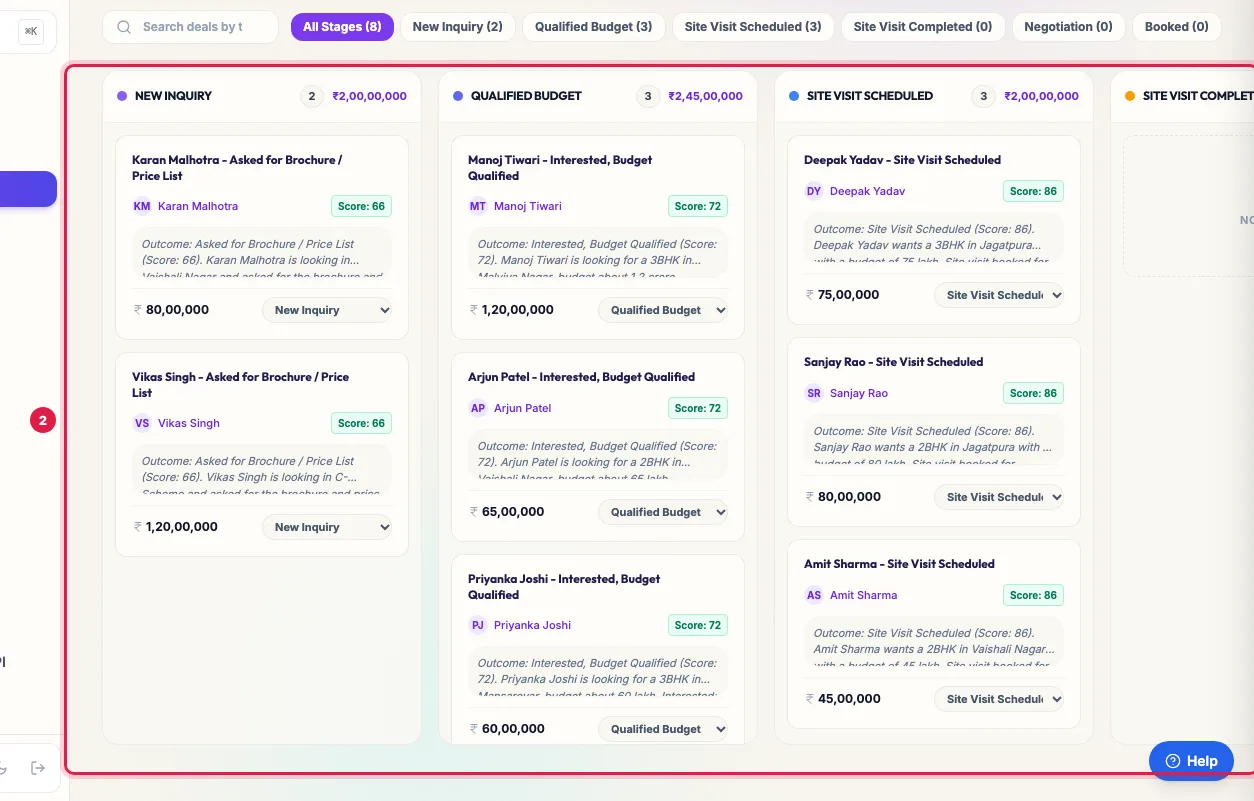
A deal card: the customer, the value and the stage drop-down that moves it Each card shows the deal, the customer (click the name to open the lead with every call), the lead score, the latest call notes and the value. To move a deal, choose its new stage in the drop-down at the bottom of the card.
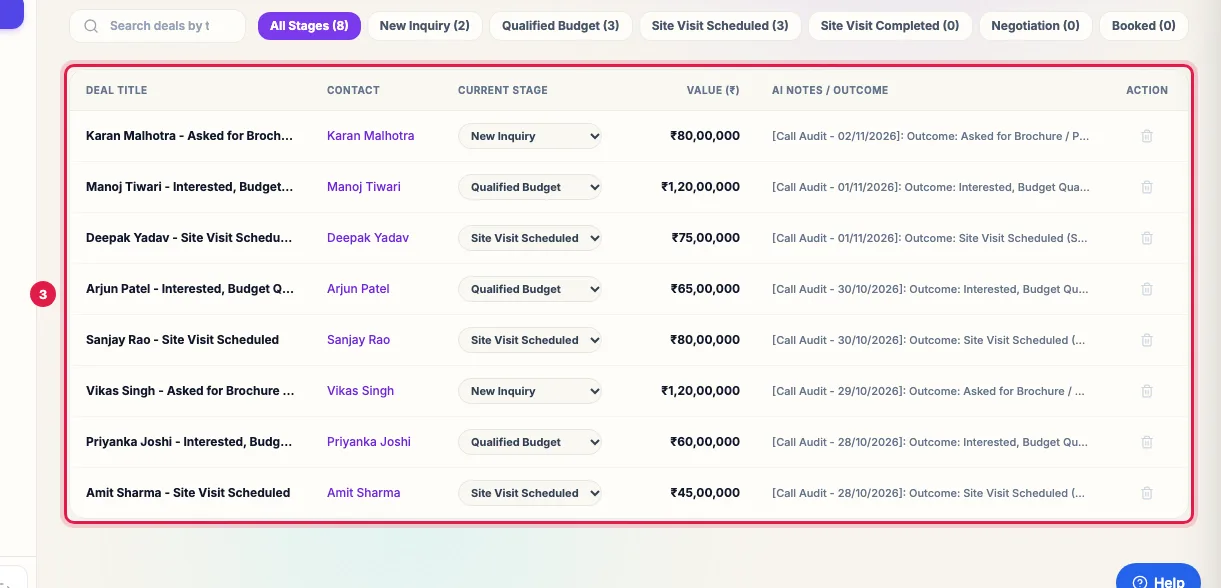
Table view: every deal with its contact, stage and value To change a deal's value, title, stage or notes, hover over the card and click the pencil, then Save Deal. The bin deletes the deal (the lead stays).
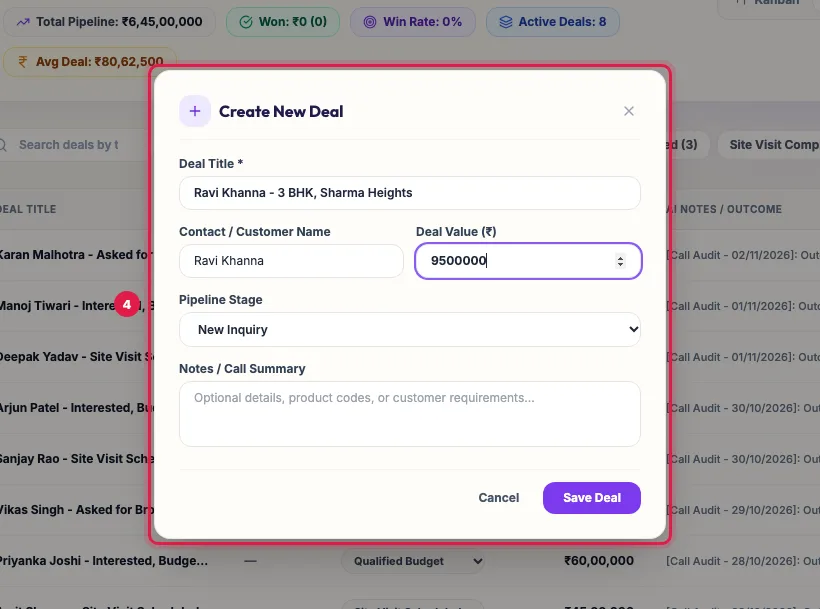
Create New Deal: title, customer, value, stage and notes To add a deal yourself, click + New Deal, enter the Deal Title, the Contact / Customer Name, the Deal Value, the Pipeline Stage and any Notes / Call Summary, and click Save Deal.
The table view lists every deal with its contact, Current Stage, value and AI notes; the stage, pencil and bin work there too.
Stages
The columns are the pipeline stages of your industry (for a property business: New Inquiry, Qualified Budget, Site Visit Scheduled, Site Visit Completed, Booked, and a lost stage), the same stages the agent's calls use for leads. A deal in a stage your pipeline no longer has gets its own column, so nothing disappears.
How calls create and move deals
- A deal opens by itself when an analysed call ends with interest, a booked appointment or visit, or a sale. Its title is the customer's name and the outcome, its stage the matching stage, and its note the call's summary.
- Its value is the amount the customer gave on the call if the agent heard one, else the lead's budget field (budget, loan amount, property value, fee and similar). Otherwise it starts at zero: set it with the pencil.
- One deal per lead: later calls add their summary to its notes and move it forward when the customer moves forward, for example from interested to a booked visit.
- When the customer declines, the deal moves to the lost stage. A deal never moves back by itself, and a won deal stays won.
- Unanswered calls and calls with no clear result neither create deals nor add notes.
Won, lost and the numbers at the top
- Won: the last stage that is not a lost one (for example Booked), or a stage whose name says won, converted, sold, enrolled, hired, placed, paid or delivered.
- Lost: a stage whose name says lost, disqualified, dead, dropped, rejected, junk or not interested.
- Total Pipeline and Active Deals count open deals: neither won nor lost. Win Rate is won deals out of all deals. Avg Deal is the average value of deals that are not lost.
Deals and leads
- Moving a deal by hand does not change the lead's own pipeline stage in Unified CRM, and the next call can still move the deal forward.
- A deal you add with + New Deal is not linked to a lead; deals made by calls are, and show the lead's name and score.
- A journey can start when a deal moves to a stage (trigger: Deal moves to a stage), and a journey's Deal step can create or move deals.
Example: Eight opportunities from one campaign
After the October campaign, Sharma Properties' board shows three deals at Site Visit Scheduled, three at Qualified Budget and two at New Inquiry. Amit Sharma's deal shows 45 lakh because he said his budget on the call; Neha Gupta's shows zero, so the manager clicks the pencil and enters 60 lakh after speaking to her. After Saturday's visits he moves Amit's deal to Site Visit Completed, and to Booked when Amit pays the token amount: Won goes up and the Win Rate follows.
Tips
- Check deals with zero value every week and fill them in, or Total Pipeline will understate your business.
- Name your stages clearly in your industry setup: a stage named Booked, Enrolled or Sold is counted as won.
- Delete test deals so the win rate stays honest.
Frequently asked questions
Deal kaise banaye?
Calls create them by themselves when a customer is interested, books or buys. To add one yourself, click + New Deal, fill the title, customer, value and stage, and click Save Deal.
How do I change a deal's value?
Hover over the deal's card, click the pencil, change the Deal Value and click Save Deal. In the table view the pencil is at the end of the row.
Why does a deal show zero?
The customer gave no amount on the call and the lead has no budget field. Set the value with the pencil.
Why didn't a call create a deal?
Only calls that end with interest, a booking or a sale create one. A callback request, an unanswered call or an unclear result does not.
I moved a deal back but it moved forward again.
A later call with a stronger result moves it forward. Calls never move a deal back, and never out of a won stage.
Does deleting a deal delete the lead?
No. The lead, its calls and notes stay in Unified CRM.
What is the win rate based on?
Won deals divided by all deals on the board, including lost and open ones.
Questions this guide answers
- Can AI calls create deals in a sales pipeline?
- How do I track sales from AI calling?
- How is the win rate calculated in the pipeline?
- How do I change a deal's value?
Related guides
- Capture Call Outcomes and Lead Details Automatically with AI: After each call the AI fills in the lead's details, gives the call an outcome and moves the lead to a pipeline stage. Your industry sets…
- Using the CRM Built into Your AI Calling Agent: Unified CRM is where every lead, call outcome, follow-up and recorded call lives. The list shows each lead's source, consent, groups…
- How to Read AI Calling Campaign Results and Export Them: Open the campaign: the top shows how many leads were dialled and answered, the counters show live calls, callbacks and leads not reached…
- Read a Lead's AI Score, Call Summary and Transcript: A lead's page shows who the person is and whether they agreed to be contacted, the AI score with its reason, your industry's details…
- How to Automate Lead Follow-ups with AI Calls, WhatsApp and Email: A journey is a follow-up you set up once. When something happens (a new lead, a call outcome, a reply, a webhook or a set time), it calls…