How AI Agents Book and Make Callbacks Automatically
In short: When a customer says "call me later", the agent books a callback for the time they asked (or the next good slot) and calls them back then, between 9 AM and 9 PM IST, with the last call's context. If the person does not answer, the AI tries again: up to 2 tries a day for 3 days. Callbacks lists every callback as Pending, Completed, Missed or Cancelled; you can also book one yourself with Schedule Callback.
A step-by-step guide for BookAICall, an AI voice agent platform that makes and answers phone calls for businesses in Hindi, English, Hinglish and other Indian languages. Updated .
Steps
Open Callbacks. The counters show Total Registered, Pending Callbacks, Completed Calls and Missed Callbacks for your whole account.
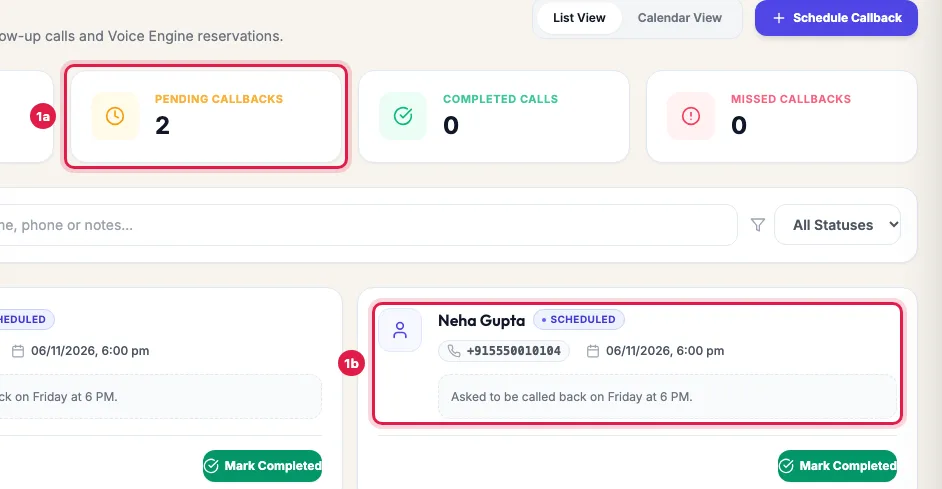
Pending callbacks, and one callback: the person, number, time and what they asked Each card shows the person, the status, Booked by AI when the agent booked it, the number, the time, the agent that calls back, what they asked, and why a missed or cancelled callback was not called. A callback the AI is trying again shows Attempt (the coming try) and Next try with its time.
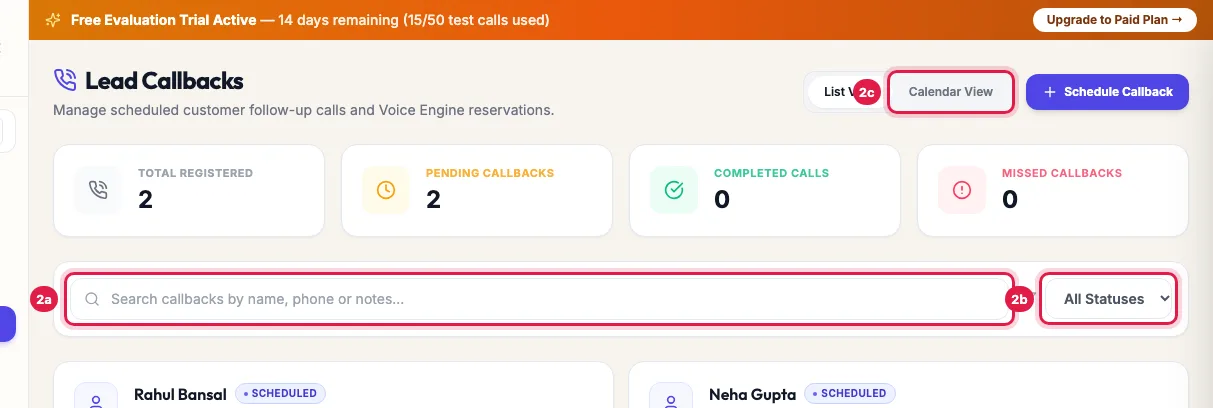
Search, filter by status, or switch to the calendar Search by name, number or note, filter with All Statuses (Pending, Completed, Missed, Cancelled), or switch between List View and Calendar View, which shows each callback on its day.
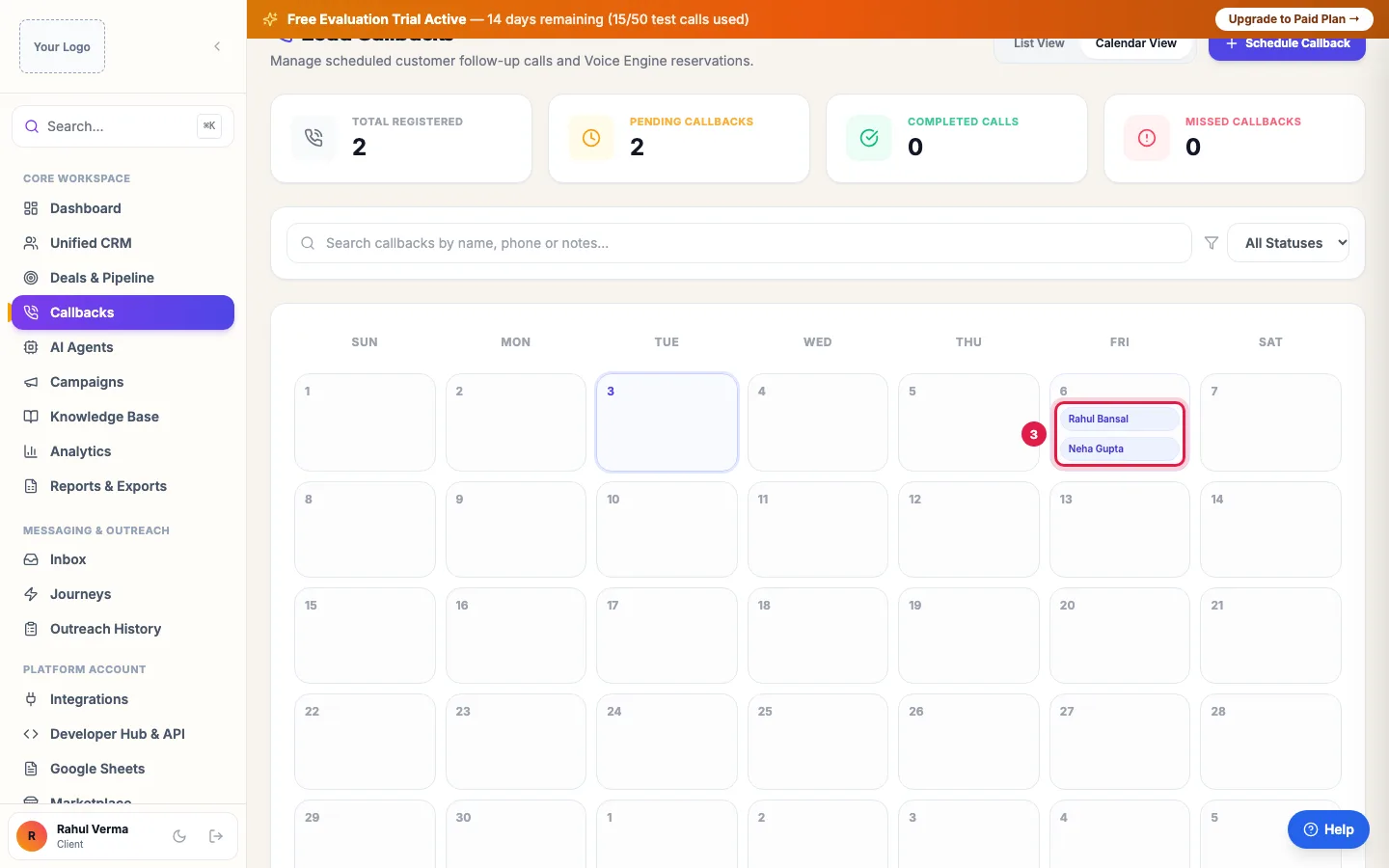
Calendar View: callbacks on their day To book one yourself, click Schedule Callback, enter the Customer / Lead Name, Phone Number, Scheduled Date & Time, choose the AI Agent (or leave it on Automatic) and write the Callback Purpose / Notes. Click Schedule Call.
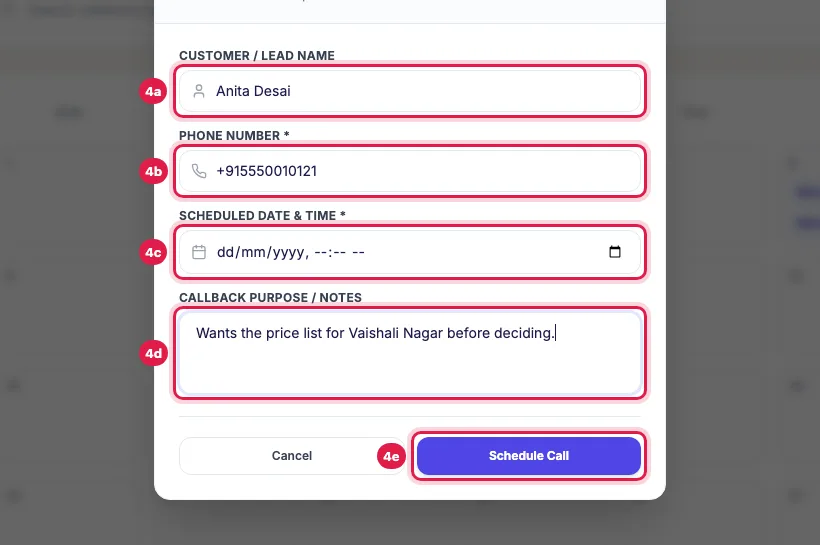
Schedule New Callback: name, number, date and time, and the reason If you call the person yourself, click Mark Completed on the card so the agent does not call too.
How callbacks are created
- During a call: when the person says "abhi busy hoon, shaam 6 baje call karna" or "10 minute baad", the agent books the callback for that time while still on the line. It shows Booked by AI.
- After the call: when the analysis finds the person asked to be called later, a callback is booked for the time they gave. If they gave no time, it is booked for 3 hours later when that falls between 9 AM and 7 PM IST, otherwise for 11 AM. At most two such automatic callbacks per person in 7 days, so a busy person is not chased.
- By you: Schedule Callback. A number not yet in your CRM becomes a lead with the source Callback; a known number (matched on its last 10 digits) uses the existing lead.
- A new callback for a person replaces their earlier pending callback or follow-up call (it shows Cancelled, "Replaced by a newer callback"). A booked site visit or meeting stays.
When the call goes out
- Due callbacks are picked up every two minutes and dialled between 9 AM and 9 PM IST. One booked for 10 PM, or for early morning, is called after 9 AM.
- A callback is dialled up to 48 hours after its time. If it could not be dialled in that window, it shows Missed with the reason; book a new one if you still want to call.
- If all the agent's lines are busy, the callback waits a few minutes for a free line instead of failing. A technical failure is retried up to 3 times, 15 minutes apart, then shown as Missed.
- A person who has since declined or bought (converted) gets no callback: it is cancelled. An opted-out person is not called either.
- If the person does not answer (no answer, line busy, the call does not connect, voicemail, or a short call in which no one speaks), the AI tries again: about 2 hours later if that is before 8:30 PM IST, otherwise the next day at 10:30 AM. At most 2 tries a day, for up to 3 days (6 tries at most). Meanwhile the card is Pending and shows Attempt 2, Attempt 3… and Next try with its time.
- After the last try the callback shows Missed: "No answer after 6 tries" (fewer when the first try was late in the evening). An answered call shows Completed; the card turns Completed when the call goes out and back to Pending if no one answers.
- A person who opts out, or whose number is on your Do Not Call list, is not tried again: the callback shows Cancelled, "Not tried again", with the reason.
Which agent calls, and what it says
- A callback booked on a call is made by the same agent. For one you book, the agent you choose; on Automatic, the agent of the person's last call, else your primary agent.
- The agent opens with its usual greeting by name, and already knows the summaries of the last calls, the lead's notes and the callback's reason, so it continues the conversation instead of starting over.
- To have it say "aapne is time call karne ko kaha tha", add one line about callbacks to the agent's prompt.
Example: Busy at the first call
Neha Gupta is in a meeting when Priya calls from Sharma Properties and says "Friday shaam 6 baje call kijiye". Priya books the callback while still on the line; it appears in Callbacks as Pending, Booked by AI, Friday 6:00 PM, with her request about 3 BHK prices. On Friday at 6 PM Priya calls again, greets Neha by name and picks up from the 3 BHK prices. The callback turns Completed and Neha's page shows both calls.
Tips
- Check Missed Callbacks every morning: each card says why, for example "No answer after 6 tries". Send those people a WhatsApp, or book a callback for another time of day.
- To change a callback's time, book a new one for the same number: it replaces the old one.
- Callbacks are also activities: the lead page's Callbacks button and the CRM's Activities tab show them with the other follow-ups.
Frequently asked questions
Callback kaise dekhe?
Open Callbacks in the menu. Pending ones are at the top, soonest first; Calendar View shows them by day.
Customer ne raat 10 baje call karne ko bola. Kya AI tab call karega?
No. Callbacks are dialled only between 9 AM and 9 PM IST, so that callback is called after 9 AM the next morning.
Why is a callback Missed?
The person did not answer any try ("No answer after 6 tries"), it could not be dialled within 48 hours of its time, or the call could not be placed (for example the number is invalid or the line kept failing). The card shows the reason.
Will the AI call again if the customer does not answer the callback?
Yes. It tries again about 2 hours later (or the next day at 10:30 AM if that would be after 8:30 PM), at most 2 tries a day for up to 3 days. The card shows Attempt and Next try; after the last try it shows Missed.
Phone nahi uthaya to AI kitni baar call karega?
At most 2 times a day, for up to 3 days: 6 tries at most, only between 9 AM and 9 PM IST. Then the callback shows Missed, "No answer after 6 tries".
How do I stop the retries?
Click Mark Completed on the card. A new callback for the same number also replaces it, and a lead that is opted out or on your Do Not Call list is not tried again.
Can I choose which agent calls back?
Yes, for callbacks you book: pick it under AI Agent in Schedule Callback. Callbacks booked on a call use that call's agent.
How do I cancel a callback?
If you called them yourself, click Mark Completed. To move it, book a new one for the same number; it replaces the old one.
Do callbacks use my calling channels?
Yes. A callback is a normal call by your agent, so it needs a free channel; it waits for one if all are busy.
Questions this guide answers
- Can an AI agent call a customer back later?
- How do I schedule callbacks with an AI calling agent?
- What time does the AI call back if the customer asks for a callback at night?
- Does the AI call again if the customer does not answer the callback?
- Why was a callback missed?
Related guides
- Read a Lead's AI Score, Call Summary and Transcript: A lead's page shows who the person is and whether they agreed to be contacted, the AI score with its reason, your industry's details…
- How to Run an AI Calling Campaign: Automate Outbound Sales Calls: Campaigns → New Campaign: name it, choose the AI agent, set the retry rules, pick the lead group and click Create & Launch. The agent…
- How to Redial Unanswered Leads in an AI Calling Campaign: Open the campaign and click Redial / Restart Campaign to call again, in the same campaign, the people who did not answer, asked for a…
- Using the CRM Built into Your AI Calling Agent: Unified CRM is where every lead, call outcome, follow-up and recorded call lives. The list shows each lead's source, consent, groups…
- How to Write a Prompt for an AI Calling Agent (with Example): Open the agent with Edit and write its Greeting Message and System Prompt: who the agent is, the one goal of the call, the steps in order…
- AI Calling Hours in India: The 9 AM to 9 PM Rule and Consent: Campaigns and automatic follow-ups call only from 9 AM to 9 PM IST, and only people who agreed to hear from you. A new lead's instant…