How to Run an AI Calling Campaign: Automate Outbound Sales Calls
In short: Campaigns → New Campaign: name it, choose the AI agent, set the retry rules, pick the lead group and click Create & Launch. The agent calls every lead in the group between 9 AM and 9 PM IST, as many at a time as it has channels, and tries again the people who do not answer.
A step-by-step guide for BookAICall, an AI voice agent platform that makes and answers phone calls for businesses in Hindi, English, Hinglish and other Indian languages. Updated .
Steps
Open Campaigns and click New Campaign. The Create Voice Outreach Campaign window opens.
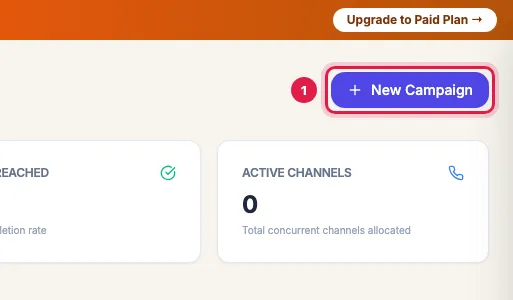
New Campaign on the Campaigns page 1. Basic Parameters: enter the Campaign Name, keep the Type (Cold Call, or Follow-up for people you have spoken to before) and Select Voice AI Agent. Max Concurrent Calls (Channels) fills in with the agent's channels. Leave Schedule Launch (Optional) empty to start as soon as you launch, or pick a date and time.
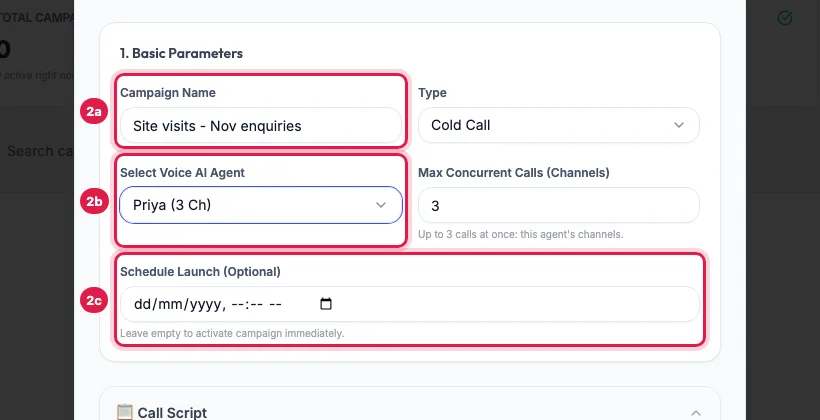
1. Basic Parameters: the campaign's name, the AI agent, and an optional start time Call Script is optional. Left empty, the agent follows its own prompt. To give this campaign its own words, fill Opening / Greeting, Main Pitch / Value Proposition, Objection Handling and Closing / Call-to-Action, or click AI Script Gen for a draft.
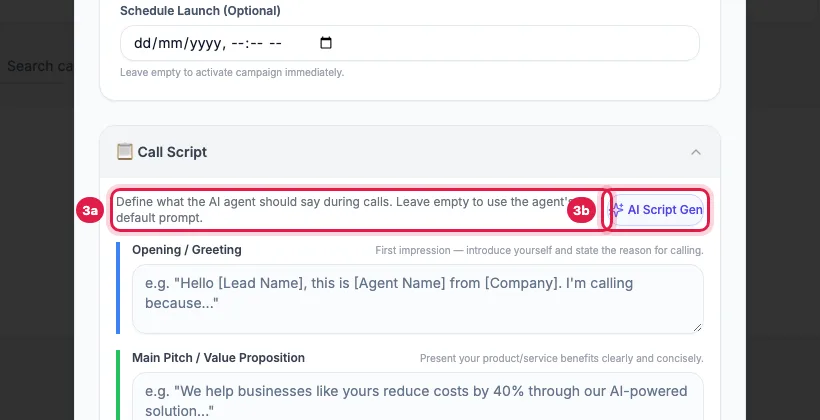
Call Script: optional; empty means the agent's own prompt is used 2. Missed Call & Retry Rules: Enable auto-retry on Busy/No Answer/Missed Calls is on, with Max Retry Attempts 3 and Retry Delay (Hours) 4; change them if you like. Below it you can switch on an email or a WhatsApp template for people who do not answer, and a WhatsApp template after answered calls.
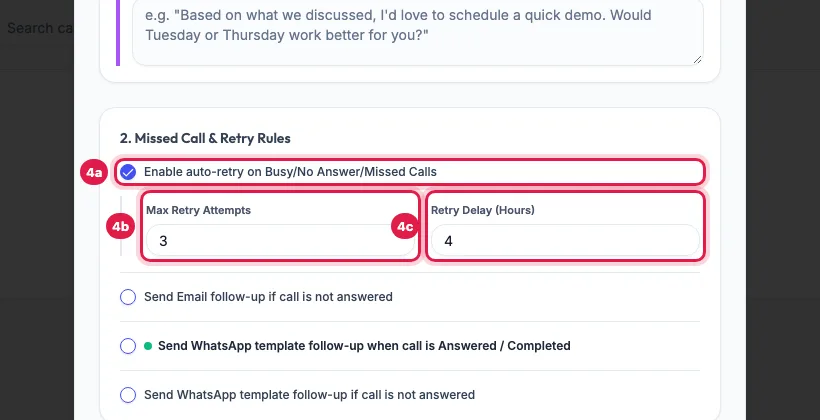
2. Missed Call & Retry Rules: retries for busy and unanswered calls 3. Select Lead Targets: choose the Lead Group Filter and, if needed, Filter by Status. Every matching lead is called. To call only some, click Pick Specific Leads and tick them (a search only narrows the list, so tick the leads it finds). Tick Keep calling new leads that join this group to call later arrivals too.
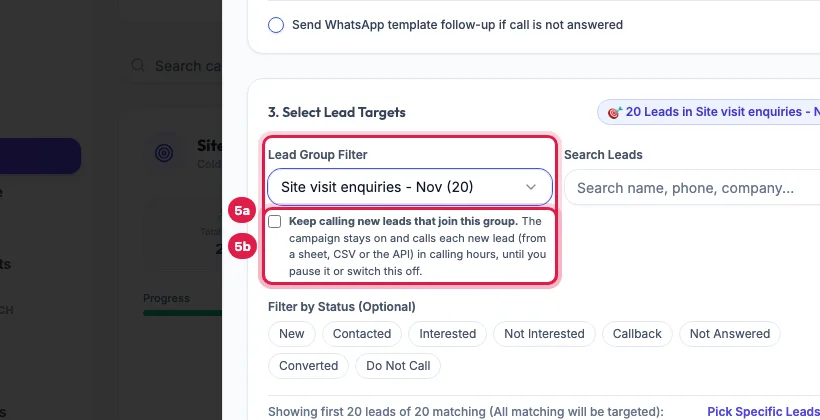
3. Select Lead Targets: the lead group to call, and Keep calling new leads that join this group Click Create & Launch. The campaign appears in the list as Running (or Scheduled) and the agent starts calling; open it to watch the calls and results.
Create & Launch
Every option in the window
- Type: Cold Call or Follow-up is a label for your own reports. Both keep the same calling hours and retry rules.
- Select Voice AI Agent: the list shows each agent's channels, for example Priya (3 Ch). An inactive agent is switched on when you launch.
- Max Concurrent Calls (Channels): how many calls this campaign makes at the same time, at most the agent's channels. A channel is one call at a time.
- Schedule Launch (Optional): the campaign waits as Scheduled and starts by itself at that time, inside calling hours.
- Max Retry Attempts (1 to 5): the most calls one lead gets in this campaign, counting the first. Retry Delay (Hours, 1 to 24): the wait before the next try.
- Send Email follow-up if call is not answered: goes from your own mailbox (connect it in Integrations first) to leads that have an email address. Tick Use AI to dynamically draft the email based on context to let AI write it, or write the Email Subject and Email Body yourself.
- Send WhatsApp template follow-up when call is Answered / Completed: choose when (On Every Answered Call, Only when Lead is Interested / Converted, or Only when Lead is Not Interested / Opt-Out) and the approved template.
- Send WhatsApp template follow-up if call is not answered: the template, and whether to Send only after ALL retry attempts fail or after the first missed call.
What happens after you launch
- The agent calls the leads in the order they joined, as many at once as the campaign's channels allow.
- Each answered call is analysed: the outcome in your industry's words, a summary and the transcript appear on the campaign page and on the lead's page, and the lead's stage moves by itself.
- A lead who does not answer, is busy or reaches voicemail is called again after the Retry Delay, until Max Retry Attempts is reached.
- The campaign shows Completed when every lead has been called and no retry is waiting. A campaign with Keep calling new leads that join this group stays Running and waits for the next lead.
Rules every campaign follows
- Calling hours: 9 AM to 9 PM IST. A campaign launched at night waits and starts calling at 9 AM.
- On a monthly plan an AI agent runs one campaign at a time. If the agent is busy in another campaign, the new one is saved as a draft: start it after you pause or finish the other.
- Numbers on your DND list are never called; they show DND in the results.
- By default a number is called at most 2 times in 24 hours and 4 times in 7 days. A lead over the limit shows Cooldown and is tried again after 24 hours.
- Leads without a phone number are not added, and a lead is never added twice to the same campaign.
Example: A morning campaign for the week's enquiries
Sharma Properties names a campaign "Site visits - Nov enquiries", picks Priya (3 channels), keeps 3 attempts 4 hours apart, chooses the group "Site visit enquiries - Nov" (20 leads) and clicks Create & Launch at 11 AM. Priya calls three leads at a time and has called all 20 by about 11:45. Fifteen answer; five do not. At about 3:45 PM those five are called again and three answer. The last two get their third call the next day, because a number is called at most twice in 24 hours. By then the manager has read the transcripts of the three site visits Priya booked.
Tips
- Test first with a group holding only your own number, so you hear the agent before your customers do.
- Use one group per batch (for example one per expo or per ad), so results and redials stay clean.
- Start the campaign in the morning: unanswered leads then get their retries the same day.
- To also call leads that join the group later (from a sheet, a form or the API), tick Keep calling new leads that join this group.
Frequently asked questions
Campaign kaise banate hai? How do I start calling my leads with the AI agent?
Put the leads in a lead group, then open Campaigns, click New Campaign, choose the agent and the group, and click Create & Launch. The agent starts calling within a minute, during calling hours.
How many calls does the agent make at the same time?
As many as the campaign's Max Concurrent Calls (Channels), which is at most the agent's channels: 3 for an agent with 3 channels. Inbound calls and booked callbacks to the same agent use those channels too.
Can one agent run two campaigns together?
On a monthly plan, no: an agent runs one campaign at a time. Pause or finish the first, or use another agent.
I launched the campaign at 10 PM. Why is nothing happening?
Campaigns call from 9 AM to 9 PM IST. It shows Running with a line saying it is outside calling hours, and starts calling by itself at 9 AM.
Can I change the settings after launch?
Yes. Open the campaign and click Settings: you can change the name, type, agent, channels, retry rules and follow-ups, then Save Changes. The leads in the campaign stay as they are.
Will the agent call numbers on my DND list?
No. Every campaign call is checked against your DND list first; those leads show DND and are skipped.
Do I need a call script?
No. Without one the agent uses its own prompt. A campaign script is useful when one campaign needs a different opening or offer than the agent's usual calls.
Questions this guide answers
- How do I automate outbound sales calls with AI?
- How do I run a bulk calling campaign with an AI agent?
- What is an AI auto dialer?
- How many calls can an AI agent make at the same time?
Related guides
- How to Call Every New Lead Automatically Within Minutes: A lead group keeps related leads together, so a campaign, a message or a report can use exactly that list. A group can also act on every…
- How to Read AI Calling Campaign Results and Export Them: Open the campaign: the top shows how many leads were dialled and answered, the counters show live calls, callbacks and leads not reached…
- AI Calling Campaign Statuses Explained: Paused, Cooldown, Failed: A campaign is Draft, Scheduled, Running, Paused, Completed or Cancelled; a paused or idle campaign says why on its page. Inside it, each…
- How to Redial Unanswered Leads in an AI Calling Campaign: Open the campaign and click Redial / Restart Campaign to call again, in the same campaign, the people who did not answer, asked for a…
- How to Add Leads to a Running AI Calling Campaign: Open the campaign, click Add Leads, choose a group or status (or tick specific leads), and click Add Selected Targets. Leads already in…
- AI Agent Not Making Calls? Every Reason and the Fix: Open the campaign: a line under its name says when it is paused by the wallet, by the plan or by you, or waiting for calling hours (9 AM…
- Call New Leads from a Google Sheet Every Day, Automatically: Connect the sheet with Import into a lead group. Then either switch on the group's automatic call, or create one campaign on the group…