Lead Notes: Tell the AI Agent What Was Discussed Before
In short: Each lead has Internal Notes for what your team should know: a visit, a preference, a promise. Add them in Add Lead, on the lead's page with the pencil, or with Add Note in the 360° Profile, which adds a dated note. The agent reads the notes before every call, together with the summaries of the last calls.
A step-by-step guide for BookAICall, an AI voice agent platform that makes and answers phone calls for businesses in Hindi, English, Hinglish and other Indian languages. Updated .
Steps
Open the lead's page from Unified CRM and click the pencil on the details card (Edit details and notes).
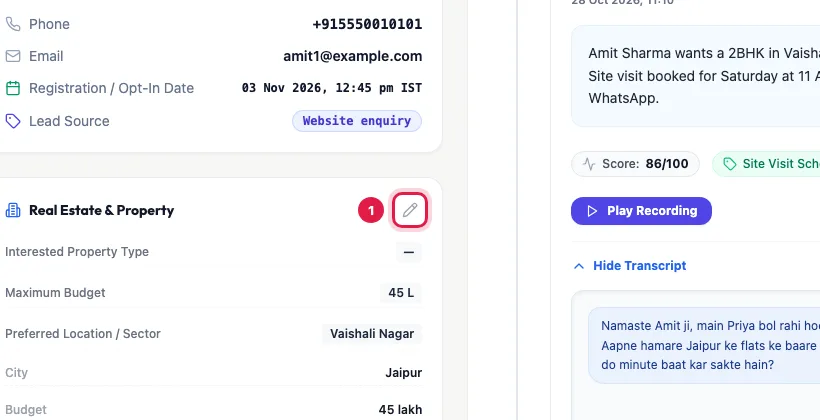
The pencil opens the lead's details and notes for editing Write in Internal Notes: short facts your team or the agent can use, with dates.
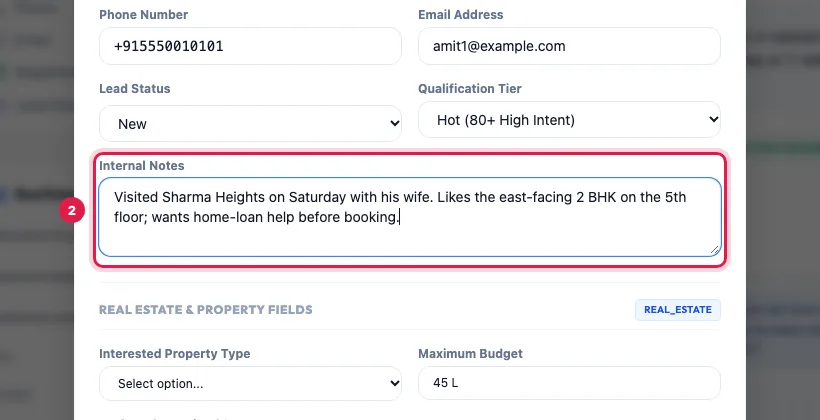
Internal Notes: what your team should know about this lead Click Save Changes.
The note shows under Contact Profile on the lead's page; Read more opens a long one.
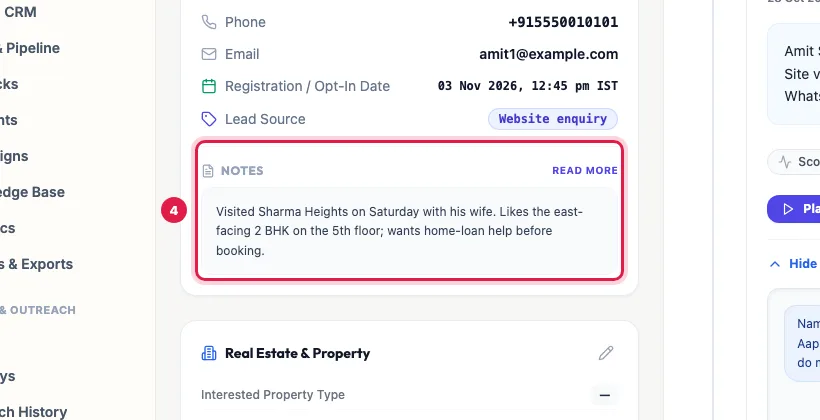
The note on the lead's page, under Contact Profile
Three ways to add a note
- Add Lead: the Internal Notes box when you create the lead.
- The lead's page: the pencil → Internal Notes edits the whole text, so you can also correct or remove a line.
- 360° Profile in the CRM list: CRM Notes & Activity Log → Add Note → Save Note adds a new note with the date and time below the earlier ones, without touching them.
- A file import fills notes from a Notes column too.
How the agent uses notes
- Before every call, the agent reads the lead's notes (the most recent part of a very long text), its details and the summaries of its last calls, so it does not ask again what the person already told you.
- Write facts, not instructions: "Wants a ground-floor flat; father uses a wheelchair" helps; "Be very polite" belongs in the agent's prompt.
- After an analysed call, the AI may add its own dated note with the key facts (budget, timeline, concerns), below yours.
Notes or something else?
- A time to call back: book a callback (Callbacks → Schedule Callback), so the agent actually calls.
- A budget, location or course: use your industry's field on the details card, so it is filtered, exported and used in deals.
- A call's own summary is already on the timeline; notes are for what happened outside the calls.
Example: After the site visit
Amit Sharma visits Sharma Heights with his wife on Saturday. The sales manager opens the 360° Profile, clicks Add Note and writes "Likes the east-facing 2 BHK on the 5th floor; wants home-loan help before booking." On Monday the agent's follow-up call starts from the home loan instead of asking about his budget again.
Tips
- Add to the notes rather than replacing what is there: Add Note in the 360° Profile does this for you.
- Keep notes short and dated; the newest facts matter most to the agent.
- Never write card numbers, Aadhaar numbers or passwords in notes.
Frequently asked questions
Lead par note kaise likhe?
Open the lead, click the pencil on its details card, write in Internal Notes and click Save Changes. Or use Add Note in the 360° Profile from the CRM list.
Does the AI agent read my notes?
Yes, before every call, with the lead's details and the summaries of its last calls.
Who can see the notes?
Your team members who can view the CRM. Notes are never sent to the customer.
Some notes appeared that nobody wrote.
After an analysed call the AI adds a dated note with the key facts it heard. You can edit or remove it with the pencil.
Can I add a note while adding the lead?
Yes: Add Lead has an Internal Notes box.
Questions this guide answers
- How do I add notes to a lead?
- Can the AI calling agent use notes about a lead?
- Does the AI add notes after a call?
Related guides
- Read a Lead's AI Score, Call Summary and Transcript: A lead's page shows who the person is and whether they agreed to be contacted, the AI score with its reason, your industry's details…
- How to Edit a Lead or Mark It Opted Out in the AI Calling CRM: Unified CRM → Edit at the end of the lead's row changes the name, phone, email, company, source, pipeline stage and the opt-in. Untick…
- Using the CRM Built into Your AI Calling Agent: Unified CRM is where every lead, call outcome, follow-up and recorded call lives. The list shows each lead's source, consent, groups…
- How AI Agents Book and Make Callbacks Automatically: When a customer says "call me later", the agent books a callback for the time they asked (or the next good slot) and calls them back then…
- How to Write a Prompt for an AI Calling Agent (with Example): Open the agent with Edit and write its Greeting Message and System Prompt: who the agent is, the one goal of the call, the steps in order…