How to Connect WhatsApp Business API to Your AI Calling CRM
In short: Open WhatsApp Suite (activate the WhatsApp add-on if asked), choose your provider in API Configuration, enter your WhatsApp Business number's Phone Number ID, account ID and access token, click Save Credentials and Test Integration, then paste the Inbound Webhook URL into your WhatsApp account so that replies reach your Inbox. Messages always go from your own number, never ours.
A step-by-step guide for BookAICall, an AI voice agent platform that makes and answers phone calls for businesses in Hindi, English, Hinglish and other Indian languages. Updated .
Steps
Open WhatsApp Suite. If WhatsApp is not active yet, the page shows Activate WhatsApp: the add-on is paid from your wallet, and its price is shown there and in Marketplace.
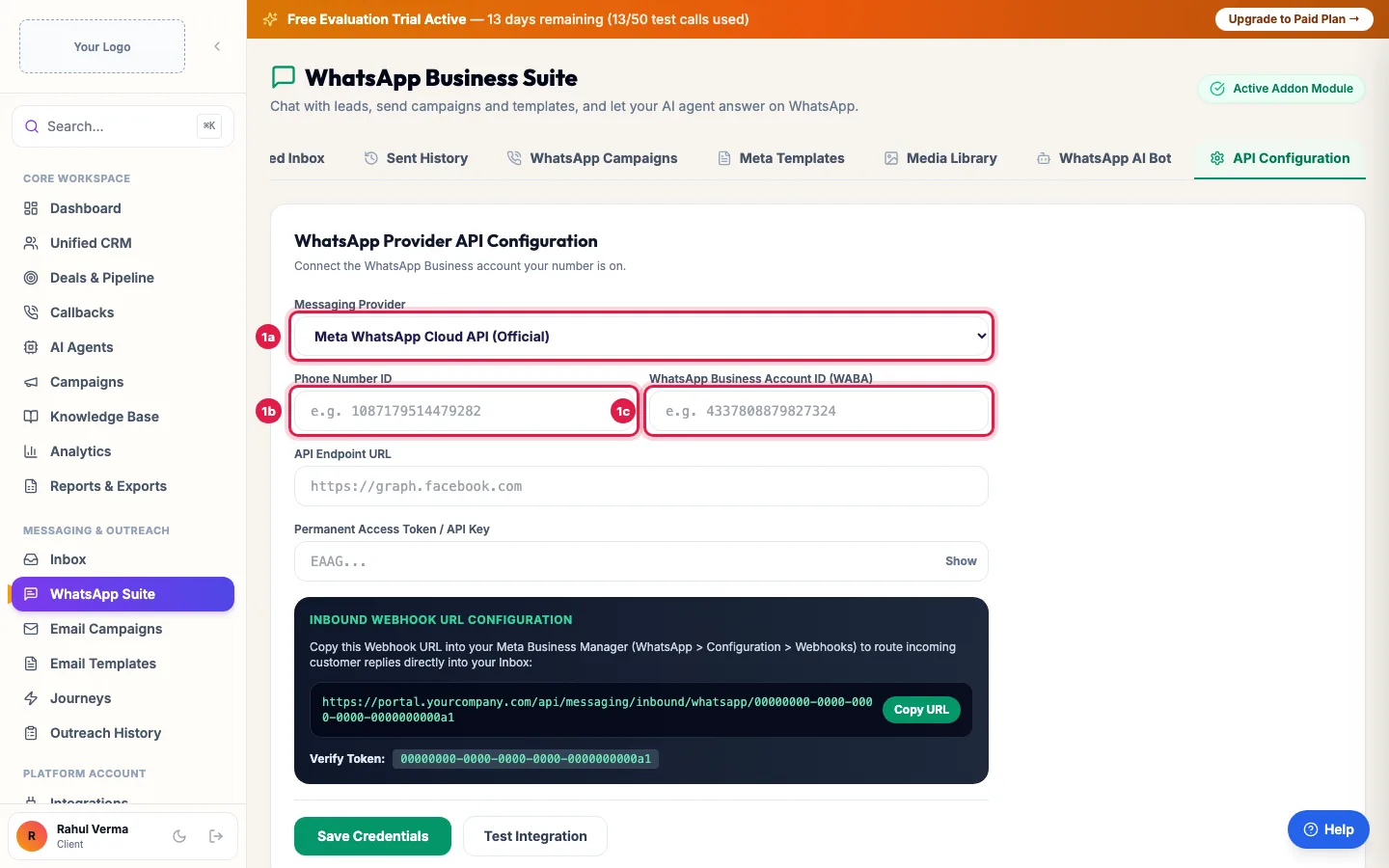
API Configuration: choose your WhatsApp provider and enter your account's details Click the API Configuration tab and choose the Messaging Provider: Meta WhatsApp Cloud API (Official), or the WhatsApp partner your number is with.
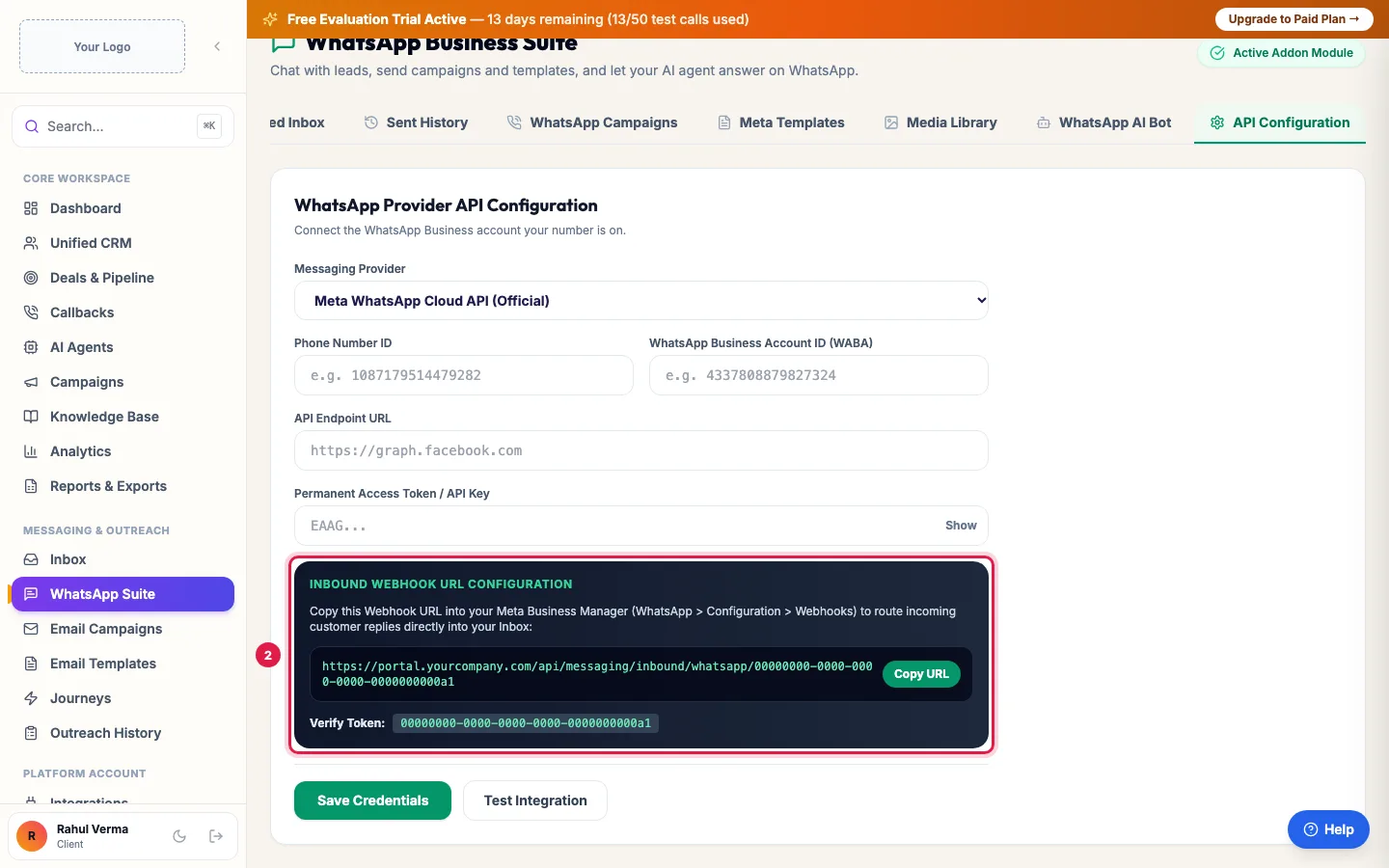
Copy the webhook address and verify token into your WhatsApp account, so replies reach your inbox Enter the Phone Number ID, the WhatsApp Business Account ID (WABA) and the Permanent Access Token / API Key from that account (some partners ask for their API Endpoint URL and key instead), then click Save Credentials.
Click Test Integration. A success message means your number is connected.
Under Inbound Webhook URL Configuration, click Copy URL and paste it, with the Verify Token shown next to it, into your WhatsApp account's webhook settings (for Meta: WhatsApp → Configuration → Webhooks, subscribed to messages). Leads' replies then reach your Inbox.
What you need before you start
- A WhatsApp Business Account (WABA) with your business number on it. A number in use on the ordinary WhatsApp app has to be moved to the business platform first.
- For Meta's Cloud API: in your Meta app's WhatsApp → API Setup you find the Phone number ID and the WhatsApp Business Account ID. Create a permanent access token for a system user with WhatsApp messaging and management permissions; a temporary token stops working within a day.
- With a WhatsApp partner: the API key and endpoint from the partner's dashboard.
Your number, always
Campaigns, follow-ups after calls, Inbox replies and your AI agent's WhatsApp messages all go from the number you connect here, never from ours. If it is not connected, they are not sent: a WhatsApp campaign refuses to run and says WhatsApp is not connected. (If your account was set up by a partner, their WhatsApp number may be used for follow-ups until you connect your own.)
What comes next
- Meta Templates: create your message templates and get them approved; you need them to message anyone who has not written to you in the last 24 hours.
- WhatsApp Campaigns: send a template to a lead group.
- WhatsApp AI Bot: switch on Enable AI Auto-responder and choose the agent under Assigned AI Voice & Knowledge Agent, then Save Agent Assignment, to let your AI agent answer chats.
- Media Library: PDFs and images your AI agent can send on WhatsApp during calls, such as a brochure.
- Sent History: every WhatsApp message sent from your number, with its source and status.
Example: A coaching institute connects its admissions number
Bright Future Classes has its admissions number on a WhatsApp Business Account. The admin opens WhatsApp Suite → API Configuration, picks Meta WhatsApp Cloud API (Official), pastes the Phone Number ID, WABA ID and a permanent token, clicks Save Credentials and Test Integration, and adds the Inbound Webhook URL and Verify Token in the Meta app. When a parent replies "Fees kitni hai?" to the brochure, the message shows in Inbox and the counsellor answers from the same number.
Tips
- Use a permanent token, not the temporary one from the API Setup page.
- If replies do not reach your Inbox, check the webhook: the URL, the Verify Token, and that messages is subscribed.
- The same connection appears in Integrations → Messaging Channels.
Frequently asked questions
WhatsApp kaise connect kare?
Open WhatsApp Suite → API Configuration, choose your provider, enter the Phone Number ID, WABA ID and access token, click Save Credentials and Test Integration, and paste the webhook address into your WhatsApp account.
Can I use my normal WhatsApp app number?
Only after the number is moved to a WhatsApp Business Account (the business platform). Then it no longer works in the ordinary app.
Will messages go from your number if mine is not connected?
No. Your customers never get messages from our number. Without your own number connected, WhatsApp messages are not sent.
Why did my free text message fail?
WhatsApp delivers free text only within 24 hours of the customer's last message. Otherwise use an approved template.
Test Integration failed.
Check that the token is permanent and has WhatsApp permissions, and that the Phone Number ID belongs to the WABA you entered. Save Credentials again, then test.
Replies are not coming into Inbox.
The webhook is missing or wrong. Copy the Inbound Webhook URL and Verify Token again into your WhatsApp account's webhook settings, with messages subscribed.
Questions this guide answers
- How do I connect WhatsApp Business to my calling CRM?
- Where do I find the WhatsApp Phone Number ID and WABA ID?
- Do WhatsApp messages go from my own number?
Related guides
- How to Create WhatsApp Templates and Get Them Approved: A template is a message WhatsApp has approved, needed to message anyone who has not written to you in the last 24 hours. Create it in…
- How to Send a Bulk WhatsApp Campaign to Your Leads: WhatsApp Suite → WhatsApp Campaigns → New Campaign: name it, pick an approved template and the leads (a group, picked leads, pasted…
- Reply to Leads' WhatsApp Messages from One Inbox: Inbox shows every WhatsApp conversation in which a lead wrote to you, newest first, with a count of messages since your last reply. Click…
- Connect WhatsApp, Email, Your Store and Other Apps to AI Calling: Integrations is where you connect your own tools: your WhatsApp Business number, your email sender, your online store or any system with…
- Add WhatsApp, Call Transfer and More to Your AI Calling Plan: Marketplace lists the add-ons you can buy for your workspace, each with its monthly price: AI employees such as the WhatsApp agent, Email…