Connect WhatsApp, Email, Your Store and Other Apps to AI Calling
In short: Integrations is where you connect your own tools: your WhatsApp Business number, your email sender, your online store or any system with an API, webhooks that send each call's result to Zapier, Make or your CRM, your Google account for Google Sheets, and lead-generation tools. Overview & Status shows what is connected.
A step-by-step guide for BookAICall, an AI voice agent platform that makes and answers phone calls for businesses in Hindi, English, Hinglish and other Indian languages. Updated .
Steps
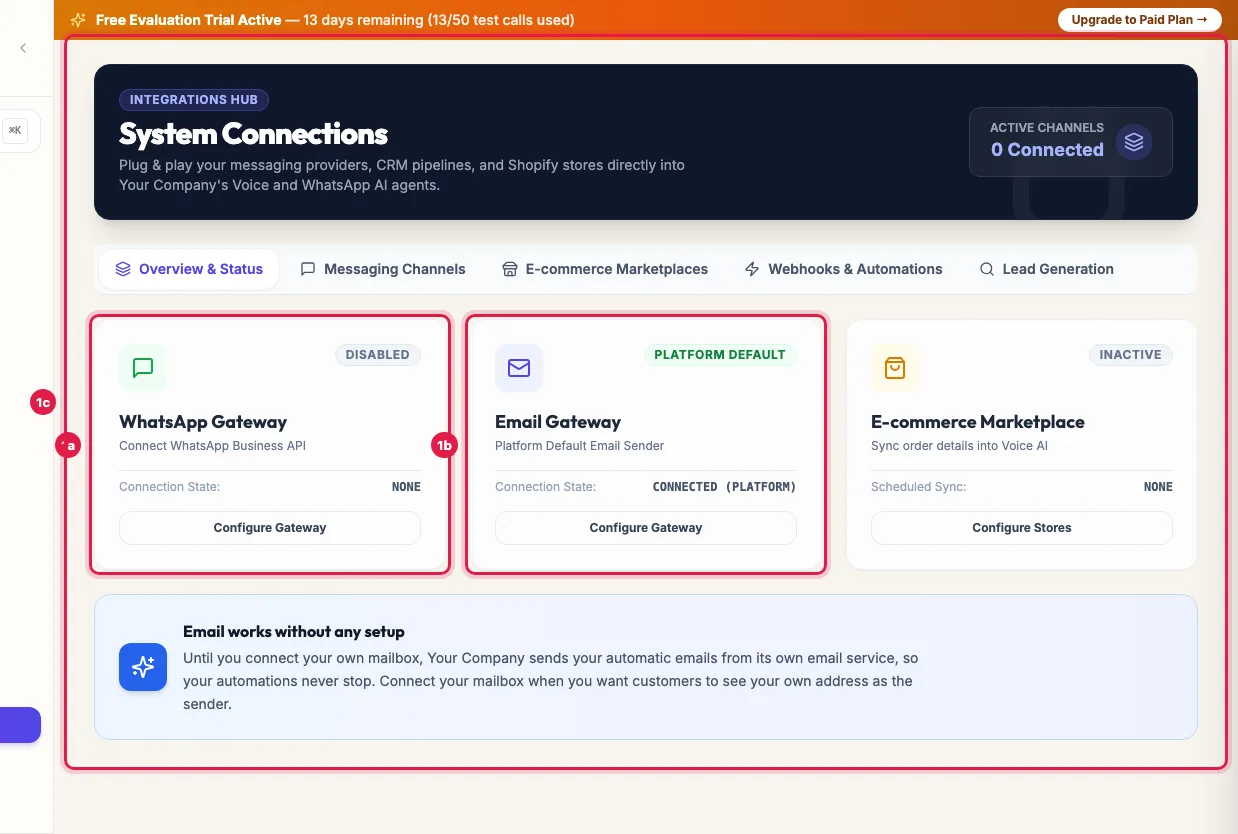
Open Integrations. Overview & Status shows whether the WhatsApp Gateway, the Email Gateway and an E-commerce Marketplace are connected; Configure Gateway or Configure Stores takes you to the right tab.
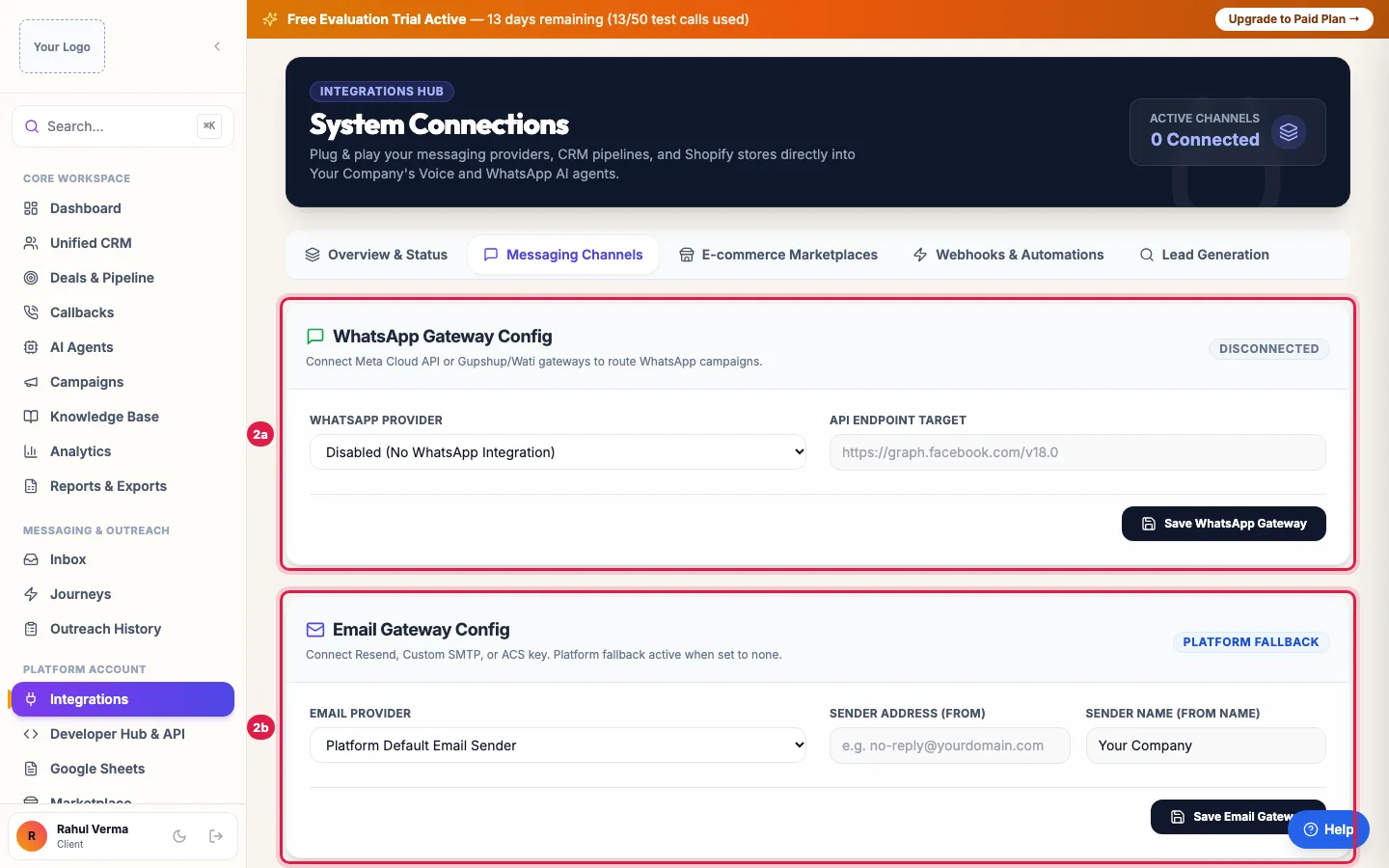
Integrations: what is connected for WhatsApp, email and online stores Messaging Channels: choose your WhatsApp Provider and enter its details (for example Phone Number ID and WABA Account ID), then Test WhatsApp Gateway and Save WhatsApp Gateway. For email, choose the Email Provider, the Sender Address (From) and Sender Name (From Name), then Test Email Connection and Save Email Gateway.
Messaging Channels: connect your WhatsApp Business number and your own email sender E-commerce Marketplaces: click Add Store Connection, choose the platform under Select Platform (Shopify Store, WooCommerce, Unicommerce OMS, Shipway Logistics, or Universal API Connector for any system with an API), enter its keys, pick the Target Data Catalog, and click Save & Activate Connector.
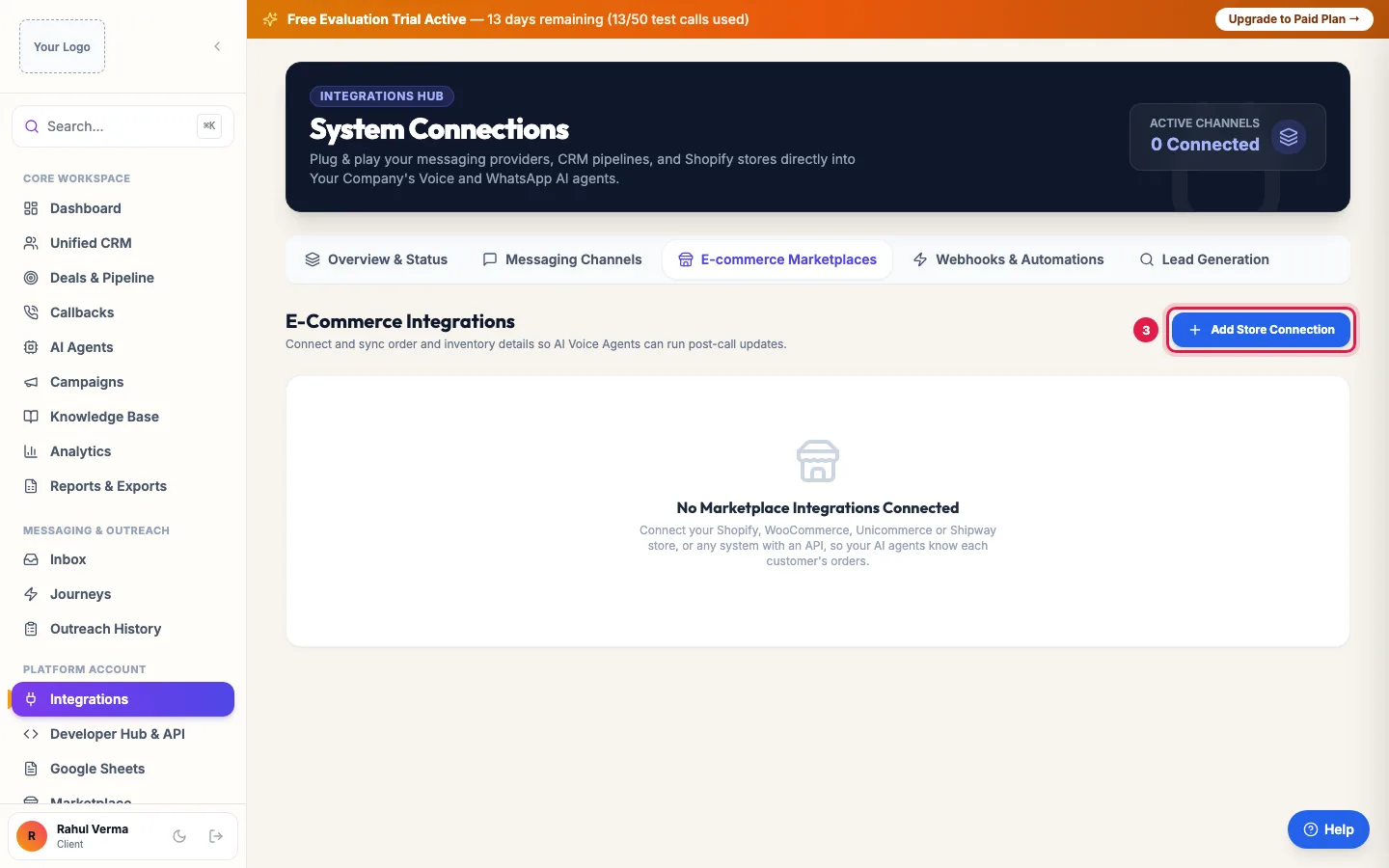
E-commerce Marketplaces: connect your store so agents know each order On each connected store, use Test to check the keys and Sync Now to fetch orders at once; Last Sync shows when it last ran.
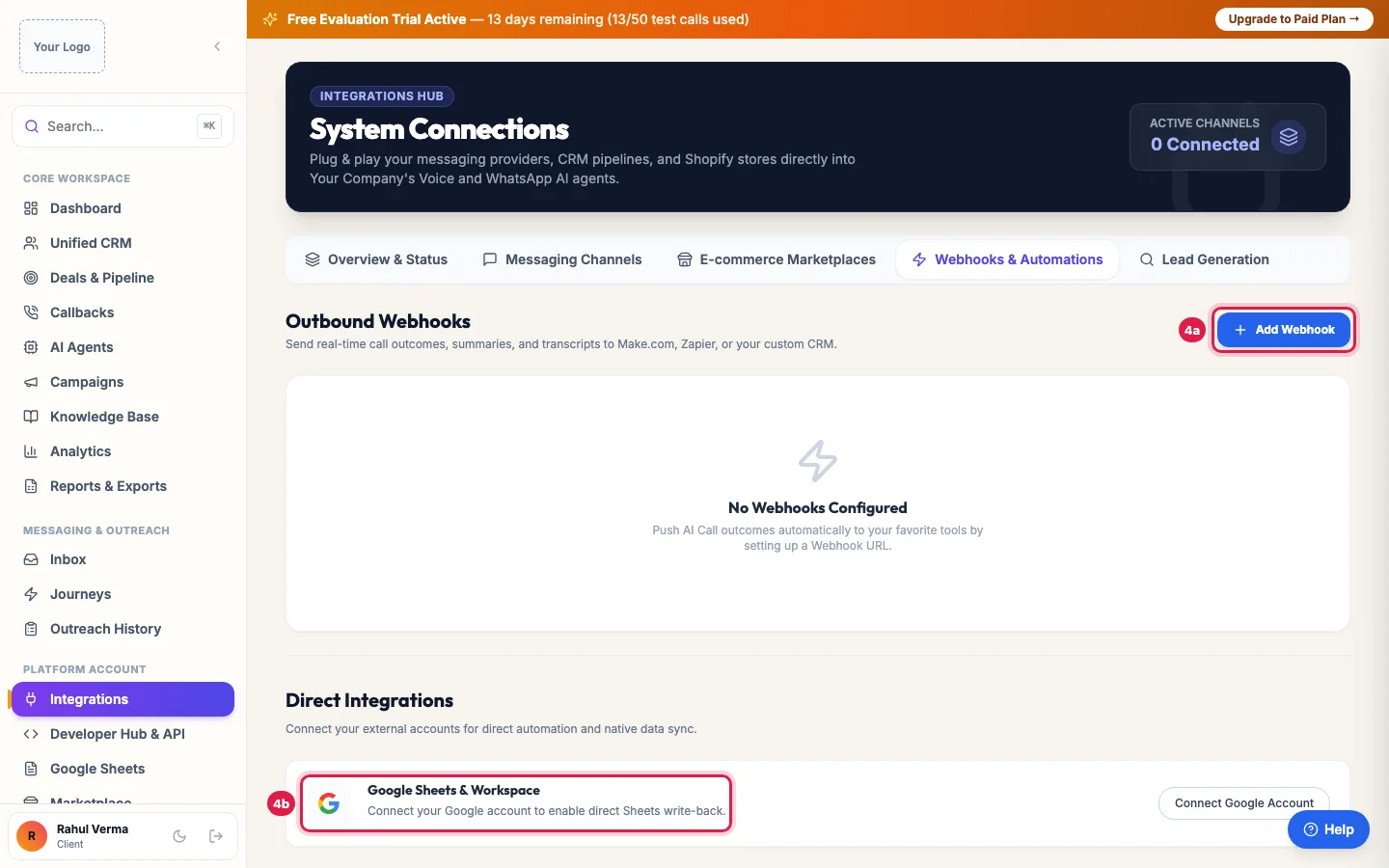
Webhooks & Automations: send call results to other tools, or connect Google Webhooks & Automations: click Add Webhook, paste the Webhook URL (Zapier / Make / Custom), leave the Signing Secret empty to have one made for you, and click Save Webhook. After every call it receives the call's outcome, summary and transcript.
Under Direct Integrations, click Connect Google Account to use Google Sheets for imports and write-back. Lead Generation connects tools that bring new leads into your CRM automatically.
What each connection does
- WhatsApp Gateway: your own WhatsApp Business number sends your templates and follow-ups, and replies reach your inbox. It needs the WhatsApp Messaging add-on.
- Email Gateway: your own mailbox or email service sends your emails, so customers see your address.
- Stores: orders, statuses and stock come into a Data Catalog, so your agents can answer "Where is my order?" and confirm or follow up orders.
- Webhooks: each call's result goes to another tool the moment the call is analysed.
- Google Sheets: import leads from a sheet, keep it in sync, and write call results back.
Email needs your own mailbox
Emails to your customers (email campaigns, journey emails, Test Send, follow-ups after calls and your agent's emails) go only from your own mailbox, so customers see your address and replies reach you. Until you connect it in Email Gateway Config, those emails are not sent and Launch Campaign stays off. Account emails from the platform itself, such as password reset and invoices, do not need it. Zoho Mail works with an App Password.
Webhook security
Every delivery carries an HMAC-SHA256 signature of the body in the X-Webhook-Signature header, made with the endpoint's signing secret, and an event ID in X-Webhook-Event-Id that stays the same if a delivery is retried. Check the signature before trusting the data. A failed delivery is retried three times over about six minutes.
The Universal API Connector
For a system with no ready connector, paste its API collection or enter the base URL, the sign-in method (OAuth2 client credentials, a bearer token, an API key header or none) and the list endpoint. It can create a lead group of the synced people and, if you choose, call them or add them to a campaign. Passwords are stored encrypted and calls to internal addresses are blocked.
Example: A D2C brand connects its store and its CRM
Ghar Ki Rasoi connects its Shopify Store under E-commerce Marketplaces, so the agent can tell callers where their order is. It adds a webhook to Zapier that puts every interested caller into its sales CRM with the summary, and connects WhatsApp so order-confirmation follow-ups go from its own number.
Tips
- Test before you save: Test WhatsApp Gateway, Test Email Connection and Test on a store catch wrong keys at once.
- Send webhooks to an HTTPS address and verify the signature on your side.
- For developer details (API keys, all endpoints), open Developer Hub.
Frequently asked questions
How do I connect my AI calling agent to my CRM?
Integrations → Webhooks & Automations → Add Webhook with your CRM's or Zapier's URL. Every call's result is sent there. To add leads from your CRM, use the Developer API.
Can AI call results go to Google Sheets?
Yes. Connect Google Account under Direct Integrations, then set up the sheet's write-back in Google Sheets.
Shopify connect kaise kare?
Integrations → E-commerce Marketplaces → Add Store Connection → Shopify Store, enter your store address and keys, and Save & Activate Connector.
Do I need my own email service?
For email campaigns, journey emails, Test Send, follow-up emails and your agent's emails, yes: they go only from your own mailbox (Messaging Channels → Email Gateway Config). Account emails such as password reset and invoices come from the platform.
Which WhatsApp providers can I use?
The WhatsApp Provider list shows the supported ones, including the official WhatsApp Business API. Your provider gives you the IDs and keys to enter.
My store shows a Connection Warning.
Click Test to check the keys, fix them with Edit Connection & Target Catalog, then Sync Now.
How do website or Facebook leads reach my agent?
Facebook/Instagram and Google Ads lead forms: open Ad leads and connect your Facebook Page or paste the Google Ads webhook URL and key; every new enquiry is called within about a minute. Website forms: point your form, Zapier or Make at the lead-capture webhook in Developer Hub with a lead group's ID.
Questions this guide answers
- How do I connect my AI calling agent to my CRM?
- Can AI call results go to Zapier or Google Sheets?
- Can an AI voice agent check Shopify orders during a call?
- How do I send emails and WhatsApp from my own account?
Related guides
- Call Facebook and Google Lead Form Leads Within 60 Seconds: Ad leads connects your Facebook/Instagram lead forms (Connect Facebook Page) and your Google Ads lead forms (a webhook URL and key). Each…
- How to Connect WhatsApp Business API to Your AI Calling CRM: Open WhatsApp Suite (activate the WhatsApp add-on if asked), choose your provider in API Configuration, enter your WhatsApp Business…
- Send CRM Emails From Your Own Address: Zoho, Gmail or SMTP: Integrations → Messaging Channels → Email Gateway Config: choose your Email Provider (Zoho Mail, your own SMTP server such as Gmail or…
- AI Calling API and Webhooks: Add Leads and Get Call Results: Developer Hub gives your developers an API key to add leads, start AI calls and run campaigns from your own systems, webhooks that receive…
- How to Auto-Call Leads from Google Sheets with an AI Agent: Connect your Google account, add the sheet and tab, and say which columns hold the name, phone and email. New rows become leads within…
- Give an AI Calling Agent Live Product, Stock or Order Data: A catalog is a table the agent searches during a call: products, stock, rate lists, available flats or orders. Create it in Data Catalogs…