AI Calling API and Webhooks: Add Leads and Get Call Results
In short: Developer Hub gives your developers an API key to add leads, start AI calls and run campaigns from your own systems, webhooks that receive every call's result signed with HMAC-SHA256, and the API reference with examples. Calls go to your portal's address followed by /api. The API is included in every plan, the free trial too: there is no add-on to buy.
A step-by-step guide for BookAICall, an AI voice agent platform that makes and answers phone calls for businesses in Hindi, English, Hinglish and other Indian languages. Updated .
Steps
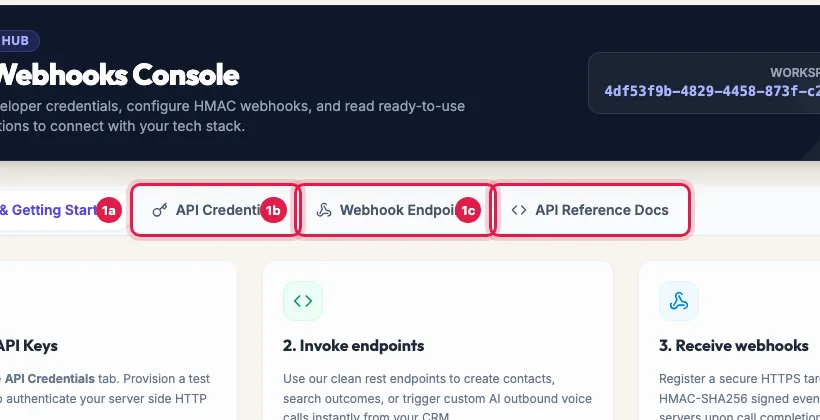
Open Developer Hub. The tabs are Overview & Getting Started, API Credentials, Webhook Endpoints and API Reference Docs; your Workspace Client ID is at the top.
Developer Hub: API keys, webhooks and the API reference Under API Credentials, click Request Key. Enter a Key Label named after where it will be used, choose Live or Test under Label as, and click Generate Secret Key.
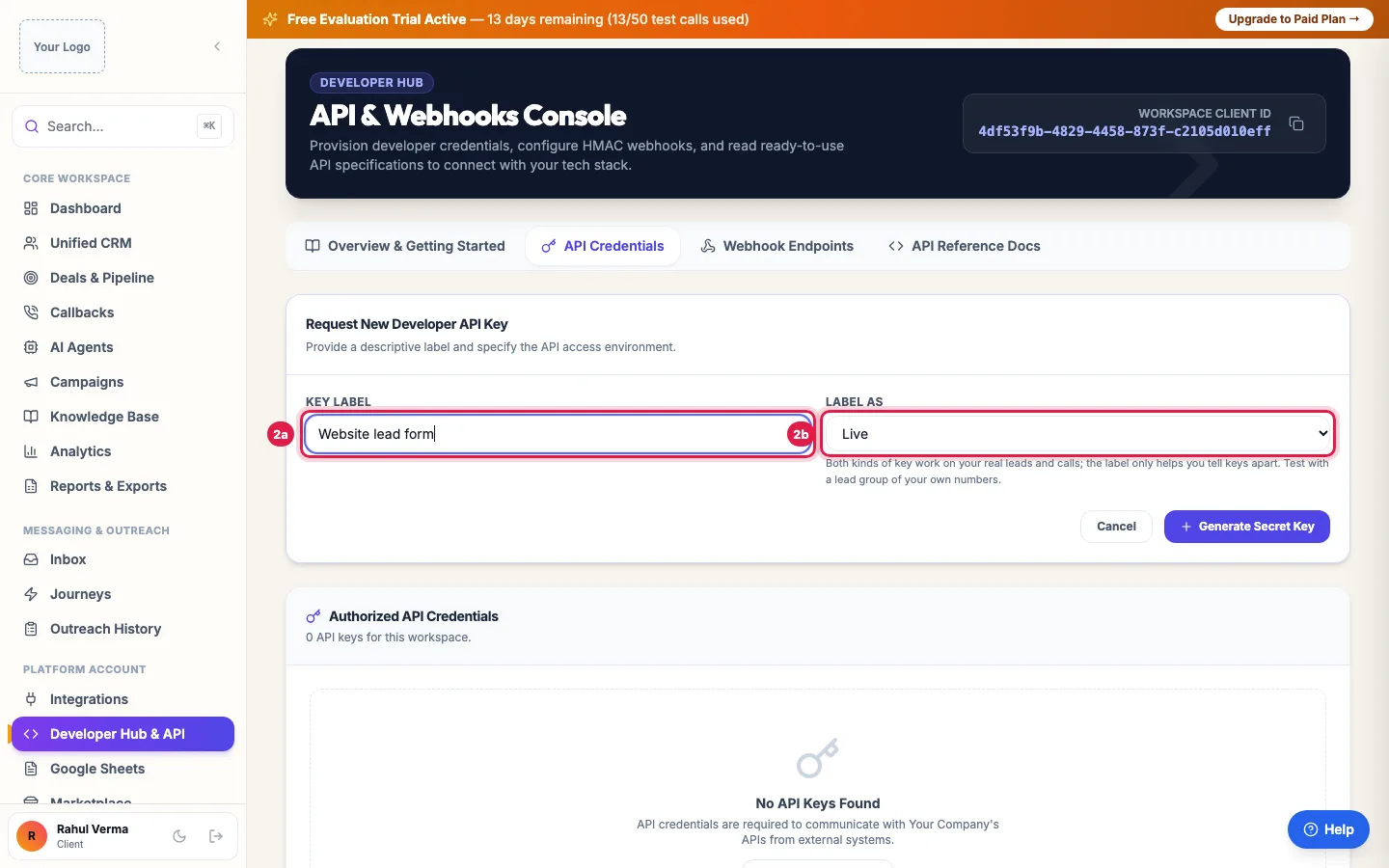
Request Key: name it after where it is used; the secret is shown once Copy the secret at once: it is shown only once. Click I Have Saved the Secret Key. Send it in the x-api-key header from your server, never from a web page or app.
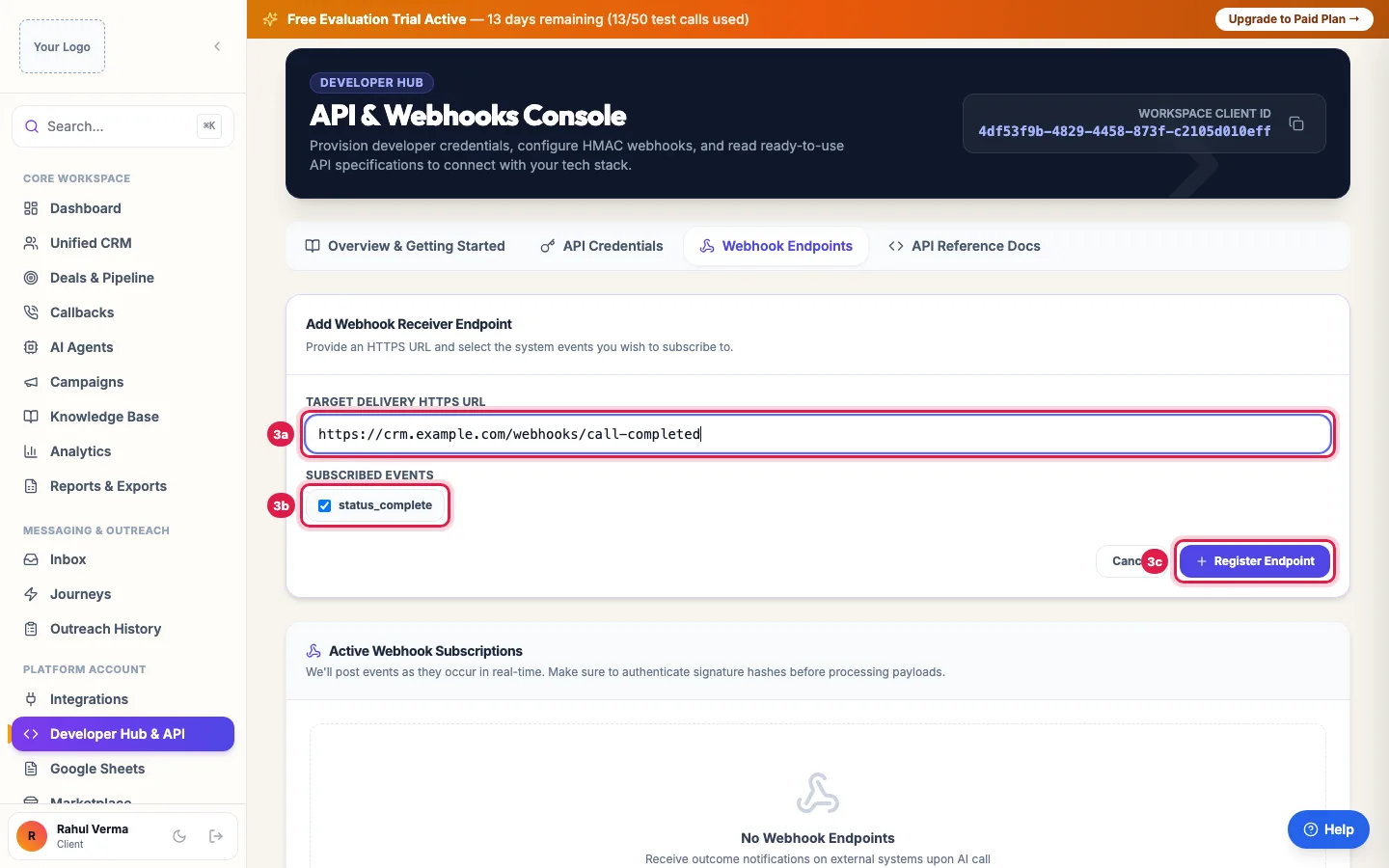
Add Webhook: your HTTPS address receives each call's result, signed with your secret Under Webhook Endpoints, click Add Webhook (Add Target Endpoint when there is none yet), enter your Target Delivery HTTPS URL and click Register Endpoint. Each endpoint shows its Signing Secret, Deliveries and Failures, and can be paused or deleted.
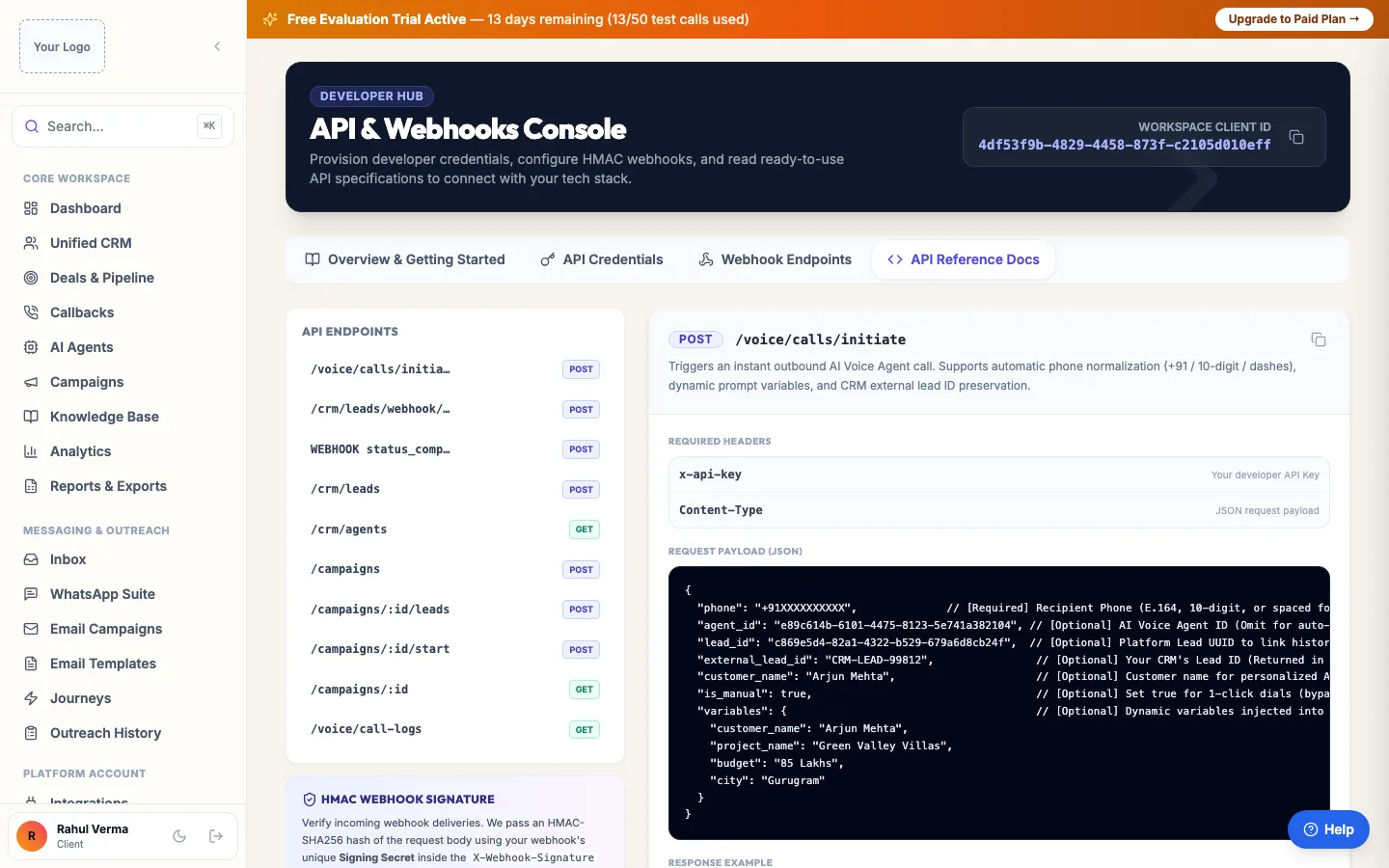
API Reference Docs: every endpoint with an example request and response Open API Reference Docs for every endpoint with its Required Headers, Request Payload (JSON) and Response Example, and verification examples for Node.js and Python.
What you can do with the API
- POST /voice/calls/initiate: call a number now with an agent, with the customer's name and any details for the agent to use.
- POST /crm/leads: add a lead; GET /crm/agents: list your agents.
- POST /campaigns, POST /campaigns/:id/leads and POST /campaigns/:id/start: create a campaign, attach leads and start it; GET /campaigns/:id: its progress.
- GET /voice/call-logs: calls with their outcome, summary and recording link.
- POST /crm/leads/webhook/<your workspace ID>: a lead-capture address for website forms, Facebook Lead Ads, Zapier or Make (see below).
The lead-capture webhook
- Authenticate with the X-Webhook-Secret header, or ?secret= on the URL for a plain HTML form.
- Send the name, phone, email, company and any form fields. Add group_id (or a group_ids list, or ?group_id= on the URL) to put the lead in a lead group: copy a group's ID from Unified CRM → Manage Groups → the copy icon (Copy group ID).
- If the group has Auto-trigger on new lead, its call goes out after the group's delay, at any hour for a single enquiry, and its WhatsApp message or journey starts too.
- A second enquiry from the same number updates that lead instead of making a duplicate: it fills a missing name, email or company, merges the form fields and joins the groups.
- The response is { success, lead_id, updated, groups }; updated is true when an existing lead was updated.
The call-result webhook
After every call, each active endpoint receives a status_complete event: the lead, the number, direction, status, duration, outcome, sentiment, intent score, qualification tier, next follow-up date, the summary, the transcript and the recording link. The body is signed with HMAC-SHA256 using the endpoint's Signing Secret, in the X-Webhook-Signature header; X-Webhook-Event-Id stays the same on retries, so you can ignore an event you have already handled. Failed deliveries (no answer, timeouts, 408, 429 or 5xx) are retried three times over about six minutes.
Rules the API follows
- Calls you start through the API follow the same rules as calls from the portal: DND numbers are not called, and on pay as you go a low wallet stops calls (the response says the balance is insufficient).
- A call to a number that is already on a call with you is refused.
- Single calls run 24 hours a day, so a new enquiry is called at once at any hour; bulk calls (campaigns, files, sheets, several leads at once) run only from 9 AM to 9 PM IST.
- Live and Test keys both work on your real leads and calls; the label only tells keys apart. Test with a lead group of your own numbers.
- Revoke a key you no longer use; it stops working at once.
Example: A real estate website calls every enquiry in a minute
Sharma Properties' developer adds one line to the website form handler: POST the enquiry to /crm/leads with the project and budget, then POST /voice/calls/initiate with the lead. The agent calls within a minute, even at 10 PM, because the person just asked. A webhook endpoint posts each call's outcome back to the company's own CRM, and site visits booked by the agent appear there with the summary.
Tips
- Keep keys on the server and rotate them by creating a new key and revoking the old one.
- Check the signature with the raw request body, before parsing it.
- Use the lead-capture webhook with a group_id for no-code tools like Zapier, Make or Facebook Lead Ads: the group's automatic call does the rest, without code.
Frequently asked questions
Is there an API to trigger AI calls?
Yes: POST /voice/calls/initiate with your x-api-key, the number and the agent. The response gives the call ID.
How do I get AI call results by webhook?
Developer Hub → Webhook Endpoints → Add Webhook with your HTTPS URL. Every finished call is posted there, signed.
What is the base URL?
Your portal's address followed by /api, for example the address you sign in on plus /api. The API Reference Docs show the full URLs.
API key kho gayi, ab kya kare?
The secret cannot be shown again. Create a new key with Request Key and revoke the old one.
Can I test without calling real customers?
Both key types call real numbers. Use a lead group of your own team's numbers while testing.
Do API calls cost extra?
No extra charge for the API itself; calls it starts are charged like any other call on your plan.
Do I need to buy the Developer API in Marketplace?
No. API keys, webhooks and the Developer Hub are included in every plan, the free trial too. Open Developer Hub → API Credentials → Request Key.
Will the same customer filling my form twice create two leads?
No. The lead-capture webhook updates the existing lead for that number and answers "updated": true.
Questions this guide answers
- Is there an API to trigger AI calls?
- How do I get AI call results by webhook?
- How do I verify an AI calling webhook signature?
- Can my website form trigger an AI call instantly?
Related guides
- Connect WhatsApp, Email, Your Store and Other Apps to AI Calling: Integrations is where you connect your own tools: your WhatsApp Business number, your email sender, your online store or any system with…
- How to Auto-Call Leads from Google Sheets with an AI Agent: Connect your Google account, add the sheet and tab, and say which columns hold the name, phone and email. New rows become leads within…
- AI Calling Hours in India: The 9 AM to 9 PM Rule and Consent: Campaigns and automatic follow-ups call only from 9 AM to 9 PM IST, and only people who agreed to hear from you. A new lead's instant…
- How to Call Every New Lead Automatically Within Minutes: A lead group keeps related leads together, so a campaign, a message or a report can use exactly that list. A group can also act on every…