Send CRM Emails From Your Own Address: Zoho, Gmail or SMTP
In short: Integrations → Messaging Channels → Email Gateway Config: choose your Email Provider (Zoho Mail, your own SMTP server such as Gmail or Outlook, or an email service's API key), enter the Sender Address and Sender Name, fill the provider's details, click Save Email Gateway, then Test Email Connection. Your own mailbox is needed for email campaigns, journey emails, Test Send, follow-up emails after calls and your agent's emails: nothing goes out from a shared sender.
A step-by-step guide for BookAICall, an AI voice agent platform that makes and answers phone calls for businesses in Hindi, English, Hinglish and other Indian languages. Updated .
Steps
Open Integrations and click the Messaging Channels tab. The Email Gateway card shows Not connected or the provider you use. (The same settings are also in Settings → Email Gateway.)
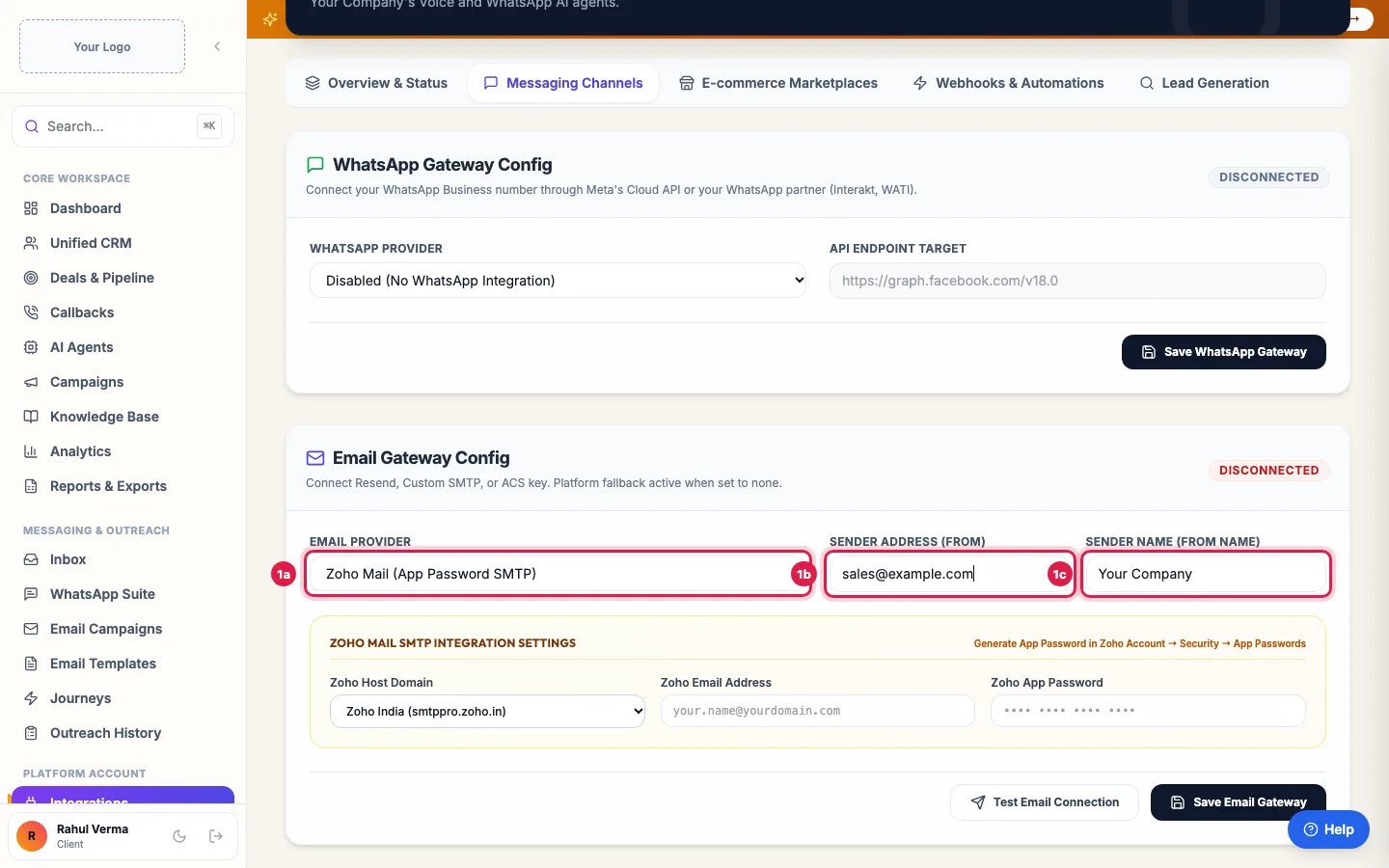
Email Gateway: choose your provider and the address and name customers see Under Email Gateway Config, choose the Email Provider: Zoho Mail (App Password SMTP), Custom SMTP Relay Server (for Gmail, Outlook or your host's mail server), or one of the email services by API key.
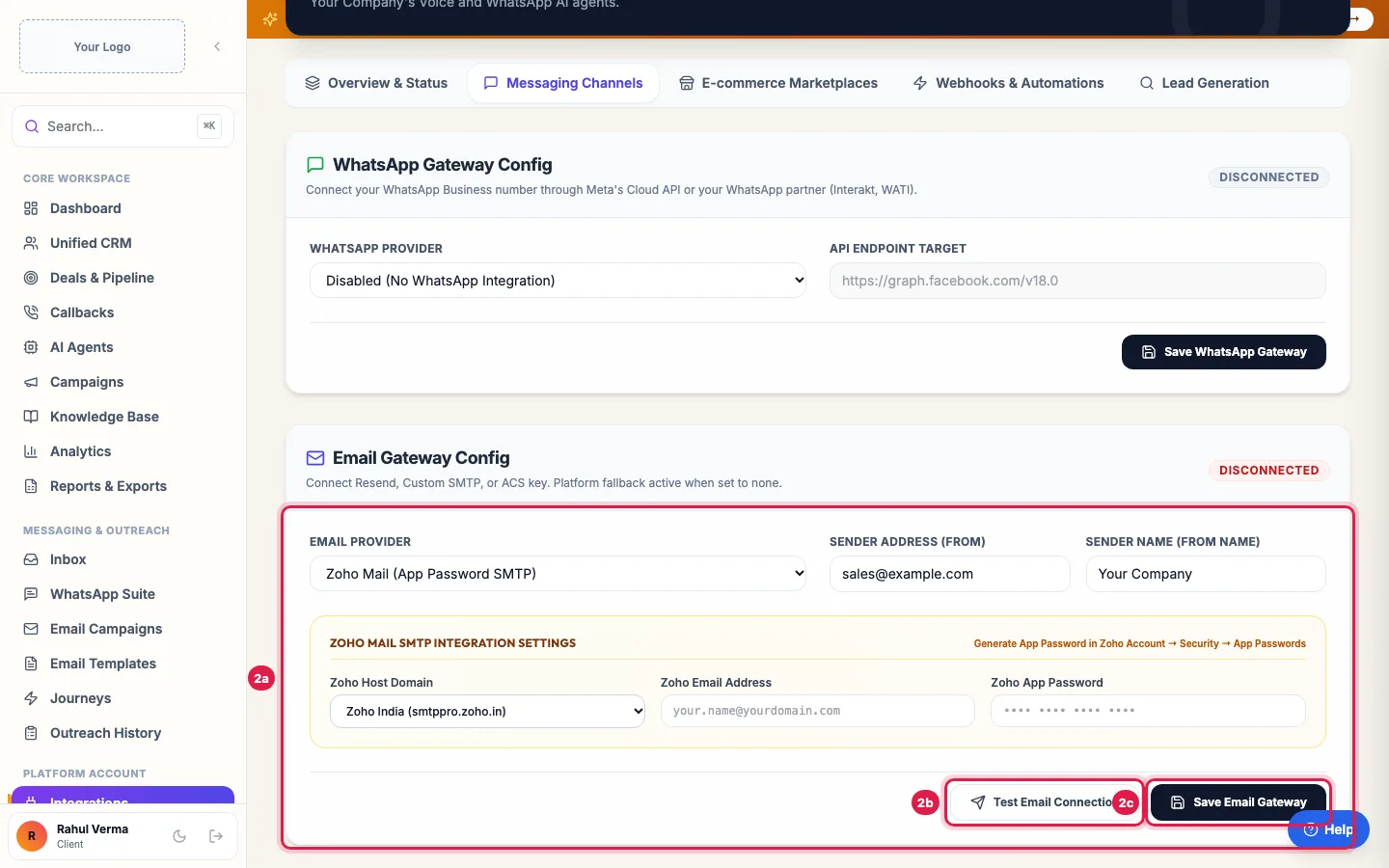
Enter the provider's details (for Zoho, an App Password), test, then save Enter the Sender Address (From), the address customers see and reply to, and the Sender Name (From Name), for example your business name.
Fill in the provider's details. Zoho: the Zoho Host Domain (Zoho India for accounts made in India), the Zoho Email Address and a Zoho App Password. SMTP: SMTP Hostname, SMTP Port, TLS / Secure, SMTP Username and SMTP Password. Click Save Email Gateway.
Click Test Email Connection. "Email connection tested! Status updated to Active." means it works. To see a real email arrive, use Test Send in Email Templates.
What needs your own mailbox
- Follow-up emails after campaign calls (Send Email follow-up if call is not answered).
- Emails your AI agent sends during a call, such as details or a brochure link.
- Test Send in Email Templates.
- Email campaigns: Launch Campaign and Resume stay off until your mailbox is connected, and a running campaign pauses if the mailbox is removed. Campaigns go from your address, so replies come to you.
- Email steps in your journeys: without your mailbox they are not sent (Runs shows "Not sent: connect your own mailbox first") and the lead moves on to the next step.
- Account emails from the platform itself (password reset, invoices, renewal notices) do not need your mailbox.
Settings for common mailboxes
- Zoho Mail: in your Zoho account's security settings create an App Password and use it here, not your login password. Choose the host for where your account was made (Zoho India, Global or EU).
- Gmail or Google Workspace: Custom SMTP Relay Server with SMTP Hostname smtp.gmail.com, port 587 and STARTTLS (587); turn on 2-step verification in the Google account and use an app password.
- Outlook / Microsoft 365: SMTP Hostname smtp.office365.com, port 587, STARTTLS (587), your full email address and its password (or app password).
- Your website host's mailbox: the SMTP server, port and login your host gives you.
Good to know
- Test Email Connection checks the saved settings: save first, then test.
- A saved password shows "Saved — leave blank to keep"; type a new one only to change it.
- The Sender Address should belong to the mailbox you connect, or the mail server may refuse the email.
Example: A real-estate firm on Zoho
Sharma Properties uses [email protected] on Zoho. The admin creates an App Password in Zoho's security settings, chooses Zoho Mail (App Password SMTP), enters the Sender Address [email protected] and the Sender Name Sharma Properties, picks Zoho India, pastes the app password and clicks Save Email Gateway, then Test Email Connection. Now the not-answered follow-up email from Priya's campaign goes from sales@ and replies land in the sales team's inbox.
Tips
- Use a real address people can reply to, such as sales@ or info@, rather than no-reply@.
- After changing the password of your mailbox, update it here too, or sending stops.
Frequently asked questions
Apne domain se email kaise bheje?
Connect your mailbox in Integrations → Messaging Channels → Email Gateway Config with your provider's details, set your Sender Address, Save Email Gateway and Test Email Connection.
Can I use Gmail?
Yes, with Custom SMTP Relay Server: smtp.gmail.com, port 587, STARTTLS, and an app password from your Google account.
Test Email Connection failed.
Check the host, port and security, and that you used an app password where the provider asks for one. Save Email Gateway again, then test.
Why did my follow-up emails after calls not go?
Those go only from your own mailbox. Choose a provider here, save, and test the connection.
Email campaign says "Connect your own mailbox first".
Email campaigns are sent only from your own address. Connect it in Integrations → Messaging Channels → Email Gateway Config (or Settings → Email Gateway), click Test Email Connection, then launch or resume the campaign.
Where do replies to my emails go?
To the mailbox of your Sender Address. They do not appear in the Inbox.
Questions this guide answers
- How do I send CRM emails from my own domain?
- How do I connect Zoho Mail with an App Password?
- What are the SMTP settings for Gmail?
Related guides
- How to Design Email Templates for Automated Follow-ups: Email Templates lets you design branded emails without code: start from a ready design or Create Custom Template, set the subject, header…
- Email Campaigns That Trigger an AI Call When a Lead Clicks: Email Campaigns → Create Campaign takes four steps: details, the email, the recipients, and what your AI agent does when someone opens or…
- Connect WhatsApp, Email, Your Store and Other Apps to AI Calling: Integrations is where you connect your own tools: your WhatsApp Business number, your email sender, your online store or any system with…
- How to Run an AI Calling Campaign: Automate Outbound Sales Calls: Campaigns → New Campaign: name it, choose the AI agent, set the retry rules, pick the lead group and click Create & Launch. The agent…