Email Campaigns That Trigger an AI Call When a Lead Clicks
In short: Email Campaigns → Create Campaign takes four steps: details, the email, the recipients, and what your AI agent does when someone opens or clicks. Launch Campaign starts sending at once (about 25 emails a minute) or at the time you scheduled; opens and clicks are counted, and a click can start an AI call or a WhatsApp message. Campaigns go only from your own connected mailbox, and every email carries an unsubscribe link.
A step-by-step guide for BookAICall, an AI voice agent platform that makes and answers phone calls for businesses in Hindi, English, Hinglish and other Indian languages. Updated .
Steps
Connect your own mailbox first: Integrations → Messaging Channels → Email Gateway Config (or Settings → Email Gateway). Until then Email Campaigns shows "Connect your own mailbox first" and Launch Campaign stays off.
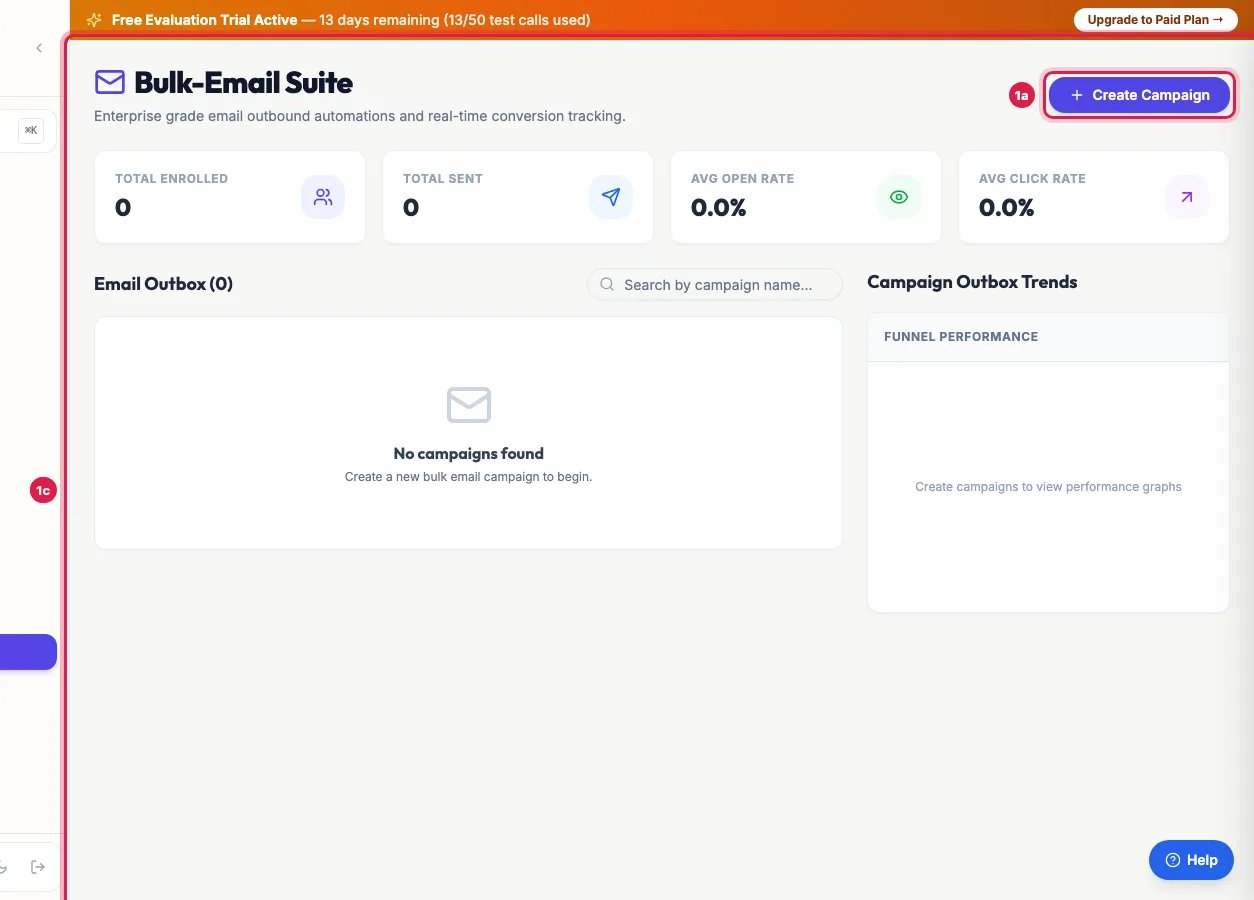
Email Campaigns: what was sent, opened and clicked, and Create Campaign Open Email Campaigns. The cards show Total Enrolled, Total Sent, Avg Open Rate and Avg Click Rate. Click Create Campaign.
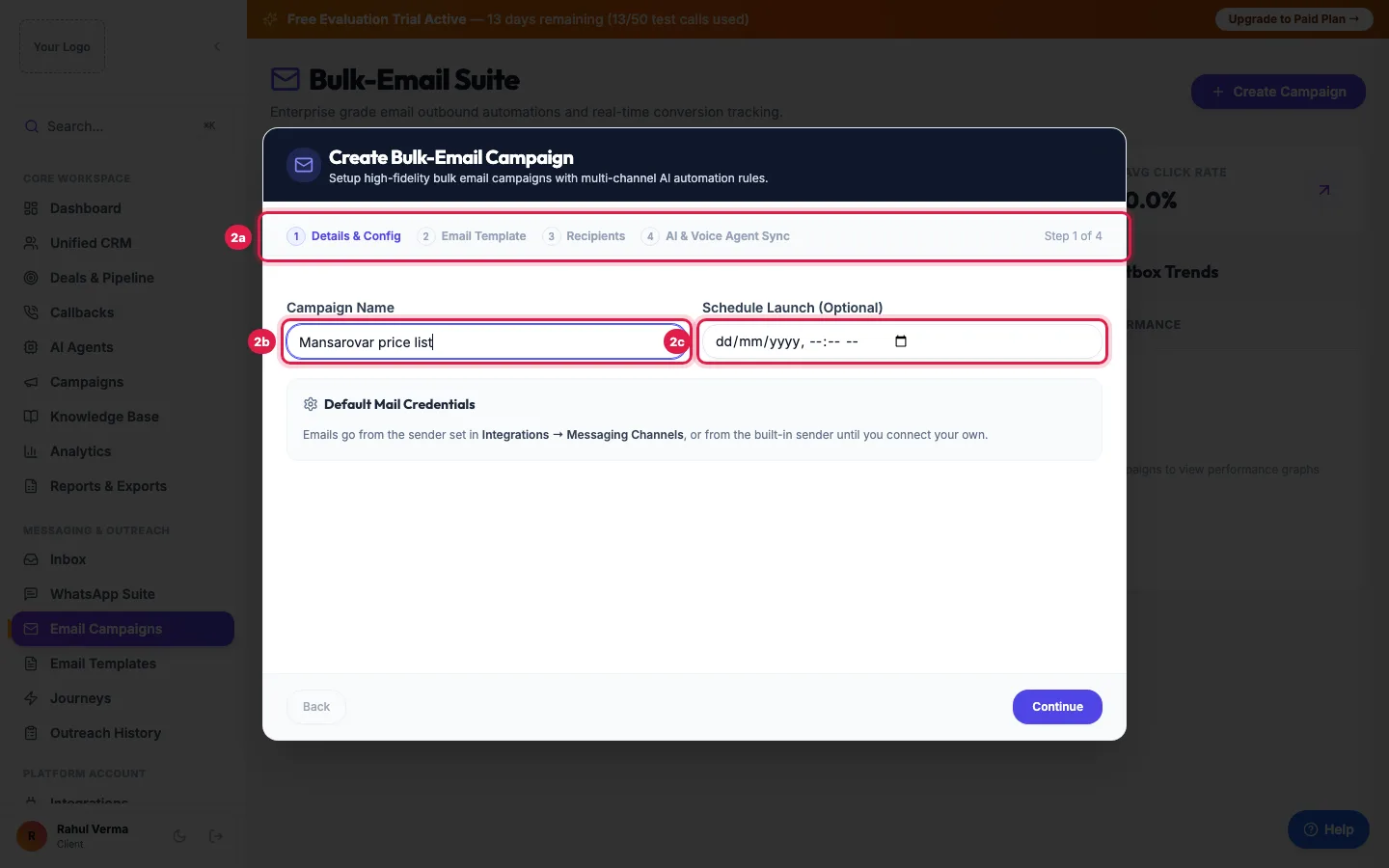
Four steps: details, the email template, the recipients, and what an AI agent does when someone clicks 1. Details & Config: enter the Campaign Name and, to send later, a time under Schedule Launch (Optional). Click Continue.
2. Email Template: click one of Your Custom Saved Templates or a ready design, or describe the email to the AI copywriter Assistant and click Generate. Check the Subject Line and the Email HTML Content, then Continue.
3. Recipients: Select from CRM (filter by Lead Group or Lead Statuses, tick leads or Select All), Copy-Paste List of addresses, or Upload CSV/Excel with an email column. Click Continue.
4. AI & Voice Agent Sync: under Trigger rule: On Open and Trigger rule: On Click choose No Action, Trigger Call via AI Voice Agent (and the agent), or Send WhatsApp Message Template (and the template).
Click Launch Campaign. It starts sending at once, or at the scheduled time. Click the campaign to see Funnel Performance and the Recipient Outbox Logs, and Export Report to download them.
How sending works
- About 25 emails go out each minute until all recipients are done; Process Batch on the card sends the next batch at once.
- Each recipient moves from pending to sent, then opened and clicked as they read the email. Failed means the mail server refused it.
- {{name}}, {{company}}, {{email}} and {{phone}} in the subject or text are filled from each lead.
- Emails go only from your own mailbox, so replies come to you. Without one the campaign cannot be launched; a running campaign is paused with the reason on its card, and Resume restarts it once the mailbox is connected.
Unsubscribe
- Every campaign email ends with your business name and an Unsubscribe link, and carries the unsubscribe header that email apps show as their own Unsubscribe button.
- The link opens a page in your name; when the person confirms, the address goes on your account's unsubscribe list.
- Unsubscribed addresses are skipped by your later campaigns (they are not enrolled, and pending emails to them are not sent; the recipient shows unsubscribed) and by Email steps in your journeys.
- The list belongs to your account only: unsubscribing from one business does not stop emails from another.
Opens, clicks and the AI agent
- Opens are counted when the email's images load, so they are approximate; clicks are counted when a link starting with https:// is clicked.
- Trigger Call via AI Voice Agent calls the person the first time they open or click, if they came from your CRM and have a phone number. A click after 9 PM is called from the next morning's calling window.
- Send WhatsApp Message Template sends your approved template to that person's number from your WhatsApp.
- Recipients pasted or uploaded as a file have no phone in the CRM, so they get no call; add them as leads first if you want calls.
Limits
- Select from CRM loads up to 2,000 of your leads and shows those with an email address; for a bigger list, use Upload CSV/Excel.
- An address already in the campaign is not added twice.
Example: Price list emails that turn into calls
Sharma Properties sends "Green Meadows price list" to the group "Site visit enquiries - Nov" (140 leads with email), with the On Click rule Trigger Call via AI Voice Agent and Priya. At 11 AM it clicks Launch Campaign; the emails go out by 11:06. Over the day 61 open and 18 click Download price list; Priya calls each of the 18 within minutes of the click, and books 5 site visits. A click at 10:30 PM is called the next morning.
Tips
- Connect your own mailbox first (Connect your email guide), so that replies reach you.
- Put one clear link in the email: the click is what starts the AI call.
- Send to people who enquired or bought from you; bulk email to strangers lands in spam and harms your address.
Frequently asked questions
Bulk email kaise bheje?
Email Campaigns → Create Campaign: name it, choose the email, choose the recipients, set what happens on open or click, and click Launch Campaign.
Can an email click start a sales call?
Yes. Choose Trigger Call via AI Voice Agent under Trigger rule: On Click; the agent calls each lead who clicks, within calling hours.
How fast are the emails sent?
About 25 a minute, by themselves. Process Batch sends the next 25 at once.
Why is my open rate zero or low?
Many email apps hide images until the reader allows them, so opens are undercounted. Clicks are a better measure.
Can I schedule the campaign?
Yes: set Schedule Launch (Optional) in step 1. It starts by itself at that time.
Where are my campaign emails in Outreach History?
Email campaign results are on the Email Campaigns page: click the campaign for each recipient's status.
Can I send a campaign without my own email?
No. Campaigns go only from your own mailbox, so replies reach you and your address builds its own reputation. Connect it in Integrations → Messaging Channels → Email Gateway Config.
Can people unsubscribe?
Yes. Every campaign email has an Unsubscribe link; an address that unsubscribes is skipped by your later campaigns and journey emails.
My campaign shows paused.
It stopped because no own mailbox is connected (the reason is on its card). Connect the mailbox, then click Resume.
Questions this guide answers
- Can an email click trigger a sales call automatically?
- How do I run an email campaign from my CRM?
- How fast are bulk emails sent?
Related guides
- How to Design Email Templates for Automated Follow-ups: Email Templates lets you design branded emails without code: start from a ready design or Create Custom Template, set the subject, header…
- Send CRM Emails From Your Own Address: Zoho, Gmail or SMTP: Integrations → Messaging Channels → Email Gateway Config: choose your Email Provider (Zoho Mail, your own SMTP server such as Gmail or…
- How to Automate Lead Follow-ups with AI Calls, WhatsApp and Email: A journey is a follow-up you set up once. When something happens (a new lead, a call outcome, a reply, a webhook or a set time), it calls…
- How to Call Every New Lead Automatically Within Minutes: A lead group keeps related leads together, so a campaign, a message or a report can use exactly that list. A group can also act on every…