Add WhatsApp, Call Transfer and More to Your AI Calling Plan
In short: Marketplace lists the add-ons you can buy for your workspace, each with its monthly price: AI employees such as the WhatsApp agent, Email writer and the industry suites at the top, and Capacity and extras such as Call Transfer Lines and Incoming AI Agent Slots below. Click Activate (Activate / Buy on a capacity card), pay from your wallet (no GST) or online (18% GST), and the module switches on at once.
A step-by-step guide for BookAICall, an AI voice agent platform that makes and answers phone calls for businesses in Hindi, English, Hinglish and other Indian languages. Updated .
Steps
Open Marketplace. The AI employees (one tile per add-on, with what it does and its monthly price) are at the top; Capacity and extras is below. Tiles you already have show On your team, cards show Active.
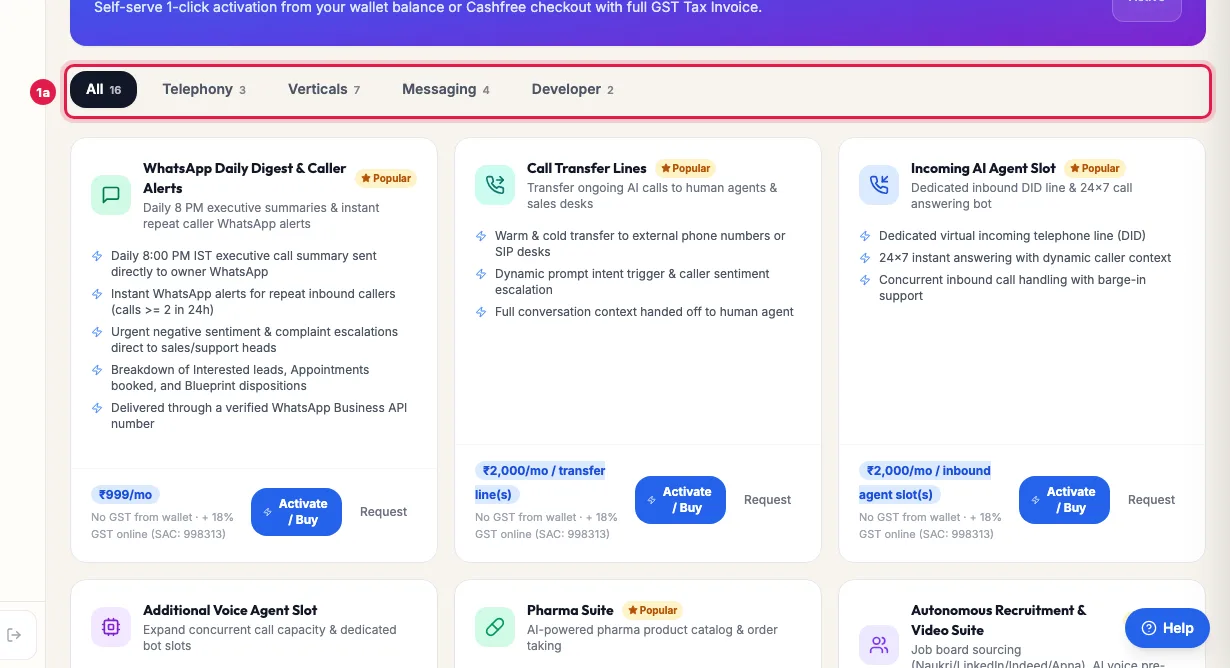
Marketplace: add-ons by category, each with what it does and its monthly price Click Activate on an AI employee's tile, or Activate / Buy on a Capacity and extras card. For add-ons sold in units, such as Call Transfer Lines or Incoming AI Agent Slots, choose the quantity under Select Quantity; Total Payable Amount updates.
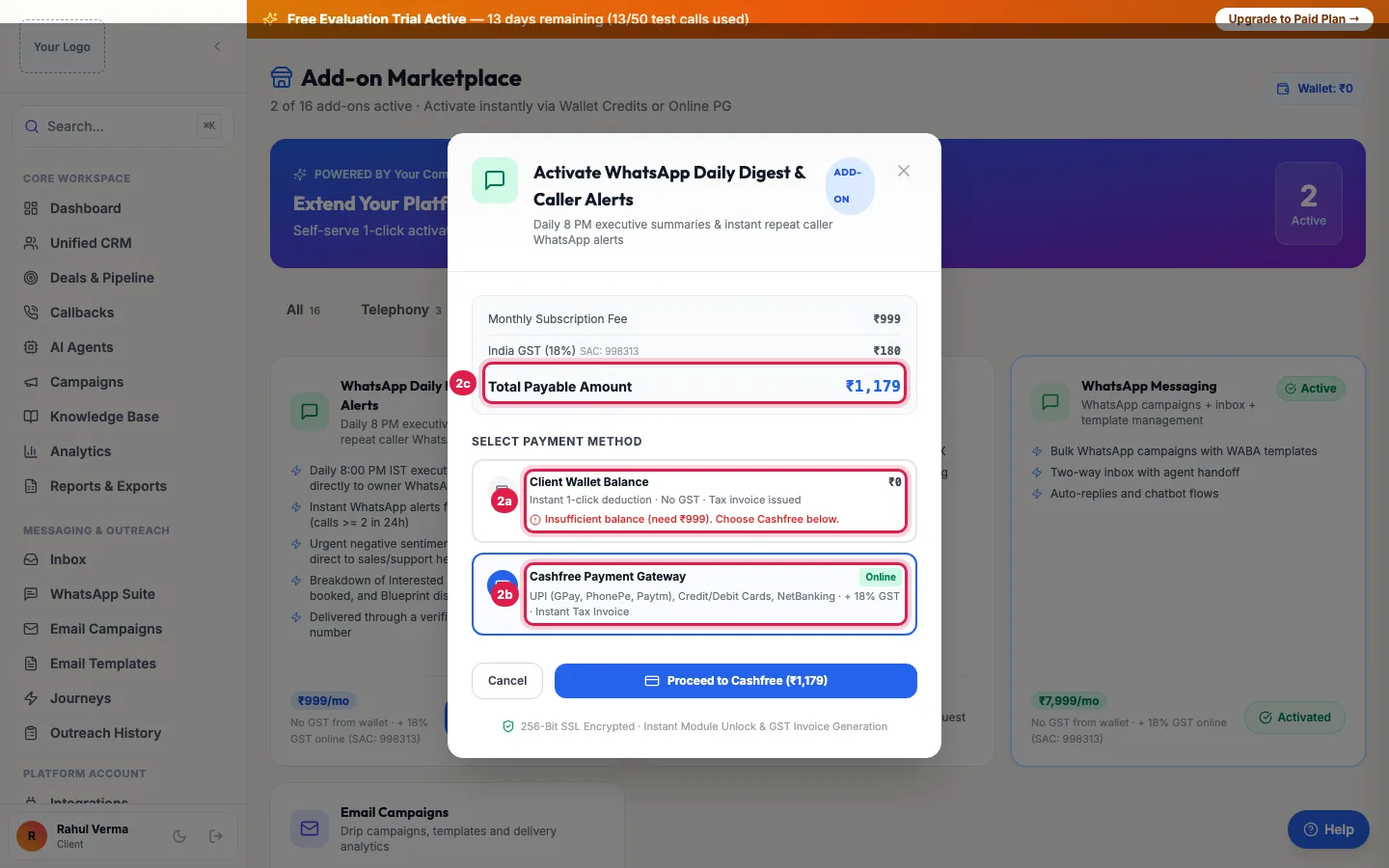
Activate: pay from your wallet with no GST, or online with 18% GST Under Select Payment Method, pay from your Client Wallet Balance with 1-Click Activate (no GST; it is on your monthly usage invoice), or online through the payment gateway, which adds 18% GST.
The module switches on as soon as the payment is confirmed: its menu appears in the sidebar and the tile shows On your team. For a stackable add-on, + Add More Units buys more later.
The add-ons
- AI employees: the WhatsApp agent (WhatsApp Messaging), Daily reporter (WhatsApp Daily Digest & Caller Alerts), Email writer (Email Campaigns), Social media manager, Content writer (SEO Blog), Pharma order desk, Recruiter, Store assistant (E-Commerce), Front desk (Hospital OPD), Collections officer (Trade Receivables), Dispatch clerk (Distributor Operations) and Import desk (Importer Pack). Where a free trial is offered, Start 7-day free trial tries one first (see Hire an AI employee).
- Capacity and extras: Call Transfer Lines (the agent hands a live call to your team), Incoming AI Agent Slot (3 channels only incoming calls use, on top of your plan), extra agent slots and Database Catalog Sync.
- The Developer API is not an add-on: API keys and webhooks are included in every plan (Developer Hub).
Incoming AI Agent Slot
Each slot adds 3 channels that only incoming calls can use, on top of your plan's channels: a helpline stays answered while your agents run outbound campaigns, and campaigns never take these channels. Buy as many slots as you need. Numbers are bought separately in DID Numbers (/did-marketplace).
Units, renewal and switching off
- Stackable add-ons (transfer lines, incoming slots) can be bought several times; the card shows Active (Stackable). Others, such as Database Catalog Sync, are bought once.
- An add-on renews every 30 days from the day you bought it, from your wallet. If the wallet cannot pay after 3 days of retries, the add-on switches off; your data stays.
- To stop an add-on at its next renewal: Wallet & Billing → Changes at your next renewal → Cancel at renewal. It stays on until that date, then switches off and is not charged again (no refund); Keep add-on undoes it.
Not sure what you need?
Click Request on a tile or card: Request Admin Approval sends your note (Message to Admin (optional)) to the team or your partner, who will review it and switch the module on. Once approved, the module appears in your sidebar.
Example: A hospital adds transfers and an incoming slot
Shree Hospital's AI receptionist answers OPD calls, but callers sometimes need the billing desk, and morning peaks clash with the reminder campaign. The admin buys 1 Call Transfer Line and 1 Incoming AI Agent Slot from the wallet, sets the billing desk number in the agent's Transfer to a person, and buys a second number in DID Numbers for the helpline. Reminder calls and incoming calls now run at the same time.
Tips
- If a menu you expect is missing, its add-on is probably not active: check its card here.
- Pay from the wallet when it has enough: no GST is added at that point, and the charge appears on your monthly usage invoice.
- After buying WhatsApp Messaging or Email Campaigns, connect your own number or mailbox in Integrations.
Frequently asked questions
How do I add WhatsApp to my plan?
Marketplace → the WhatsApp agent tile → Activate (or Start 7-day free trial where offered). Then connect your WhatsApp Business number in Integrations.
I bought an add-on but cannot see the menu.
Refresh the page or sign in again. If the tile shows On your team and the menu is still missing, raise a ticket.
Is GST charged on add-ons?
Paying online adds 18% GST. Paying from the wallet adds none at that point, because GST was charged on the recharge.
Add-on kaise kharide?
Marketplace → the tile → Activate (Activate / Buy on a capacity card) → pay from the wallet or online.
Do add-ons renew automatically?
Yes, every 30 days from your wallet. Keep enough balance, or the add-on switches off after 3 days.
What is the difference between an Incoming AI Agent Slot and another AI agent?
A slot adds 3 channels that only incoming calls use, on top of your plan. Another AI agent is a full agent with its own script, voice and channels, for incoming or outgoing calls.
Questions this guide answers
- How do I add WhatsApp to my AI calling plan?
- How do I add call transfer to an AI voice agent?
- How do I handle more incoming calls at once?
- Do add-ons renew automatically?
Related guides
- Hire an AI Employee: Try AI Add-ons Free, Then Keep Them: Open Marketplace: every add-on is shown as an AI employee with one job, such as the WhatsApp agent, Recruiter, Front desk (clinic) or…
- AI Calling Agent Pricing Explained: Per Agent Plans or Pay as You Go: Monthly plans are priced per AI agent, with no per-minute charge: Starter gives each AI agent 1 channel and Pro gives each AI agent 3…
- Download GST Invoices for Your AI Calling Plan: Billing lists every GST tax invoice and payment of your account, with what you have paid and what is pending; open an invoice to print it…
- How to Connect WhatsApp Business API to Your AI Calling CRM: Open WhatsApp Suite (activate the WhatsApp add-on if asked), choose your provider in API Configuration, enter your WhatsApp Business…
- How to Transfer an AI Call to a Human Agent: With the Call Transfer add-on, open the agent and fill Transfer to a person: your team's number, and departments if callers should reach…
- How to Add Another AI Agent to Your Plan: Your plan includes a number of AI agents. When you create one more, the portal opens Add-on Agent Activation with the price for the days…
- Incoming AI Agent Slot: Answer Incoming Calls While Campaigns Run: An Incoming AI Agent Slot adds 3 channels that only incoming calls can use, on top of your plan's channels. Campaigns and other outgoing…
- Sync PostgreSQL, MySQL or Google Sheets Data to an AI Calling Agent: With the Database Catalog Sync add-on, open a catalog in Data Catalogs and click Connect Platform. Choose PostgreSQL, MySQL or Google…
- AI COD Order Confirmation Calls for Shopify and WooCommerce Stores: Connect your Shopify, WooCommerce, Unicommerce or Shipway store and, with the E-Commerce add-on, your AI agent calls every new order to…
- AI Payment Reminder Calls for Distributors: Tally Outstanding Follow-up: The B2B Trade Receivables Suite chases overdue payments from your dealers and customers for you. Connect Tally or import your pending…
- Daily Call Report and Caller Alerts on WhatsApp for Business Owners: With the WhatsApp Daily Digest & Caller Alerts add-on, you get a daily call summary on WhatsApp at the time you choose (8 PM IST by…
- AI Social Media Planner for Small Business: Posts, Calendar, Reminders: The Social Media add-on plans and keeps your posts in one place. The AI writes drafts for Instagram, Facebook, LinkedIn and X from your…
- SEO Blog for Your Business: Articles with AI on Your Own Domain: The SEO Blog add-on gives your business its own blog: on a platform address from day one, and on your website's subdomain (for example…