Download GST Invoices for Your AI Calling Plan
In short: Billing lists every GST tax invoice and payment of your account, with what you have paid and what is pending; open an invoice to print it or save it as PDF. Online payments carry 18% GST; wallet recharges get a receipt voucher, and what the wallet pays is billed on one usage invoice each month.
A step-by-step guide for BookAICall, an AI voice agent platform that makes and answers phone calls for businesses in Hindi, English, Hinglish and other Indian languages. Updated .
Steps
Add your GSTIN and billing address first: Settings → Profile & Compliance. Invoices are made with the details saved when you pay.
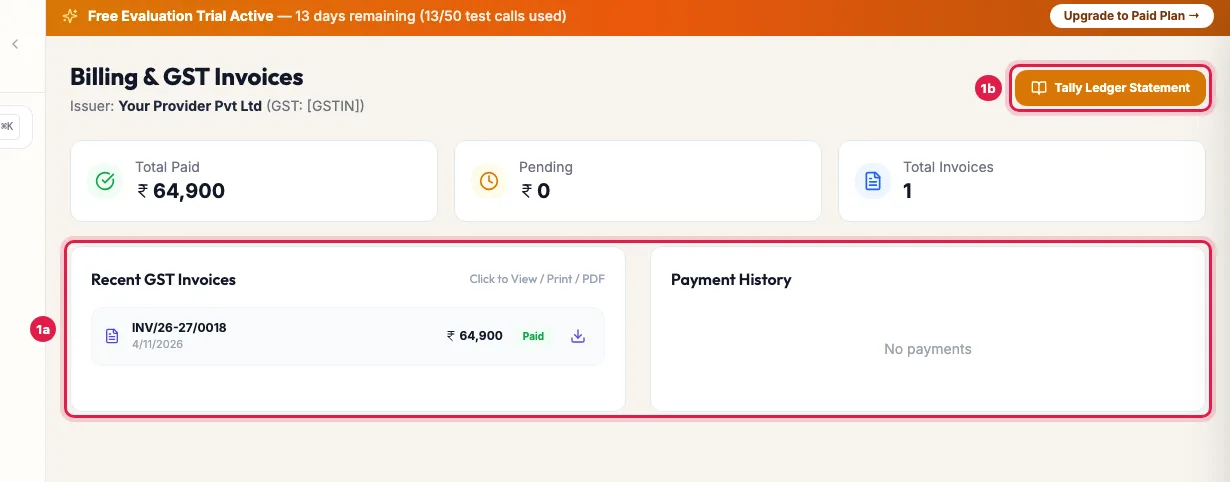
Billing: what you paid, every GST invoice, and the ledger statement Open Billing. The cards show Total Paid, Pending and Total Invoices. Under Recent GST Invoices, click an invoice's download icon to open it, then print it or save it as PDF.
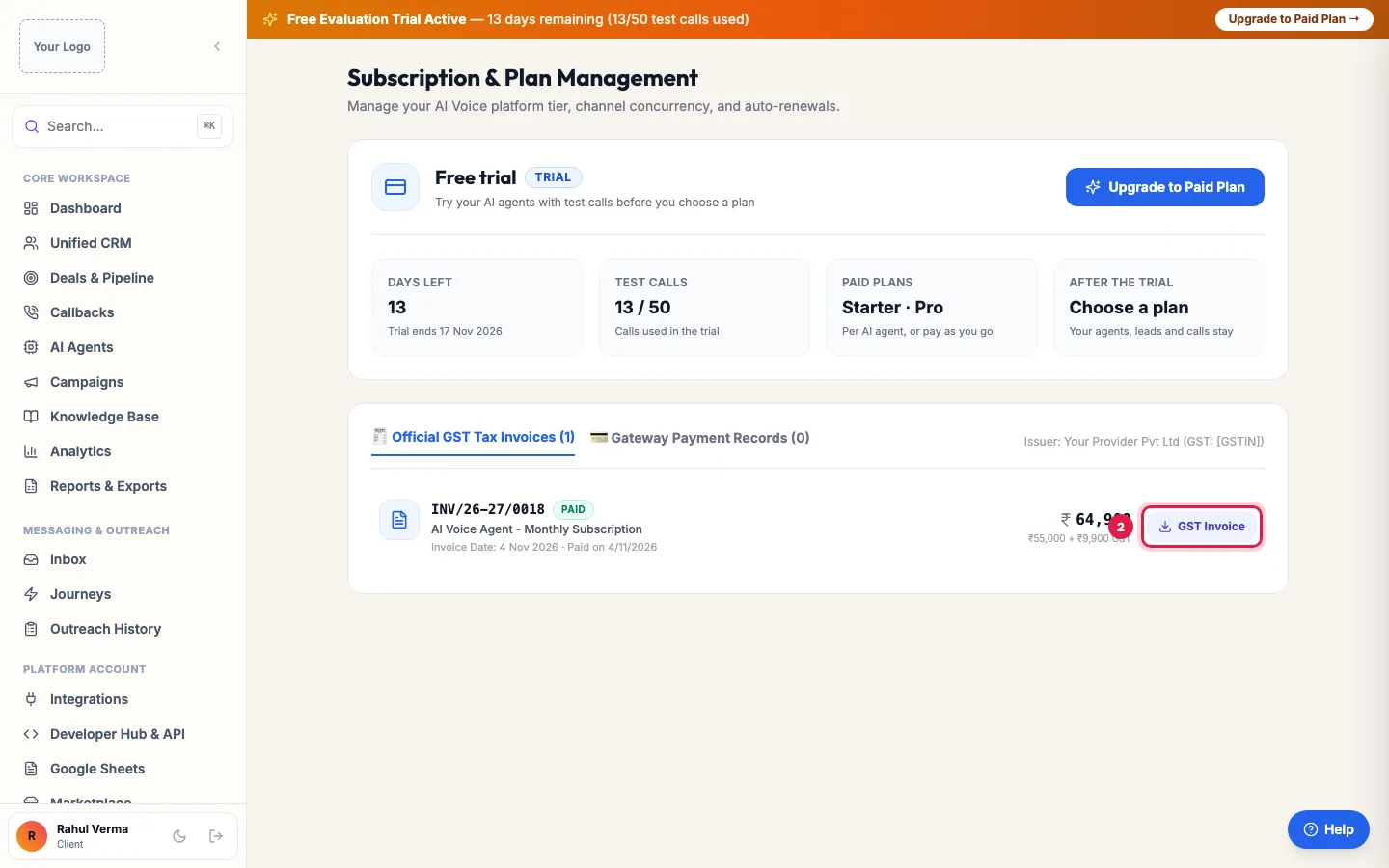
Subscription also lists your invoices: GST Invoice opens one to print or save as PDF Payment History lists your online payments.
Subscription lists the same invoices under Official GST Tax Invoices, with what each was for; click GST Invoice to open one. Gateway Payment Records lists the payments.
On Wallet, Recharges & Credits links each recharge to its receipt voucher, and Official GST Invoices lists the invoices. Tally Ledger Statement gives your accountant the full statement of account.
GST on what you pay
- Paid online (card, UPI, net banking) for a plan, renewal, add-on or extra agent: 18% GST is added, and you get a GST tax invoice.
- A wallet recharge paid online: 18% GST is added, and you get a receipt voucher for the advance.
- Paid from your wallet: no GST is added at that point, because GST was charged when the wallet was recharged.
- On the 1st of each month, one GST tax invoice covers everything the wallet paid in the month before: calls, messages, renewals and purchases that have no invoice of their own.
What an invoice shows
The seller's name and GSTIN, your company, address and GSTIN, a consecutive invoice number for the financial year, the service with its SAC code, the taxable value, the GST (split into CGST and SGST, or IGST, by state) and the total.
Not tax invoices
- Refunds and reversals: the wallet shows them as Non-Taxable.
- Credits such as transfers or adjustments get a credit advice, not an invoice.
- A wallet debit before its monthly invoice is issued shows which month's invoice will include it.
Example: Quarter-end GST filing for an NBFC
The accountant of Sahyog Finance needs the quarter's invoices. From Billing she saves each invoice as PDF, and from Wallet she downloads the Tally Ledger Statement and the receipt vouchers for the three recharges. The monthly usage invoices cover the collection calls paid from the wallet, so every rupee spent is on a GST document.
Tips
- Add your GSTIN in Settings → Profile & Compliance before you pay, so that it is printed on the invoice.
- Save invoices as PDF from the print window (choose Save as PDF as the printer).
Frequently asked questions
How do I download the GST invoice for my subscription?
Billing → Recent GST Invoices → the download icon → print or save as PDF. Or Subscription → Official GST Tax Invoices → GST Invoice.
Is GST charged on wallet recharges?
Yes, 18% when you recharge online, and you get a receipt voucher. Spending from the wallet adds no GST again; it is billed on the monthly usage invoice.
My GSTIN is missing on the invoice.
Add it in Settings → Profile & Compliance. For an invoice already issued without it, raise a ticket with the invoice number.
Why is there no invoice for each call?
Calls paid from the wallet are billed together on one usage invoice on the 1st of each month.
Invoice kaise nikale?
On the Billing page, click the invoice's download icon, then print it or save it as PDF.
Can I get a statement for Tally?
Yes: Tally Ledger Statement on the Billing and Wallet pages.
Questions this guide answers
- How do I download the GST invoice for my AI calling subscription?
- Is GST charged on wallet recharges?
- Why is there no invoice for each call?
- How do I get a Tally ledger statement for my AI calling account?
Related guides
- How to Recharge Your AI Calling Wallet: Open Wallet, pick a Quick Select amount or type one, and click Pay Online (Instant). You pay the amount plus 18% GST, and the amount you…
- How AI Call Charges Work on Pay As You Go: On pay as you go, each answered call is charged from your wallet by its length, per started minute, at your rate; calls of 15 seconds or…
- Account Settings: Company, GST, Data Retention and Alerts: Settings holds your company details, industry and GSTIN, the GST rate and terms on invoices you send, how long call recordings are kept…
- How to Renew Your AI Calling Plan: Your plan renews by itself on the renewal date when your wallet holds enough. To renew or extend yourself, open Subscription and click…