How to Recharge Your AI Calling Wallet
In short: Open Wallet, pick a Quick Select amount or type one, and click Pay Online (Instant). You pay the amount plus 18% GST, and the amount you typed is credited as soon as the payment is confirmed. For a bank transfer, use Request Manual.
A step-by-step guide for BookAICall, an AI voice agent platform that makes and answers phone calls for businesses in Hindi, English, Hinglish and other Indian languages. Updated .
Steps
Open Wallet. Under Top-up Wallet Balance (Top-up Prepaid Utility Balance on a monthly plan), click a Quick Select amount or type an amount; the minimum is shown in the box.
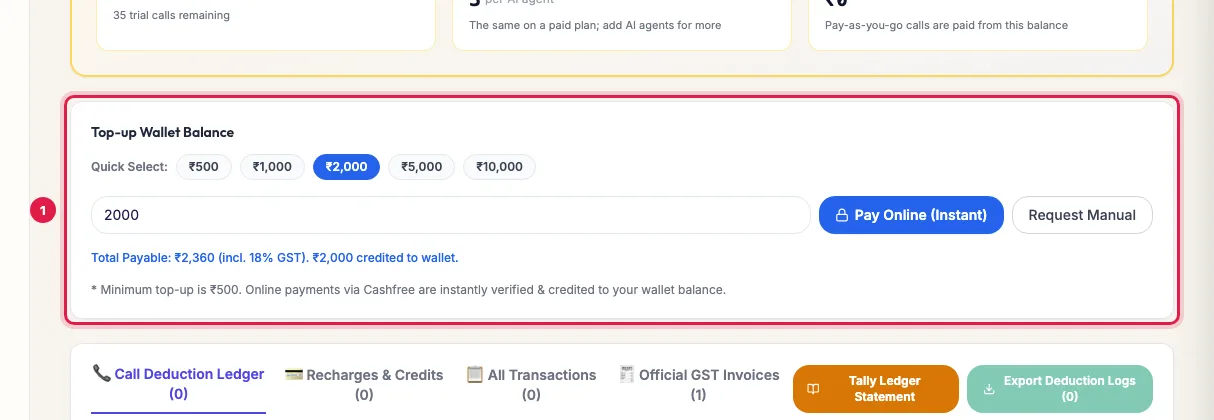
Top-up Wallet Balance: a Quick Select amount or your own Check the line below the buttons: Total Payable includes 18% GST, and the amount you typed is what reaches your wallet. Click Pay Online (Instant) and pay by card, UPI or net banking. The balance is credited once the payment is confirmed.
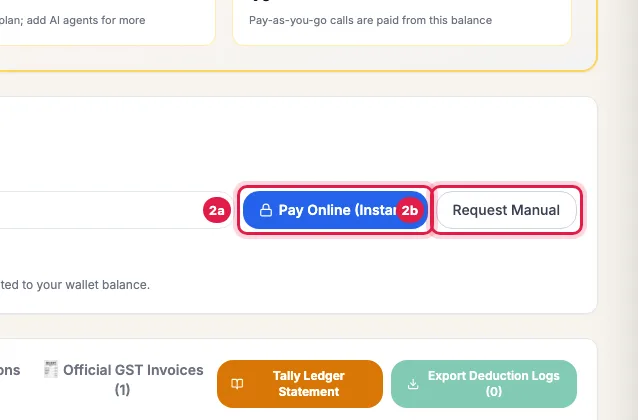
Pay Online (Instant), or Request Manual for a bank transfer If the page says an online payment is pending, click Complete Payment to finish it, or Verify & Credit Wallet if you have already paid.
To pay by bank transfer instead, type the amount and click Request Manual. It is listed under Recent Requests, and the balance is credited when the transfer is confirmed.
What the wallet pays for
- Pay-as-you-go calls, per answered minute.
- Add-ons, extra AI agents and phone numbers when you choose to pay from the wallet, and their monthly renewals.
- Your plan's renewal on the renewal date, when the wallet holds enough.
- On a monthly plan, the Utility Wallet (Add-ons) pays for WhatsApp messages, international calls and extra number rent; + Top-up Utility Wallet recharges it.
GST and documents
- A recharge paid online adds 18% GST on top of the amount, and you get a receipt voucher for it.
- Spending from the wallet adds no further GST. On the 1st of each month you get one GST tax invoice for what the wallet paid in the month before.
- Recharges & Credits lists every recharge with its GST and a link to its document; Official GST Invoices lists the invoices.
The tabs below
- Call Deduction Ledger: every call charge, with the number, agent, duration, amount and balance after.
- Recharges & Credits: every recharge, refund and credit, with Download Credit CSV.
- All Transactions: everything in and out.
- Official GST Invoices: your invoices to view and download.
- Tally Ledger Statement: the statement of account in the format accountants import.
Low balance
On pay as you go the Wallet page warns "Low wallet balance. Please top up to maintain uninterrupted calling." When the balance falls below one minute at your rate, new calls wait; a call already running always finishes. Calls start again as soon as the recharge is credited.
Example: A D2C brand keeps calls running during a sale
Ghar Ki Rasoi runs cash-on-delivery confirmation calls on pay as you go. Before its Diwali sale the owner sees the low-balance warning, picks the largest Quick Select amount and pays by UPI. The balance is credited within a minute, the receipt voucher is in Recharges & Credits for the accountant, and the confirmation calls never stop.
Tips
- Add your GSTIN in Settings → Profile & Compliance before you recharge, so it appears on your documents.
- Recharge before a big campaign, not during it: calls pause when the balance runs out.
- Unused balance stays in the wallet; it does not lapse at the end of the month.
Frequently asked questions
Money was deducted but my wallet was not credited.
Click Verify & Credit Wallet. If it still has not credited, raise a ticket with the payment reference.
Wallet recharge kaise kare?
Wallet → choose or type an amount → Pay Online (Instant) → pay by card, UPI or net banking.
Is GST charged on a recharge?
Yes, 18% on top when you pay online. Spending the balance later adds no GST again.
How do I pay by bank transfer?
Type the amount and click Request Manual. Raise a ticket if you need the bank details; the balance is credited when the transfer is confirmed.
Does the wallet balance expire?
No. It carries over from month to month.
What is the Utility Wallet?
On a monthly plan it pays for extras not in the plan: WhatsApp messages, international calls and extra number rent.
Questions this guide answers
- How do I add money to my AI calling wallet?
- Can I recharge the wallet by bank transfer?
- Is GST charged on an AI calling wallet recharge?
- Money was deducted but the wallet was not credited: what do I do?
Related guides
- Download GST Invoices for Your AI Calling Plan: Billing lists every GST tax invoice and payment of your account, with what you have paid and what is pending; open an invoice to print it…
- How AI Call Charges Work on Pay As You Go: On pay as you go, each answered call is charged from your wallet by its length, per started minute, at your rate; calls of 15 seconds or…
- AI Calling Agent Pricing Explained: Per Agent Plans or Pay as You Go: Monthly plans are priced per AI agent, with no per-minute charge: Starter gives each AI agent 1 channel and Pro gives each AI agent 3…
- How to Renew Your AI Calling Plan: Your plan renews by itself on the renewal date when your wallet holds enough. To renew or extend yourself, open Subscription and click…