How to Add Another AI Agent to Your Plan
In short: Your plan includes a number of AI agents. When you create one more, the portal opens Add-on Agent Activation with the price for the days left until your renewal date: pay from your wallet (no GST) or by card or UPI (18% GST), and the agent is saved. Updating an agent you already have is free.
A step-by-step guide for BookAICall, an AI voice agent platform that makes and answers phone calls for businesses in Hindi, English, Hinglish and other Indian languages. Updated .
Steps
Create the agent as usual: AI Agents → New Agent, or Generate with AI. When all your plan's agents are in use, the Add-on Agent Activation window opens before the agent is saved.
Read the price: Locked Monthly Seat Rate is the monthly price per agent; Cycle Days Remaining and Pro-Rata Net Charge show what you pay now, for the days until your plan's next billing date.
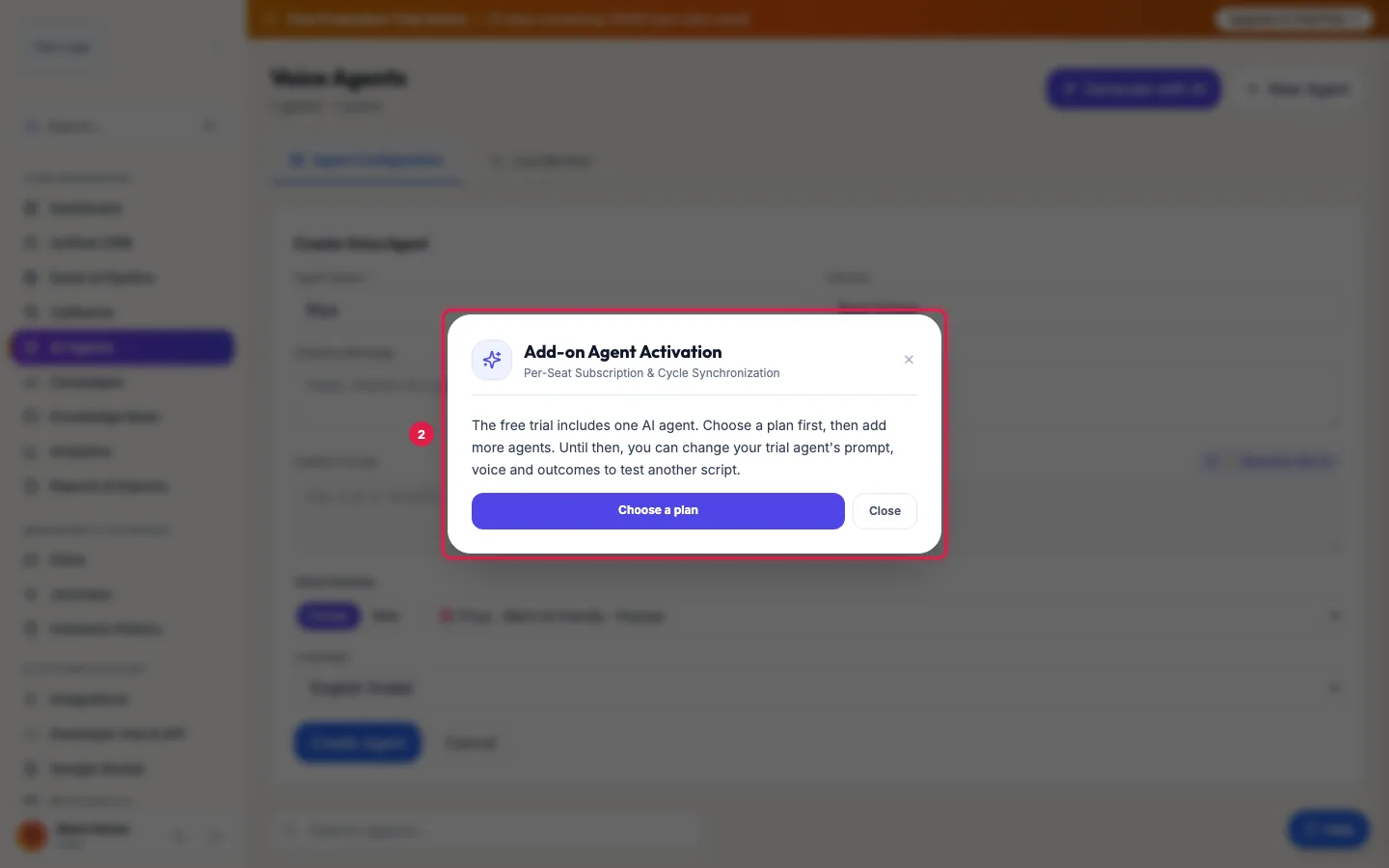
One more agent on the free trial: the window asks you to choose a plan first Click Pay … via Wallet to pay the Pro-Rata Net Charge from your wallet, with no GST. The button is greyed out when the wallet holds less.
Or click Pay … (Cards/UPI) to pay online: 18% GST (Online PG) is added, and Total Gateway Payable is what you pay.
Once the payment is confirmed the agent is created, and it renews with your plan from then on.
What one more agent gives you
- Its own script, voice, language, knowledge base and number.
- Its own channels, the same size as your plan: 1 call at a time on Starter, 3 on Pro. So on a monthly plan, more agents also mean more calls at once.
- Its own results in Analytics and its own campaigns.
Rather not pay?
Update an agent you already have: change its prompt, voice and outcomes in AI Agents → Edit, or in Generate with AI choose to overwrite it. One agent can serve several campaigns one after another.
Other ways to add capacity
- Incoming AI Agent Slot (Marketplace): adds 3 channels that only incoming calls can use, on top of your plan, so a busy helpline does not hold up your campaigns. Outbound campaigns leave these channels free. You can add several. Numbers are bought separately in DID Numbers.
- Moving from Starter to Pro: every agent gets 3 calls at a time (Subscription → Renew / Extend Plan → Plan size).
On the free trial
The trial includes one AI agent. The window says so and offers Choose a plan, which opens the upgrade window. Until then, change the trial agent to test another script.
Asking instead of paying
Request Reseller to Provision sends the request to whoever provides your account (the team, or your partner) to add the agent for you; they approve it and the agent is created.
Example: A clinic adds a reminder agent
City Care Clinic has one Pro agent answering appointment calls. It wants a second agent for next-day reminder calls in Marathi. Creating the agent opens Add-on Agent Activation with 12 days left in the cycle, so the clinic pays only for those 12 days from its wallet. From the next renewal both agents renew together.
Tips
- Pay from the wallet when it has enough: no GST is added, and the charge appears on your monthly usage invoice.
- Keep your agents' numbers and names clear (Inbound, Reminders, Campaigns) so the team knows which is which.
Frequently asked questions
Can I add an agent during the free trial?
The trial includes one agent. Choose a plan first (see Move from trial to a paid plan), then add agents; until then, change the trial agent to test other scripts.
Does the extra agent renew?
Yes, together with your plan, at the Locked Monthly Seat Rate. Deleting an agent frees its seat for a new agent but does not stop the renewal; to drop a seat, raise a ticket before your renewal date.
Why do I pay less than the monthly rate?
You pay only for the days left until your plan's next billing date, so every agent renews on the same day.
Doosra agent banane mein paise lagenge?
Yes, when your plan's agents are all in use. Editing an agent you already have is free.
Is there a limit to how many agents I can have?
No fixed limit: add as many AI agents as you need, each with its own channels.
Can I give one agent more channels instead?
Not yourself. On Starter or Pro the channels per agent come with the plan. Add an agent, move to Pro, or add an Incoming AI Agent Slot for incoming calls.
Questions this guide answers
- How do I add another AI calling agent?
- Does editing an AI agent cost extra?
- How do I make more AI calls at the same time?
- Why is the extra AI agent charged pro-rata?
Related guides
- AI Calling Agent Pricing Explained: Per Agent Plans or Pay as You Go: Monthly plans are priced per AI agent, with no per-minute charge: Starter gives each AI agent 1 channel and Pro gives each AI agent 3…
- How to Build an AI Voice Agent Step by Step (Your Own Script): AI Agents → New Agent: type the agent's name, industry, greeting and system prompt yourself, pick a voice and a language, and click Create…
- How to Create an AI Calling Agent in Minutes (No Code): AI Agents → Generate with AI: describe your business, the call's goal and the voice you want, and the studio writes the call stages…
- Add WhatsApp, Call Transfer and More to Your AI Calling Plan: Marketplace lists the add-ons you can buy for your workspace, each with its monthly price: AI employees such as the WhatsApp agent, Email…