How to Add Leads to an AI Calling CRM (One, Bulk or Automatic)
In short: Unified CRM → Add Lead adds one person: name, phone, source, stage, group, notes and your industry's fields. For many people at once use Bulk CSV Import, and for leads that keep coming connect Google Sheets or the API. A phone number is never added twice.
A step-by-step guide for BookAICall, an AI voice agent platform that makes and answers phone calls for businesses in Hindi, English, Hinglish and other Indian languages. Updated .
Steps
Open Unified CRM and click Add Lead (the button uses your industry's word for a lead). For many leads at once, use Bulk CSV Import instead.
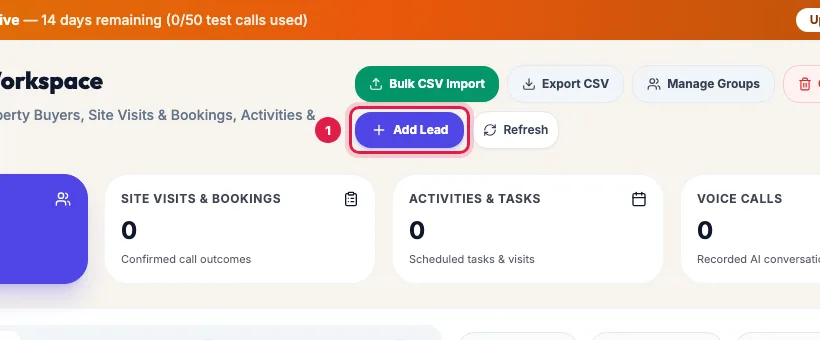
Add Lead at the top of the Unified CRM Enter the Full Name and the Phone Number: 10 digits for India, or with +91. The Email Address is optional.
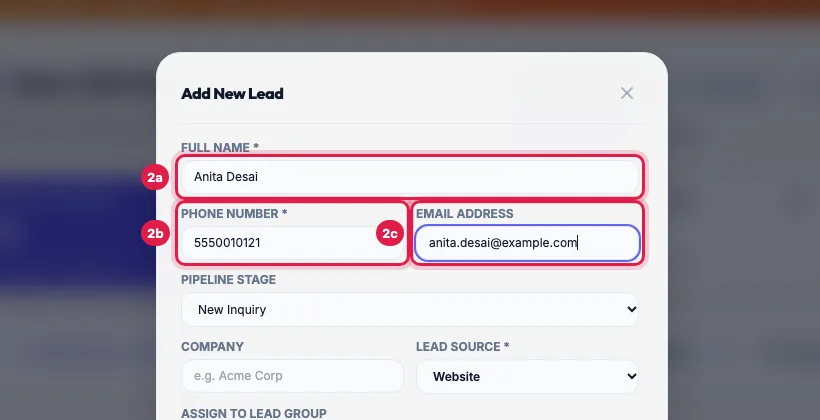
Full Name, Phone Number and Email Address Choose the Pipeline Stage (the first stage, such as New Inquiry, for a fresh lead), the Company if any, the Lead Source (Website, Facebook, Instagram, WhatsApp, Referral and so on) and, if the lead belongs in one, a group under Assign to Lead Group.
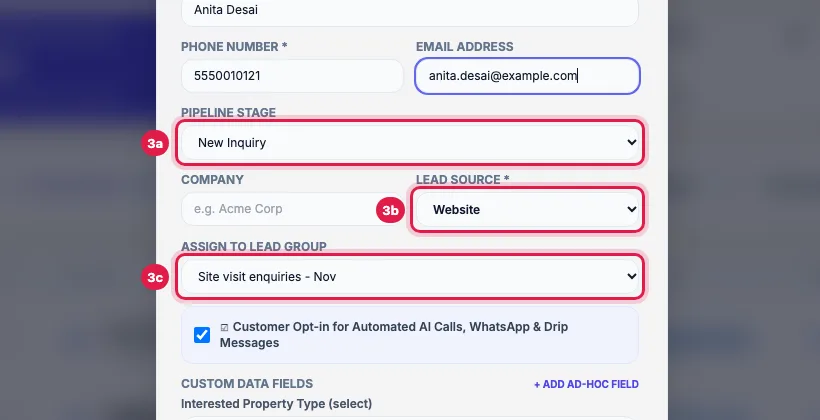
Pipeline Stage, Lead Source and the lead group Write anything your team or the agent should know in Internal Notes. Fill your industry's fields under Custom Data Fields, for example the budget and the preferred location; + Add Ad-hoc Field adds any other detail as a name and a value.
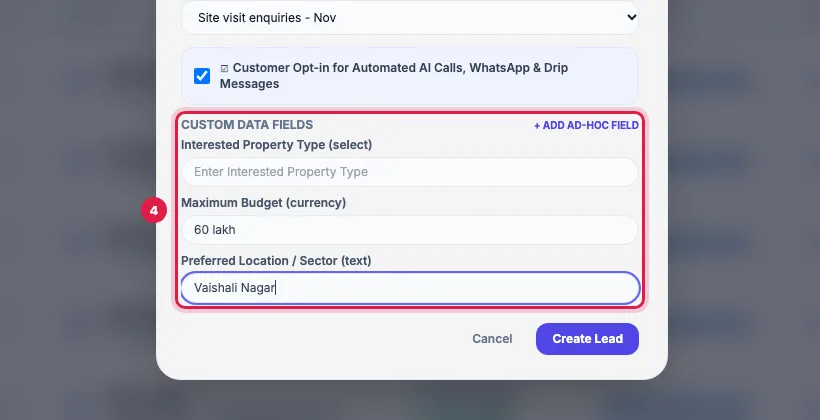
Your industry's fields under Custom Data Fields Leave Customer Opt-in for Automated AI Calls, WhatsApp & Drip Messages ticked if the person agreed to hear from you, and click Create Lead. A message confirms it and the lead appears at the top of the list.
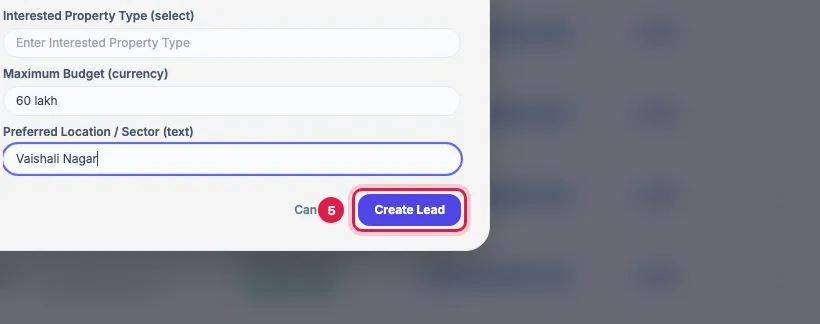
The Create Lead button
Every way leads reach your CRM
- Add Lead: one person at a time, for walk-ins and phone enquiries.
- Bulk CSV Import: a .csv, .xlsx or .xls file, or rows pasted from Excel (see "Import leads from a CSV or Excel file").
- Google Sheets: a sheet your website form or team fills; new rows become leads by themselves (see "Connect Google Sheets").
- Webhook and API: your website, ad forms or another app send leads directly (Bulk CSV Import → Webhook shows the address; Developer Hub & API has the rest).
- A call to your agent from a new number creates a lead too, so every conversation has a record.
What happens after you add a lead
- If the group you chose has Auto-trigger on new lead switched on, its WhatsApp template, AI call or journey starts for this lead after the group's delay. One new lead is called at any hour; leads that arrive in bulk are called between 9 AM and 9 PM IST.
- Journeys that start on "New lead created or imported" start too.
- The lead is ready for a campaign, or for Call AI on its row, which calls it at once with your agent.
- The stage, the lead score and your industry's fields fill in by themselves after the first analysed call.
Duplicates
A phone number is one lead: Add Lead refuses a number that is already in your CRM (matched on its last 10 digits) and an email that is already there, with the message "A lead with this phone number already exists." A file import or a sheet does not refuse it: it updates the existing lead instead.
Example: A walk-in enquiry at a site office
A visitor at the Sharma Properties site office leaves her number. The manager opens Unified CRM, clicks Add Lead and enters Anita Desai, her phone and email, source Website, group "Site visit enquiries - Nov", budget 60 lakh, location Vaishali Nagar and the note "Came with her husband; wants a park-facing flat". The evening campaign for that group calls her too, and the agent already knows what she wants.
Tips
- Only add people who agreed to hear from you, and choose the right Lead Source: it shows where the enquiry came from in every report.
- Use a group per source or batch, so a campaign or a WhatsApp message can target exactly those people.
- Unticking the opt-in box records the person as opted out: they get no AI calls, campaign WhatsApp or email.
Frequently asked questions
It says the phone number already exists.
Each phone number is one lead, matched on its last 10 digits. Type the number in Search on Unified CRM and update that lead instead, for example with Edit or a new group.
Lead kaise add kare, ek ek karke ya bulk?
One person: Add Lead. Many people: Bulk CSV Import with an Excel or CSV file. Leads that keep coming from a form: Google Sheets or the API.
Can I add a lead without a phone number?
Not with Add Lead: Full Name and Phone Number are required there. A file import accepts a row with only a name or an email, but such a lead cannot be called.
Will the AI call the lead as soon as I add it?
Only if you put it in a group with Auto-trigger on new lead and an agent chosen, or start a journey or campaign. To call it now, click Call AI on its row.
Can I add leads from my phone?
Yes. The portal works in a mobile browser; Add Lead is at the top of Unified CRM.
Where do I see a lead after adding it?
At the top of Unified CRM. Click the name to open its page with calls, notes and activities.
Questions this guide answers
- How do I add leads to an AI calling CRM?
- Where do leads for AI calls come from?
- Will the AI call a lead as soon as I add it?
- Can I add leads without a phone number?
Related guides
- How to Import Leads from Excel or CSV for AI Calling: In Unified CRM click Bulk CSV Import, choose a lead group, upload your CSV or Excel file (or paste rows from Excel), check how each column…
- How to Auto-Call Leads from Google Sheets with an AI Agent: Connect your Google account, add the sheet and tab, and say which columns hold the name, phone and email. New rows become leads within…
- How to Call Every New Lead Automatically Within Minutes: A lead group keeps related leads together, so a campaign, a message or a report can use exactly that list. A group can also act on every…
- Using the CRM Built into Your AI Calling Agent: Unified CRM is where every lead, call outcome, follow-up and recorded call lives. The list shows each lead's source, consent, groups…
- How to Edit a Lead or Mark It Opted Out in the AI Calling CRM: Unified CRM → Edit at the end of the lead's row changes the name, phone, email, company, source, pipeline stage and the opt-in. Untick…