AI Calling Dashboard Tour: Calls, Results and Navigation
In short: The Dashboard shows your trial, the set-up steps still to do, and your calls and results for the period you choose, with live calls and recent calls below. The left menu has three groups: Core Workspace, Messaging & Outreach and Platform Account.
A step-by-step guide for BookAICall, an AI voice agent platform that makes and answers phone calls for businesses in Hindi, English, Hinglish and other Indian languages. Updated .
Steps
The bar at the top shows your free trial: the days left and the test calls used. Click Upgrade to Paid Plan when you are ready to choose a plan.

The trial bar: days left, test calls used, and Upgrade to Paid Plan Get to your first live call lists the set-up steps: create an agent, attach a number, add leads, create a campaign and make the first call. Each open step has a Guide link; the list disappears when everything is done, or click × to hide it.
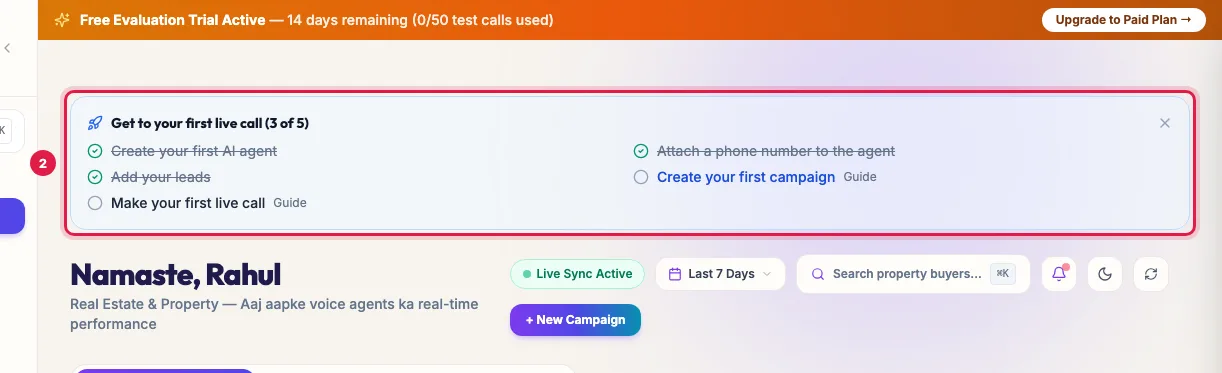
The first-call checklist with a Guide link for each step Choose the period for every number on the page (Today, Yesterday, Last 7 Days, Last 30 Days, This Month or a Custom Range). Start a New Campaign from here, or search your leads by name or number (Ctrl or Cmd + K).
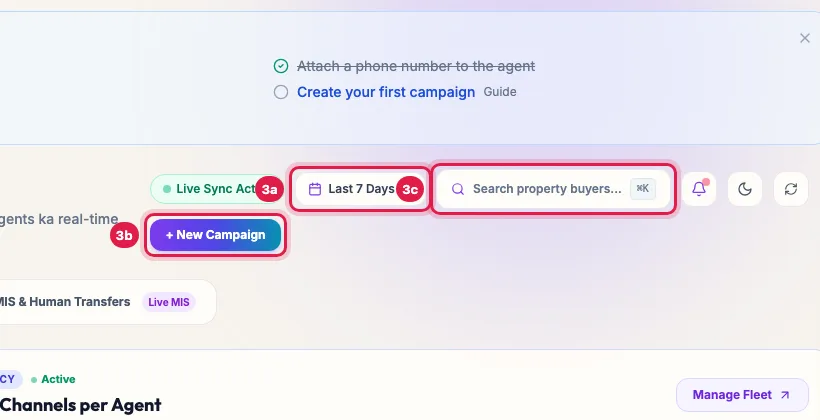
Date range, New Campaign and the search box (Ctrl or Cmd + K) Overview & Live Fleet shows your numbers and the calls running now. Executive MIS & Human Transfers has the management report, the calls handed to your team, and Download Excel.
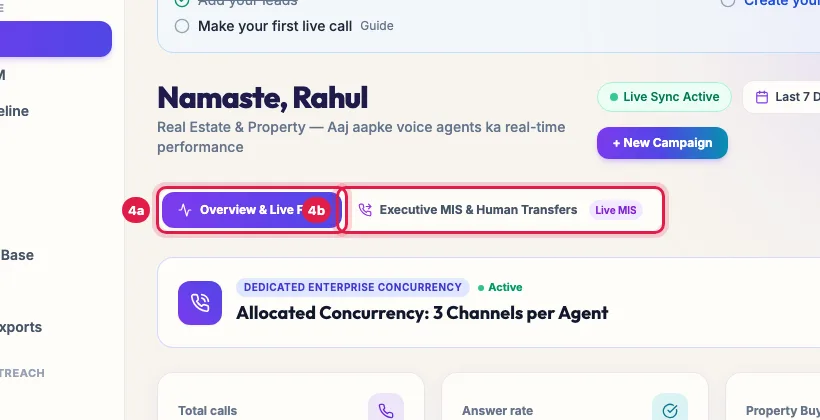
The Overview & Live Fleet and Executive MIS & Human Transfers tabs The cards show total calls, answer rate, your industry's main result (for a real-estate business, property buyers qualified) and the average call duration. Below them: calls per day for the last 7 days and your call outcomes.
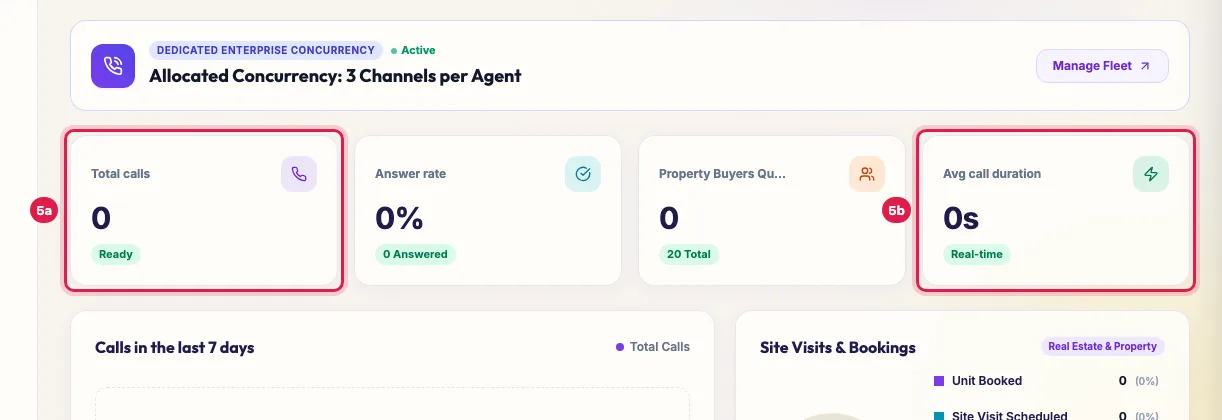
The cards for total calls, answer rate, your industry's main outcome and average call duration The left menu has three groups. Core Workspace: Unified CRM, Deals & Pipeline, Callbacks, Data Catalogs, AI Agents, Campaigns, Knowledge Base, Analytics, and Reports & Exports. Messaging & Outreach: Inbox, Journeys and Outreach History. Platform Account: integrations, Google Sheets, Marketplace, DID Numbers, Support, TRAI Complaints, DND & Opt-Outs, Wallet & Billing, Team & Roles and Settings. An add-on you have not bought, such as WhatsApp Suite or Email Campaigns, is not in the menu until you add it from the Marketplace.
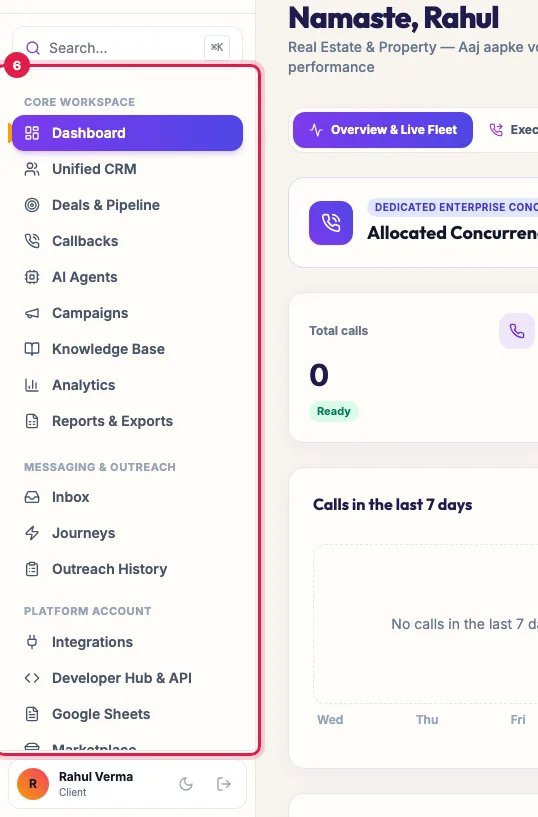
The left menu: Core Workspace, Messaging & Outreach and Platform Account
Further down the Dashboard
- Your agents and channels, with Manage Fleet to open AI Agents, and your wallet with Recharge Wallet.
- Live call feed: the latest call and how long it has run.
- Agent fleet performance: how each agent is doing in the period.
- Recent calls: the latest calls with their result; View all logs opens every call in Unified CRM, Voice Calls.
- During the trial, a Trial tip card gives one task for the day with a link to its guide.
Names that follow your industry
The portal uses your industry's words: a real-estate account sees Property Buyers where another sees Leads, and the catalog may be called Products or Listings. The pages are the same; only the labels change.
Example: A morning check in two minutes
Every morning at 10, Rahul opens the Dashboard, picks Yesterday, and reads four numbers: 182 calls, the answer rate, 14 property buyers qualified and an average call of 160 seconds. He opens Executive MIS & Human Transfers to see the 6 calls handed to his sales head, clicks Download Excel for the weekly report, and then View all logs to listen to two calls with the outcome Not interested.
Tips
- Press Ctrl+K or Cmd+K anywhere to search and jump to a page.
- The names on the Dashboard follow your industry: a real-estate account sees Property Buyers where another sees Leads.
- If the Dashboard says it is temporarily busy, wait a moment and reload; your data is safe.
Frequently asked questions
What does the AI calling dashboard show?
Your calls, answer rate, main result and call length for the period you choose, the calls running now, and recent calls.
Where are all my call recordings?
Click View all logs under Recent calls, or open Unified CRM and the Voice Calls tab.
Menu mein WhatsApp kyun nahi dikh raha?
WhatsApp Suite is an add-on; it appears in the menu after you add it from the Marketplace.
Where do I find campaigns, CRM and billing?
Campaigns and Unified CRM are under Core Workspace; Wallet & Billing is under Platform Account in the left menu.
Can I hide the set-up checklist?
Yes, click × on it. It also disappears by itself once all five steps are done.
Questions this guide answers
- What does the AI calling dashboard show?
- Where do I find campaigns, CRM and billing in the portal?
- Where can I see all my AI call recordings?
Related guides
- The 5-Step Setup Wizard for Your AI Calling Workspace: After sign-up, a five-step wizard sets up your workspace: Business, Agent Studio, Agreement, KYC and Activate. It takes about five minutes…
- How to Set Up an AI Calling Agent: Your First Live Call in 10 Minutes: Follow the Dashboard's "Get to your first live call" list: make the agent yours, add yourself as a lead in a test group, and launch a…
- AI Calling Analytics: Connect Rate, Conversions, Cost per Lead, ROI: Analytics shows how your AI calling performs: total calls, connect rate, opportunity rate and talk time, the funnel from dial to won, what…
- Add WhatsApp, Call Transfer and More to Your AI Calling Plan: Marketplace lists the add-ons you can buy for your workspace, each with its monthly price: AI employees such as the WhatsApp agent, Email…
- How to Listen to AI Call Recordings and Read Transcripts: Every answered AI call is recorded and transcribed. In Unified CRM → Voice Calls, click Play Recording on any call to listen; click…