The 5-Step Setup Wizard for Your AI Calling Workspace
In short: After sign-up, a five-step wizard sets up your workspace: Business, Agent Studio, Agreement, KYC and Activate. It takes about five minutes and creates your first AI agent with a free trial number. The free trial itself starts later, with your first call.
A step-by-step guide for BookAICall, an AI voice agent platform that makes and answers phone calls for businesses in Hindi, English, Hinglish and other Indian languages. Updated .
Steps
Business: check your company name. Your email and WhatsApp number already show Verified from sign-up. Choose your Region / Currency and click Continue.
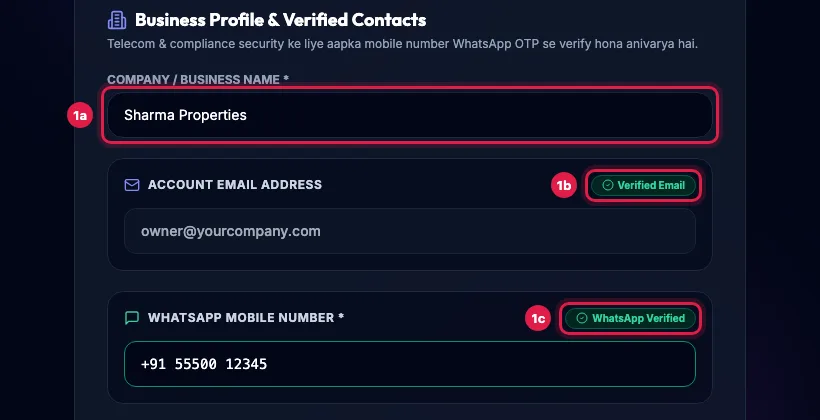
Business step: company name, and the email and WhatsApp number already marked Verified from sign-up Agent Studio: choose your industry. It gives your first agent ready pipeline stages and call outcomes. To have AI write the whole agent from a short description, click Launch AI Studio.
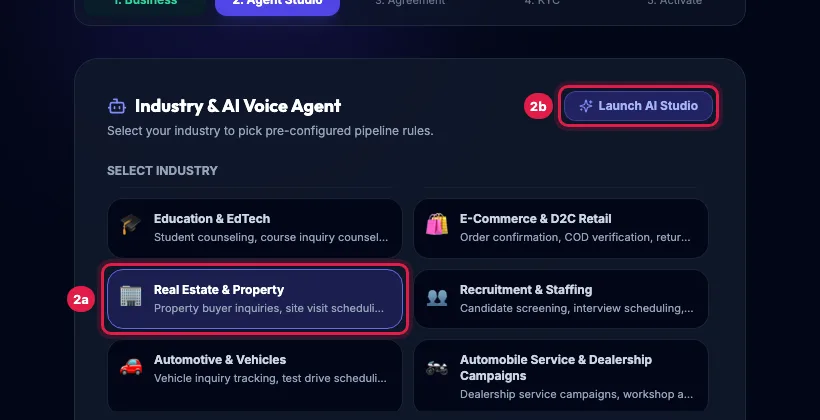
Agent Studio step: industry cards and the Launch AI Studio button Name your agent, choose its primary language, pick a free Trial Phone Number (Demo DID) and write the opening greeting your callers will hear. Click Continue.
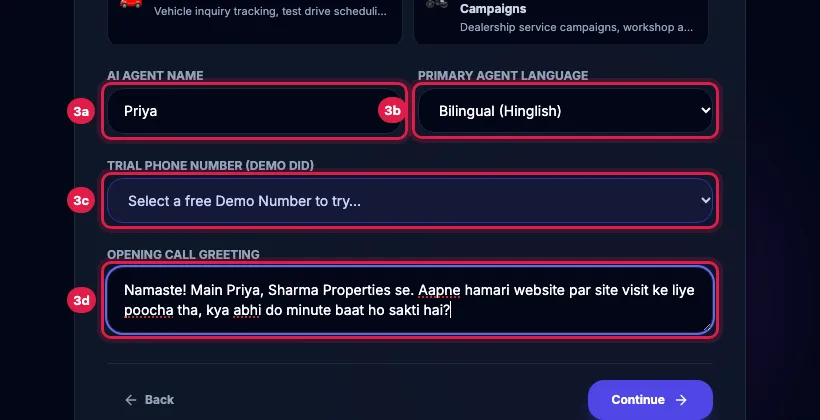
Agent name, primary language, trial number and opening greeting Agreement: scroll to the end of the Service Agreement, type your full name to sign, tick the box and click Continue. A signed copy is emailed to you and stays downloadable in Settings.
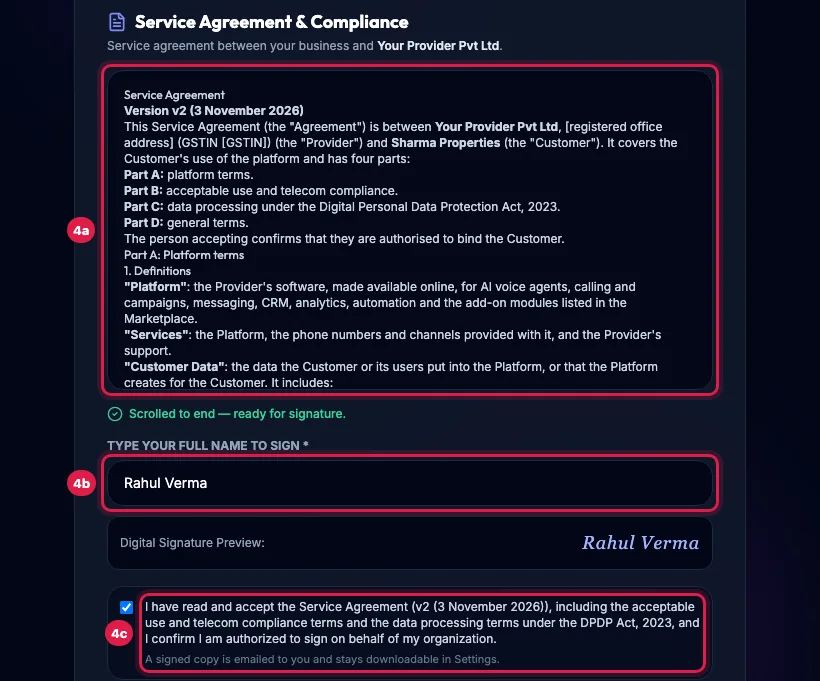
Agreement step: the Service Agreement, the typed signature and the acceptance box KYC: click Verify Identity with DigiLocker and finish the DigiLocker steps in the window that opens, then click Continue.
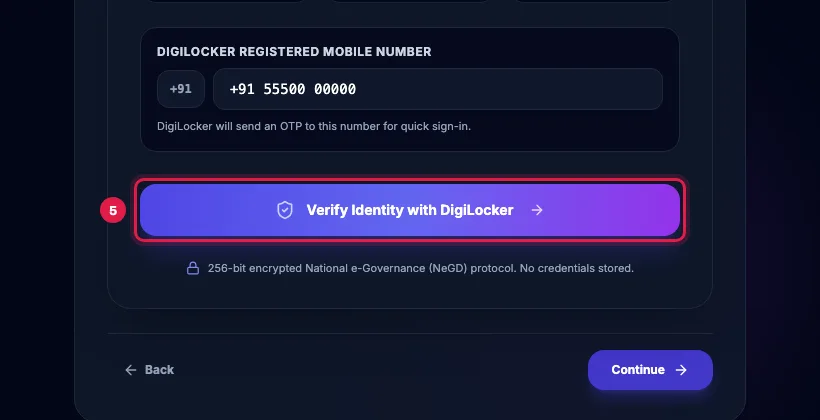
KYC step: the Verify Identity with DigiLocker button Activate: read the DPDP consent notice, tick the consent box and click Finish & Launch Workspace. You're All Set! shows what was set up; click Go to Dashboard.
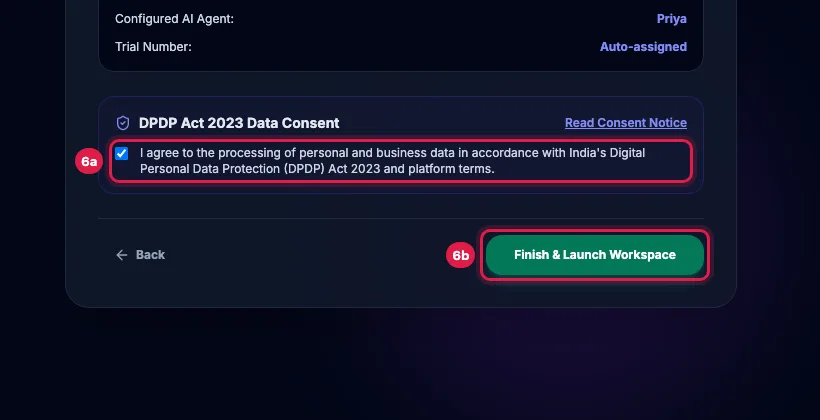
Activate step: the DPDP consent box and the Finish & Launch Workspace button
Each step in detail
- Business: Company / Business Name, your verified email and WhatsApp number, and Region / Currency: India (INR), United States (USD) or United Kingdom (GBP). If you signed up with Google, verify your WhatsApp number here first: Verify on WhatsApp, then the 6-digit code.
- Agent Studio: pick the industry card closest to yours, or Other / Custom Industry and type it. AI Agent Name, Primary Agent Language (Hinglish, Hindi, English or a regional language, with a greeting already written in it), Trial Phone Number (Demo DID) and Opening Call Greeting.
- Agreement: the Service Agreement must be scrolled to the end before you can sign; type your full name exactly and tick I have read and accept the Service Agreement.
- KYC: DigiLocker Paperless e-KYC. Enter your DigiLocker Registered Mobile Number; DigiLocker sends an OTP to it. No documents are uploaded. See "Complete KYC with DigiLocker".
- Activate: a summary of your industry, agent and trial number, and the DPDP Act 2023 consent. Read Consent Notice explains what is processed, where it is stored, your rights and how your consent is recorded.
What the wizard creates
- Your first AI agent, switched on, with the name, language and greeting you chose, marked as your primary agent.
- A shared trial number attached to it (the one you picked, or one chosen for you), so you can test calls straight away.
- Your industry's pipeline stages, call outcomes and lead fields.
- The free trial: 3 days from your first connected call or 25 connected calls, whichever comes first. Make the first call within 7 days of signing up.
If you stop half way
Your account is saved. Log in again and the wizard opens again; your email and WhatsApp number stay verified, so it goes quickly. While you are in the wizard, click a finished step at the top to go back to it. None of the trial is used while you set up: it starts with your first call.
Example: Sharma Properties, a real-estate firm
Rahul picks Real Estate & Property, names the agent Priya, keeps Bilingual (Hinglish), and writes the greeting: "Namaste! Main Priya, Sharma Properties se. Aapne hamari website par site visit ke liye poocha tha, kya abhi do minute baat ho sakti hai?" He signs the agreement, verifies with DigiLocker, ticks the consent and lands on the Dashboard with the trial running.
Tips
- You can change the agent, the greeting and the industry later in AI Agents; nothing here is final.
- If DigiLocker does not open, allow pop-ups for the portal and try again.
- Keep the greeting short and end it with a question; you will hear it on your first test call.
Frequently asked questions
Do I have to verify my email and WhatsApp again?
No. The codes you entered at sign-up are enough; the Business step shows both as Verified.
Where is my signed agreement?
It is emailed to you when you sign, and you can download it any time in Settings, Profile & Compliance.
Can I skip KYC?
No. DigiLocker verification is needed to finish the wizard. If it does not work, click Ask our team for help on the KYC step.
Which trial number should I pick?
Any of them. Trial numbers are shared and only for testing; buy your own number after choosing a plan.
Setup wizard beech mein band ho gaya, ab kya karein?
Log in again; the wizard opens again and your verified email and WhatsApp number are kept.
When does the free trial start?
With your first connected call after the wizard, not when you click Finish & Launch Workspace. Make that call within 7 days of signing up.
Questions this guide answers
- How do I set up an AI calling account after sign-up?
- What does the AI voice agent setup wizard ask for?
- When does the AI calling free trial start?
Related guides
- How to Sign Up for an AI Calling Software Free Trial: Register at /register with your work email and WhatsApp number, verify both OTPs and finish the short setup. Your free trial runs 3 days…
- How to Complete KYC with DigiLocker for AI Calling: KYC is the fourth step of the setup wizard and uses DigiLocker: enter your DigiLocker mobile number, sign in with its OTP and your…
- How to Complete KYC for Your AI Calling Account: DigiLocker or PAN/GST: Telecom rules need every business account that makes calls to be KYC-verified. Open the KYC link from your WhatsApp or email (no login…
- AI Calling Free Trial: What Is Included: The free trial runs 3 days from your first connected call, or 25 connected calls, whichever comes first. Setup days do not count: make…
- How to Set Up an AI Calling Agent: Your First Live Call in 10 Minutes: Follow the Dashboard's "Get to your first live call" list: make the agent yours, add yourself as a lead in a test group, and launch a…
- How to Create an AI Calling Agent in Minutes (No Code): AI Agents → Generate with AI: describe your business, the call's goal and the voice you want, and the studio writes the call stages…