How to Sign Up for an AI Calling Software Free Trial
In short: Register at /register with your work email and WhatsApp number, verify both OTPs and finish the short setup. Your free trial runs 3 days from your first call or 25 connected calls, whichever comes first, so setup days do not use it up. No card and no coupon code are needed.
A step-by-step guide for BookAICall, an AI voice agent platform that makes and answers phone calls for businesses in Hindi, English, Hinglish and other Indian languages. Updated .
Steps
Open the sign-up page (/register) and enter Full Name, Company Name, Work Email, WhatsApp Mobile Number and a password of at least 8 characters.
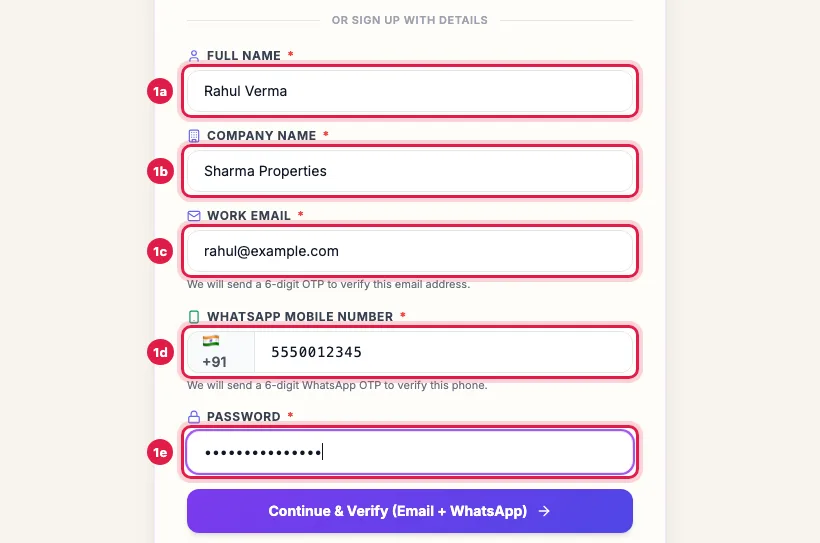
The sign-up form with Full Name, Company Name, Work Email, WhatsApp Mobile Number and Password filled in Click Continue & Verify (Email + WhatsApp). A 6-digit code goes to your email and another to your WhatsApp.
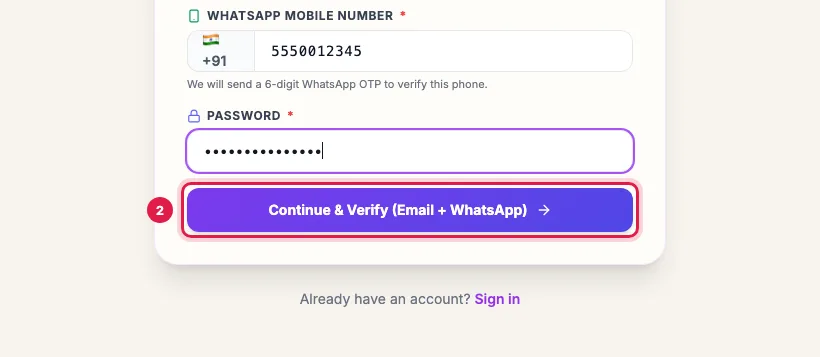
The Continue & Verify button below the sign-up form Enter both codes and click Verify & Create Account.
The setup wizard opens. Finish its five steps: Business, Agent Studio, Agreement, KYC and Activate (see "Finish the setup wizard"). Your email and WhatsApp number already show as verified.
What you need
- A work email you can open now, for the email code.
- An Indian mobile number that has WhatsApp, for the WhatsApp code. Login codes and alerts go to it later too.
- About ten minutes: two minutes to register, about five for the setup wizard, and a few to test your agent.
- For the KYC step of the wizard: the mobile number registered with your DigiLocker account.
Sign up with Google instead
The Google button at the top of the sign-up page creates the account from your Google login. The setup wizard then asks you to verify your WhatsApp number (Verify on WhatsApp, then the code) and, if needed, your email, before you can continue.
If a code does not arrive
- Each code has a Resend OTP button that works again after a short countdown.
- WhatsApp code: check that the number is the one with WhatsApp and that WhatsApp is connected to the internet.
- Email code: look in Spam or Promotions, and check the address for typos. Change Details takes you back to the form.
- Still nothing after a few tries: raise a ticket or write to Support with the email and number you used.
What happens next
After the setup wizard you land on the Dashboard with your first AI agent already created and a shared trial number attached. The trial's 3 days start with your first connected call, so set the agent up first; make that call within 7 days of signing up. The bar at the top of every page shows where your trial stands.
Example: A real-estate firm signs up
Rahul Verma of Sharma Properties, Jaipur, opens /register on his laptop, enters his name, the company name, his work email, his WhatsApp number and a password, and clicks Continue & Verify. He types the email code and the WhatsApp code, clicks Verify & Create Account, and the setup wizard opens with both shown as Verified.
Tips
- Use the WhatsApp number you actually carry; login OTPs and alerts go there.
- If the WhatsApp OTP does not arrive in a minute, check that the number has WhatsApp, then use Resend.
- Sign up with the company name customers know you by; the agent introduces itself with your business name.
Frequently asked questions
Do I need a card or coupon?
No. The trial needs no card and no coupon code.
Can I sign up with Google?
Yes, use the Google button on the sign-up page if it is shown for your portal. You then verify your WhatsApp number in the setup wizard.
Account kaise banaye, kitna time lagta hai?
Register at /register with your email and WhatsApp number and verify both codes: about two minutes. The setup wizard takes about five more.
OTP nahi aaya, kya karein?
Use Resend OTP after the countdown, check Spam for the email code, and check that the mobile number has WhatsApp.
When does the free trial start?
With your first connected call, even a test call to your own phone, not when you register or finish setup. Make that call within 7 days of signing up.
I already have an account.
Click Sign in at the bottom of the sign-up page and log in instead.
Questions this guide answers
- How do I start a free trial of AI calling software?
- Do I need a credit card for the AI voice agent trial?
- What if the sign-up OTP does not arrive?
Related guides
- The 5-Step Setup Wizard for Your AI Calling Workspace: After sign-up, a five-step wizard sets up your workspace: Business, Agent Studio, Agreement, KYC and Activate. It takes about five minutes…
- AI Calling Free Trial: What Is Included: The free trial runs 3 days from your first connected call, or 25 connected calls, whichever comes first. Setup days do not count: make…
- How to Set Up an AI Calling Agent: Your First Live Call in 10 Minutes: Follow the Dashboard's "Get to your first live call" list: make the agent yours, add yourself as a lead in a test group, and launch a…
- Cannot Log In or Not Getting the Code? Every Sign-in Message Explained: The sign-in page says what is wrong: a wrong password (5 tries, then a 15-minute lock), a sign-in code that lasts 5 minutes, a network…