Cannot Log In or Not Getting the Code? Every Sign-in Message Explained
In short: The sign-in page says what is wrong: a wrong password (5 tries, then a 15-minute lock), a sign-in code that lasts 5 minutes, a network your workspace does not allow, or an account that belongs to another portal. Forgot the password? Click Forgot Password? and follow Reset your password.
A step-by-step guide for BookAICall, an AI voice agent platform that makes and answers phone calls for businesses in Hindi, English, Hinglish and other Indian languages. Updated .
Steps
Open the sign-in page on your portal's address (the one in your welcome or invitation email), enter your Email and Password, and click Sign In. If you signed up with Google, click Sign in with Google instead.
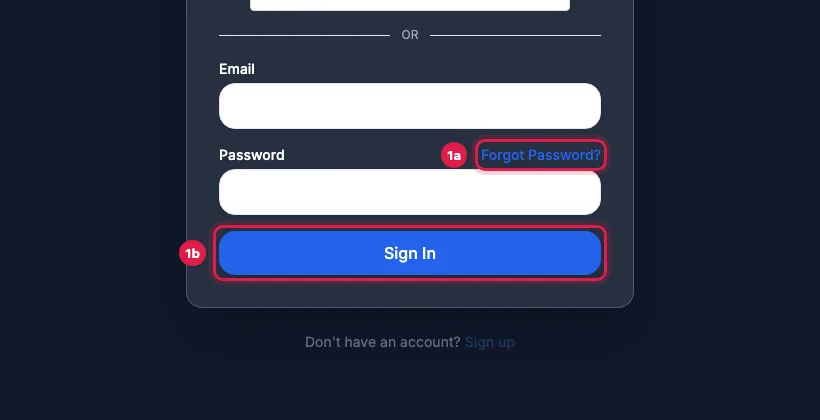
Sign in, or click Forgot Password? to set a new password If the page asks for a code, enter the 6-digit code under Verification Code (OTP), from the email "Your Verification Code", or under Authenticator Code, from your authenticator app. Resend Code sends a new email code.
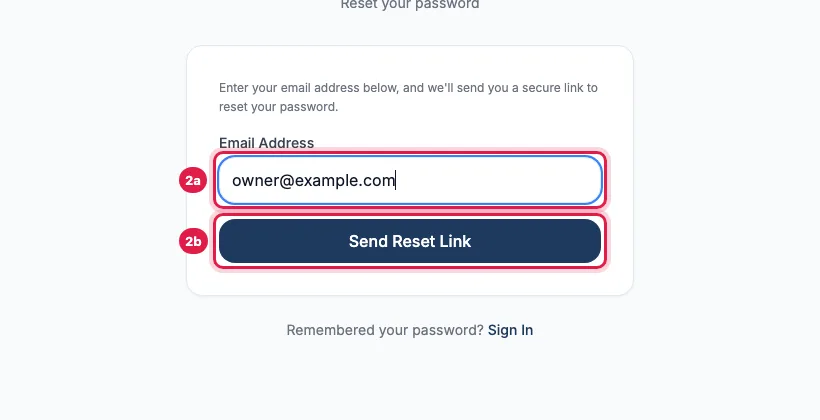
Enter your email and click Send Reset Link If it shows a message instead, find it below and do what it says. If you have forgotten your password, click Forgot Password? next to the Password label.
What the message means
- "Invalid credentials. 4 attempts remaining before account lock.": the email or the password is wrong. Check Caps Lock and the email you sign in with.
- "Account temporarily locked due to 5 consecutive failed login attempts": after 5 wrong passwords in a row, sign-in for that email is locked for 15 minutes. Wait, or reset your password, which lifts the lock at once.
- "Invalid or expired OTP": the email code is wrong or older than 5 minutes. Click Resend Code and use the newest one.
- "Invalid Authenticator Code": the code from your authenticator app did not match. Codes change every 30 seconds; check that your phone's clock is set automatically.
- "Your network is not on this workspace's allowed IP list. Ask your admin to add it.": your admin allows sign-in only from certain networks (Team → Security Policies). Ask them to add your network, or use an allowed one.
- "This account is registered under a different portal. Please log in via your assigned organization portal URL.": your account belongs to your company's or partner's own portal. Sign in on that address.
- "You were signed out after a period of inactivity. Please sign in again.": your workspace signs people out after the inactivity time your admin set. Sign in again.
Other situations
- Signed out when you sign in somewhere else: your workspace allows one session per person (Restrict Concurrent Login Sessions in Team → Security Policies).
- Invited by a colleague: open the invitation email and click Set Password & Accept Invitation, within 7 days, or sign in with the temporary password in that email. If the invitation expired, ask them to click Resend Invite Email on the Team page.
- Signed up with Google and never set a password: Sign in with Google works; the email and password form says Invalid credentials until you set a password with Forgot Password?.
- Trial or plan ended: you can still sign in. The menu shows Subscription, Wallet, Billing, Support and Settings until you choose or renew a plan.
Frequently asked questions
The sign-in code did not arrive.
It comes by email with the subject "[your portal's name] Your Verification Code" and lasts 5 minutes. Wait a minute, check Spam and Promotions, then click Resend Code. If you use an authenticator app, the code is in the app, not in email.
I lost the phone with my authenticator app.
Ask your workspace admin to raise a support ticket for you. A password reset does not turn the sign-in code off.
Login nahi ho raha, kya karu?
Read the red message on the sign-in page: it says whether the password is wrong, the account is locked, the code expired or the network is not allowed. If you forgot the password, click Forgot Password?.
Can my admin sign me in or see my password?
No. Nobody can see your password. Your admin can resend an invitation, change your role or remove you; you set your own password with Forgot Password?.
Which address do I sign in on?
The one in your welcome or invitation email. A partner's clients sign in on the partner's own address, and the password reset email always links to it.
Questions this guide answers
- Why can't I log in to my AI calling dashboard?
- Why is my sign-in verification code not arriving?
- What does 'account temporarily locked' mean?
- Why does it say my account is registered under a different portal?
Related guides
- Forgot Password? How to Reset It (and Fix a Missing Reset Email): On the sign-in page click Forgot Password?, enter the email you sign in with and click Send Reset Link. Open the email "Reset your ……
- Add Team Members and Set Roles and Sign-in Security: Team is where you invite colleagues, choose what each person can do (Admin, Manager, Member or a custom role with module-by-module rights)…
- How to Get Support for Your AI Calling Agent: Open Support, click New Ticket, enter a Subject and the Details, choose the Priority, attach a screenshot if you have one, and click…