How to Get Support for Your AI Calling Agent
In short: Open Support, click New Ticket, enter a Subject and the Details, choose the Priority, attach a screenshot if you have one, and click Submit Ticket. You get a ticket number, replies show on the ticket and come by email, and replying to a resolved ticket opens it again.
A step-by-step guide for BookAICall, an AI voice agent platform that makes and answers phone calls for businesses in Hindi, English, Hinglish and other Indian languages. Updated .
Steps
Open Support (My Support Tickets). Your tickets are listed with Ticket ID, Subject, Priority, Status and Opened; search by subject or ticket ID, or filter by status and priority. Click New Ticket.
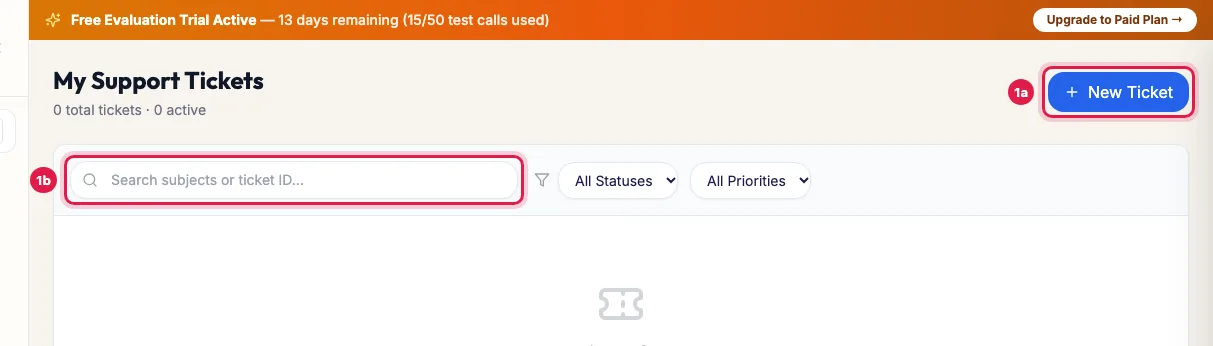
Support: your tickets, and New Ticket In Create Support Ticket, enter a Subject (a short line, for example "Campaign stopped at 4 PM") and the Details: what happened, when, and which campaign, agent, number or lead.
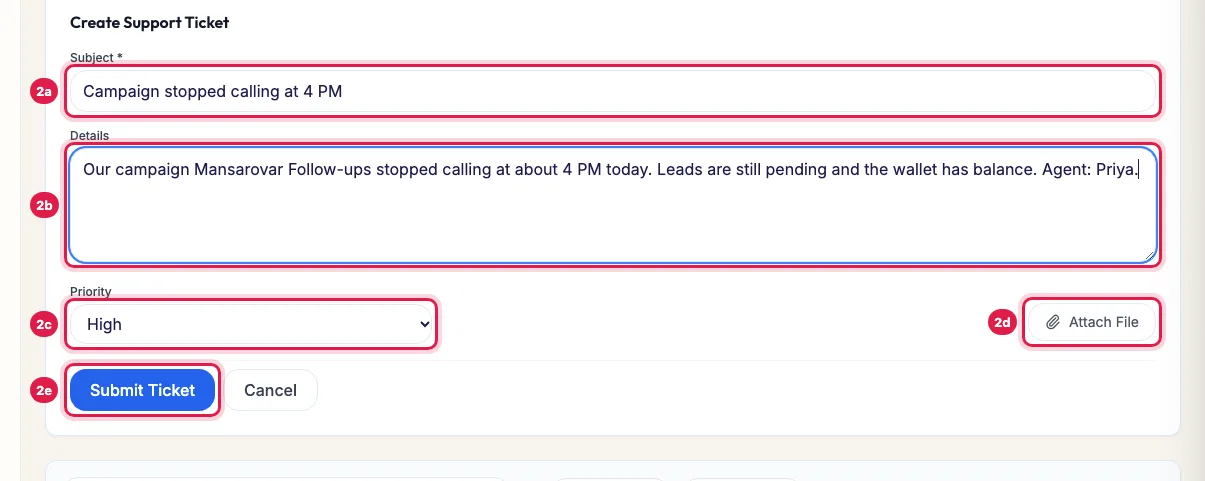
New ticket: subject, details, priority and an optional screenshot, then Submit Ticket Choose the Priority (low, medium, high or urgent), and add a screenshot or file with Attach File if you have one.
Click Submit Ticket. The ticket gets a number and appears in the list as open.
Click the ticket to open it: replies from the support team show there and come to you by email. Type your answer in the reply box and click Send Reply; Attach File adds a file.
When the ticket is resolved, rate the help you got. If the problem is still there, reply on the ticket and it opens again.
Statuses
- open: received, not yet answered.
- in progress: someone is working on it.
- resolved: the team believes it is fixed. Rate it, or reply to open it again.
- closed: finished. A reply opens it again.
Who answers
Tickets go to whoever provides your account: our support team, or your partner if your account is with one. For direct customers, an AI support engineer checks your account at once (campaigns, wallet, agents, numbers and recent calls) and replies with what it found; the team takes over where a person is needed, and anything that changes your account or money is confirmed by the team.
Write a ticket that gets solved fast
- One problem per ticket.
- The exact time (IST) and the phone number of a call that went wrong, or the campaign or agent name.
- What you expected and what happened instead.
- A screenshot of any error message.
- Choose urgent only when calling has stopped for your whole business.
Before you raise one
- Check the Status page (/status): if a service shows a problem, the team is already on it.
- Calls not going out? The guide AI Agent Not Making Calls lists the usual causes: calling hours, the plan or wallet, the agent's number, the campaign status, DND.
- Billing question? Wallet → Call Deduction Ledger shows every charge.
Example: A campaign that stopped
Rahul at Sharma Properties sees that the Mansarovar Follow-ups campaign stopped calling at 4 PM. He raises a high priority ticket with the campaign name, the time and a screenshot of the campaign page. The AI checks the campaign, the wallet and the agent and replies within minutes that the wallet ran below one minute's balance; Rahul recharges and the campaign carries on. Where a person is needed, the support team takes over on the same ticket.
Tips
- Include the phone number, the time and a screenshot where you can.
- Reply on the same ticket instead of opening a new one for the same problem.
- Feature ideas are welcome as tickets too: see Share feedback or request a feature.
Frequently asked questions
How do I contact support for my AI calling platform?
Open Support in the menu and click New Ticket. Replies show on the ticket and come by email.
Ticket kaise banaye?
Support → New Ticket → Subject, Details and Priority → Submit Ticket.
How fast will I get an answer?
Direct customers usually get the AI's first answer within minutes, and the team follows up where needed, urgent tickets first. A partner's customers are answered by the partner.
The ticket says resolved but the problem is still there.
Reply on the ticket saying what still happens. Your reply opens it again.
I cannot sign in. How do I raise a ticket?
Use Forgot Password? on the sign-in page first. If that does not help, ask a colleague who can sign in to raise the ticket, or contact whoever set up your account.
Can I attach a recording or screenshot?
Yes: Attach File when you create the ticket or reply. For a call, the time and number are enough for the team to find its recording.
Questions this guide answers
- How do I contact support for my AI calling platform?
- How do I report a problem with my AI calling agent?
- How do I reopen a resolved support ticket?
- What should I include in a support ticket?
Related guides
- Is the AI Calling Platform Down? Check the Status Page: The Status page (/status on your portal's address) shows whether Voice calls, Call analysis, Dashboard & API and WhatsApp messages are…
- AI Agent Not Making Calls? Every Reason and the Fix: Open the campaign: a line under its name says when it is paused by the wallet, by the plan or by you, or waiting for calling hours (9 AM…
- How to Share Feedback or Request a Feature: Raise a support ticket with your idea or feedback, starting the subject with "Feature request" or "Feedback". Every request is read, you…