Is the AI Calling Platform Down? Check the Status Page
In short: The Status page (/status on your portal's address) shows whether Voice calls, Call analysis, Dashboard & API and WhatsApp messages are Operational or Degraded, and every incident of the last 7 days. It needs no sign-in and refreshes every minute.
A step-by-step guide for BookAICall, an AI voice agent platform that makes and answers phone calls for businesses in Hindi, English, Hinglish and other Indian languages. Updated .
Steps
Open /status on your portal's address, for example the address you sign in on followed by /status. No sign-in is needed.
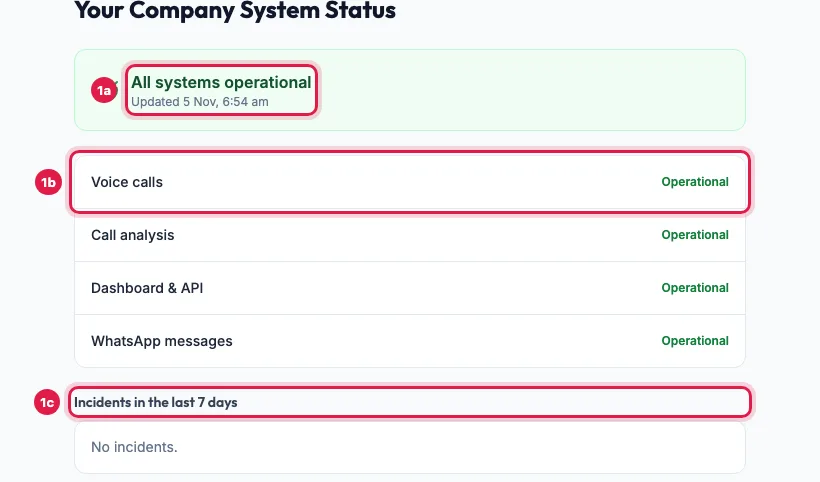
Status: each service, and any incident in the last 7 days Read the top line: All systems operational, or Some systems are degraded. Updated shows when it was last checked.
Below it, each service shows Operational or Degraded, with a short note when there is a problem.
Incidents in the last 7 days lists each incident with its title, the service, when it started and ended, and Resolved once it is over.
The services
- Voice calls: AI calls going out and coming in.
- Call analysis: summaries, outcomes and lead scores after each call.
- Dashboard & API: the portal and the developer API.
- WhatsApp messages: templates, follow-ups and replies.
How problems are detected
The platform checks itself every 5 minutes: if many recent calls fail, if the voice service stops answering, or if finished calls wait too long for their analysis, an incident opens on this page by itself and the team is alerted. It is marked Resolved after 30 quiet minutes. Tickets raised about it get the update.
What it does not show
Problems that affect only your account, such as an empty wallet, a paused campaign or a number not assigned to the agent. If everything shows Operational but something is wrong for you, raise a ticket.
Example: Summaries are late
A clinic's front desk notices that the last hour's calls have no summary yet. The Status page shows Call analysis as Degraded with the note "Call summaries and outcomes are taking longer than usual." The calls themselves were made and recorded, so the desk keeps working, and the summaries appear once the incident shows Resolved.
Tips
- If a service shows a problem, there is no need to raise a ticket for it: the team is already working on it and the page is updated.
- If everything shows Operational but something is wrong for you, raise a ticket with the time and number.
- Bookmark the page: it opens even when you cannot sign in.
Frequently asked questions
Is the AI calling service down right now?
Open /status on your portal's address: it shows each service as Operational or Degraded, live.
Calls fail ho rahi hai, kya service band hai?
Check /status. If Voice calls shows Degraded, the team is on it. If it is Operational, check your wallet, agent number and campaign, then raise a ticket.
Do I need to sign in to see the status?
No. Anyone with the address can open it.
What happens to my calls during an incident?
Calls already made keep their recordings, and delayed summaries appear once analysis catches up. Calls that failed during the incident can be redialled from the campaign.
Where can I see past incidents?
The page lists the last 7 days.
Questions this guide answers
- Is the AI calling service down right now?
- Where can I see the AI calling platform status?
- Why are AI call summaries delayed?
- Do I need to sign in to see the system status?
Related guides
- How to Get Support for Your AI Calling Agent: Open Support, click New Ticket, enter a Subject and the Details, choose the Priority, attach a screenshot if you have one, and click…
- AI Agent Not Making Calls? Every Reason and the Fix: Open the campaign: a line under its name says when it is paused by the wallet, by the plan or by you, or waiting for calling hours (9 AM…
- AI Calls Dropping or Voice Breaking? Causes and What to Do: Most broken or dropped calls come from the line on the customer's side: a weak signal, a speakerphone or loud noise near them. Listen to…