How to Make an AI Agent Take Orders over the Phone
In short: Every agent has Conversation Rules in its panel. How the agent speaks (reply length, the pause that ends the caller's turn, the inbound greeting) applies to every agent. Taking orders on the call applies only when the agent has a product catalog with rows (see Data Catalogs). Leave a field empty to use your industry's default.
A step-by-step guide for BookAICall, an AI voice agent platform that makes and answers phone calls for businesses in Hindi, English, Hinglish and other Indian languages. Updated .
Steps
Open AI Agents, click Edit on the agent and find Conversation Rules. How the agent speaks: Longest reply (words); Pause that ends the caller's turn, with how quickly it replies; and, for incoming calls, whether the greeting finishes before the caller can speak.
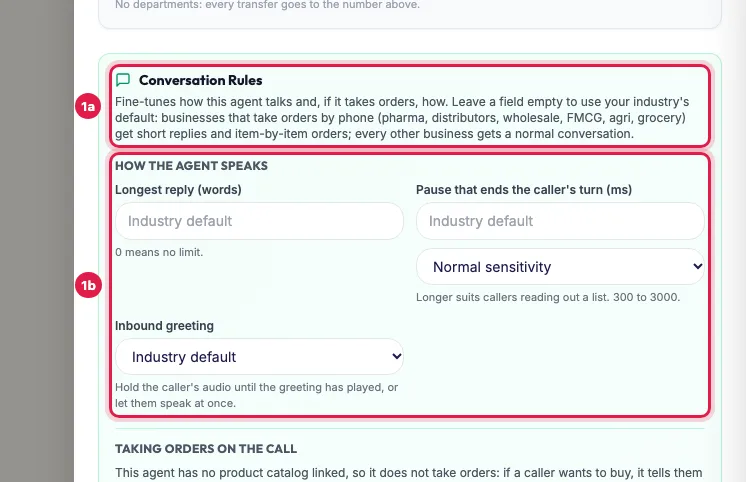
Conversation Rules: how the agent speaks, for every agent Taking orders on the call is used only when the agent can take orders, that is when it has a product catalog with rows: one ticked under Connected Data Catalogs, or any of your account's when none is ticked. Without one, the agent never takes an order: it tells the caller how to order. With one, set how orders are taken (item by item is safest), when to say the rate, what to say when a product is not found, the phrases that end the order and the thank-you line.
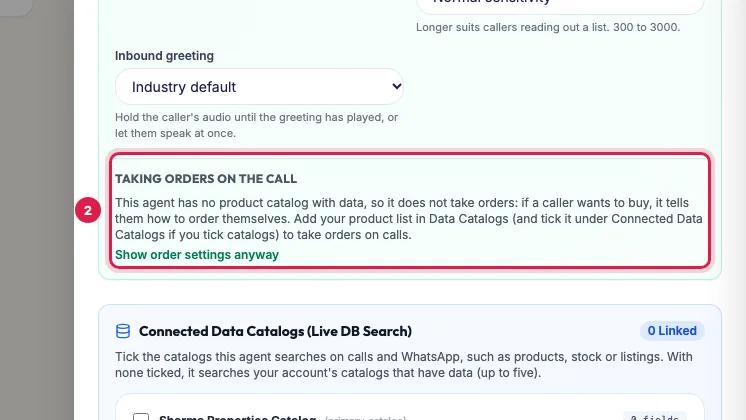
Taking orders on the call: used only when a product catalog is linked Click Save Changes, then call the agent and try it: ask a question, read out a short order, and say a phrase that ends the order.
How the agent speaks (every agent)
- Longest reply (words): the most words in one reply, from 0 to 80. 0 means no limit. About 20 suits most calls; order lines need about 15.
- Pause that ends the caller's turn (ms): how long a silence (300 to 3000 milliseconds) means the caller has finished. Longer suits callers reading out a list, an address or an order.
- Sensitivity, under the pause: Normal sensitivity; Low: waits for the caller to finish; High: replies quickly.
- Inbound greeting: Finish the greeting first holds the caller's audio until the greeting has played, so a "hello?" cannot cut it; Caller can speak at once lets them start straight away.
Taking orders on the call (agents with a product catalog)
- Order taking: Item by item (recommended for orders) saves each item the moment it is said, so a dropped call keeps the order; One booking at the end; or No ordering on calls (guide the caller to order themselves).
- Say the rate: Only when the caller asks, Always, with the product, or Never.
- Before looking up a product: Say nothing, or Say a short line such as "Theek hai". Lookups take about a second.
- After an item is noted: the line the agent says, for example "{product}, {quantity} {unit}. Theek hai, aur kuch?"
- Product not found: Ask for the spelling only, Suggest close matches or Say it is not available, with the words to use.
- When the quantity is unclear, ask: for example "Kitna likhun?"
- Phrases that end the order: comma separated, such as "order ho gaya, bas, itna hi". The agent then reads the order back and thanks the caller.
- Thank-you line, Unit when only a number is said (piece, strip, box, case, bottle, tube, vial or pack) and Extra unit words such as dabba=box, patta=strip.
- Placeholders you can use in these lines: {product} {quantity} {unit} {business_name}.
What happens if I leave everything empty?
Your industry's defaults apply. Businesses that take orders by phone (pharma, distributors, wholesale, FMCG, agri, grocery) get short replies of about 15 words, a longer pause so callers can read out a list, low sensitivity, rates only when asked, and item-by-item orders. Every other business, such as real estate, education or clinics, gets a normal conversation with no word limit.
When to change something
- The agent cuts callers off: make the pause longer, or choose low sensitivity.
- The agent talks too much: set Longest reply to about 20 words.
- Callers dictate long orders: choose Item by item, so a dropped call keeps what was said.
- Callers wait in silence after a question: choose High sensitivity or a shorter pause.
- Your list is not something callers order, such as flats: choose No ordering on calls.
Example: A medical distributor's order line
Shree Ganesh Pharma in Indore ticks its product list under Connected Data Catalogs. In Conversation Rules it keeps Item by item, sets Say the rate to Only when the caller asks, Product not found to Suggest close matches, adds "bas itna hi" and "order ho gaya" as phrases that end the order, and patta=strip as an extra unit word. A chemist reads out twelve items; when the line drops at item nine, the first nine are already saved in the order.
Tips
- Change one rule at a time and test with a call.
- If you see an error when saving, a value is out of range, for example a reply longer than 80 words or a pause outside 300 to 3000.
Frequently asked questions
Can an AI agent take orders on a phone call?
Yes, when it has a product catalog with rows. It notes each item, reads the order back and thanks the caller; the order is saved for your team.
How do I stop the AI agent from interrupting callers?
Make the Pause that ends the caller's turn longer, or choose Low: waits for the caller to finish.
Agent bahut lamba bolta hai, kaise rokein?
Set Longest reply (words) to about 20 and add "one or two short sentences" to the prompt.
Can the agent tell the rate only when asked?
Yes: set Say the rate to Only when the caller asks.
Why are the order settings folded?
The agent has no product catalog with rows, so it does not take orders. Add your product list in Data Catalogs, or click Show order settings anyway.
Questions this guide answers
- Can an AI agent take orders on a phone call?
- How do I stop an AI voice agent from interrupting callers?
- How do I make an AI agent give shorter answers?
Related guides
- Choose an Indian Voice and Language for Your AI Calling Agent: Open the agent with Edit. Under Voice & Personality choose the Language (Hindi, Hinglish, English or 11 other Indian languages) and the…
- Give an AI Calling Agent Live Product, Stock or Order Data: A catalog is a table the agent searches during a call: products, stock, rate lists, available flats or orders. Create it in Data Catalogs…
- How to Write a Prompt for an AI Calling Agent (with Example): Open the agent with Edit and write its Greeting Message and System Prompt: who the agent is, the one goal of the call, the steps in order…
- AI Voice Agent Saying Wrong Things? Fixes for Each Problem: Open the call's transcript, find the moment it went wrong and change the one setting behind it: the Language for the wrong language, the…
- AI Order Taking Calls for Pharma Distributors and Wholesalers: Every BookAICall account can take orders on calls: link a product catalog to your agent and it notes each item as the caller says it, checks…