Choose an Indian Voice and Language for Your AI Calling Agent
In short: Open the agent with Edit. Under Voice & Personality choose the Language (Hindi, Hinglish, English or 11 other Indian languages) and the Tone, pick one of 22 Indian voices (14 female, 8 male), and click Save Changes. The next call uses the new voice.
A step-by-step guide for BookAICall, an AI voice agent platform that makes and answers phone calls for businesses in Hindi, English, Hinglish and other Indian languages. Updated .
Steps
Open AI Agents and click Edit on the agent.
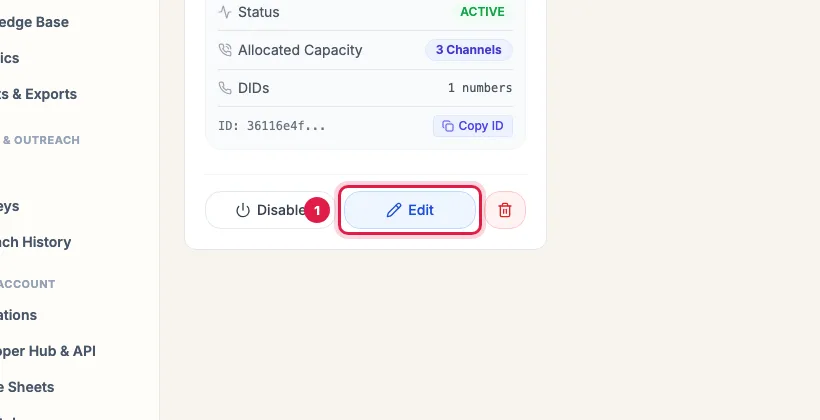
Edit on the agent's card Under Voice & Personality choose the Language (Hindi, Bilingual (Hinglish), English (India, US or UK), Marathi, Gujarati, Tamil, Telugu, Kannada, Malayalam, Bengali, Punjabi, Odia, Assamese or Urdu) and the Tone (Professional, Friendly, Empathetic, Assertive, Persuasive or Casual).
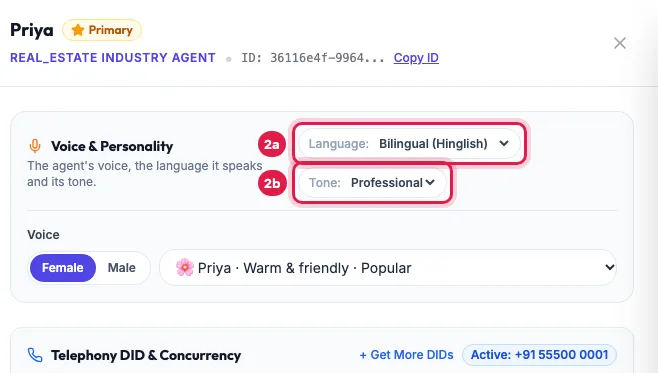
Voice & Personality: the Language and the Tone Under Voice choose Female or Male, then pick a voice from the list, for example Priya, Kavya, Arjun or Vikram; each shows its style.
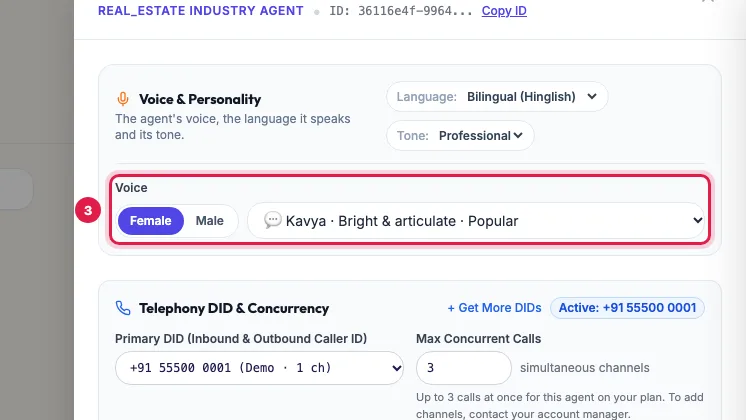
Voice: Female or Male, then the voice from the list Click Save Changes, then call the agent to hear the new voice.
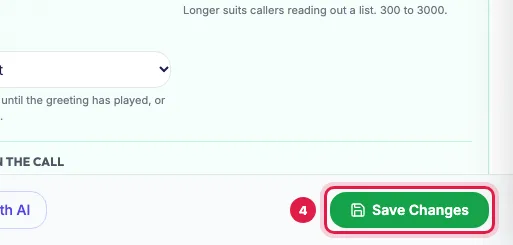
Save Changes, then call the agent to hear it
The 22 voices
- Female: Priya (warm & friendly), Anjali (soft & professional), Kavya (bright & articulate), Meera (calm & mature), Riya (energetic & cheerful), Ananya (confident & poised), Diya (sweet & melodic), Ishita (crisp & clear), Neha (friendly & natural), Saanvi (polished & smooth), Tanvi (mature & warm), Pooja (mature & assuring), Sneha (breezy & welcoming), Aditi (calm & narrative).
- Male: Arjun (energetic & upbeat), Vikram (deep & authoritative), Rohan (dynamic & persuasive), Kabir (calm & reassuring), Aarav (warm & youthful), Dev (corporate & formal), Sameer (clear & articulate), Rajesh (mature & dependable).
- The list marks the most-used voices as Popular.
How language and tone work
- Language is the language the agent speaks. Bilingual (Hinglish) mixes Hindi and English the way most Indian callers speak.
- Write the greeting and the prompt in the same language; to follow a caller who switches, add a line such as "If the caller speaks English, reply in English."
- Tone sets how it sounds for the whole call: Friendly or Empathetic for service and healthcare, Professional for finance, Persuasive for sales.
- The agent speaks as a woman or a man to match its voice, for example "main bol rahi hoon" with a female voice.
When the change applies
New calls use the voice, language and tone saved in the panel; a call in progress keeps the earlier ones. The agent's card on AI Agents shows its current voice and language.
Example: One business, two agents
A dealer in Pune runs two agents: Kabir speaks Marathi in a Calm & reassuring voice for service reminders to its older customers, and Kavya speaks Bilingual (Hinglish) with a Friendly tone for new enquiries from its website. Each greeting is written in the agent's own language, and the owner calls each agent once from his phone after saving.
Tips
- Bilingual (Hinglish) suits most Indian business calls.
- The surest test is a call: save, call the agent, and change the voice if it does not suit your customers.
- Hear sample calls in different languages on the voice samples page (/voice-samples).
Frequently asked questions
Can an AI calling agent speak Hindi?
Yes. Choose Hindi, or Bilingual (Hinglish) for a Hindi-English mix, and write the greeting in Hindi.
Which Indian languages can the agent speak?
Hindi, Hinglish, English (India, US or UK), Marathi, Gujarati, Tamil, Telugu, Kannada, Malayalam, Bengali, Punjabi, Odia, Assamese and Urdu.
Can you clone my own voice?
Not for business agents. Choose from the 22 Indian voices.
Can one agent speak two languages?
Yes. Choose Bilingual (Hinglish), or tell it in the prompt to follow the customer's language.
Awaaz male se female kaise karein?
In the agent's panel, under Voice, click Female, pick a voice and click Save Changes.
I changed the voice but the call sounded the same.
Check that you clicked Save Changes. Calls that started before the save keep the earlier voice.
Questions this guide answers
- Can an AI calling agent speak Hindi?
- Which Indian languages can an AI voice agent speak?
- How do I change the voice of my AI agent?
- Can an AI agent speak Tamil or Marathi?
Related guides
- How to Create an AI Calling Agent in Minutes (No Code): AI Agents → Generate with AI: describe your business, the call's goal and the voice you want, and the studio writes the call stages…
- How to Write a Prompt for an AI Calling Agent (with Example): Open the agent with Edit and write its Greeting Message and System Prompt: who the agent is, the one goal of the call, the steps in order…
- AI Voice Agent Saying Wrong Things? Fixes for Each Problem: Open the call's transcript, find the moment it went wrong and change the one setting behind it: the Language for the wrong language, the…