How to Upgrade from the Free Trial to a Paid AI Calling Plan
In short: Open Wallet and click Upgrade to Paid Plan. Choose Starter or Pro and how many AI agents, or pay as you go and a first recharge, check the total with 18% GST and pay online. The plan starts as soon as the payment is confirmed; your agents, leads and campaigns stay.
A step-by-step guide for BookAICall, an AI voice agent platform that makes and answers phone calls for businesses in Hindi, English, Hinglish and other Indian languages. Updated .
Steps
Open Wallet and click Upgrade to Paid Plan. The Upgrade to Paid Plan → link in the trial bar at the top of every page, and the button on Subscription, open the same window.
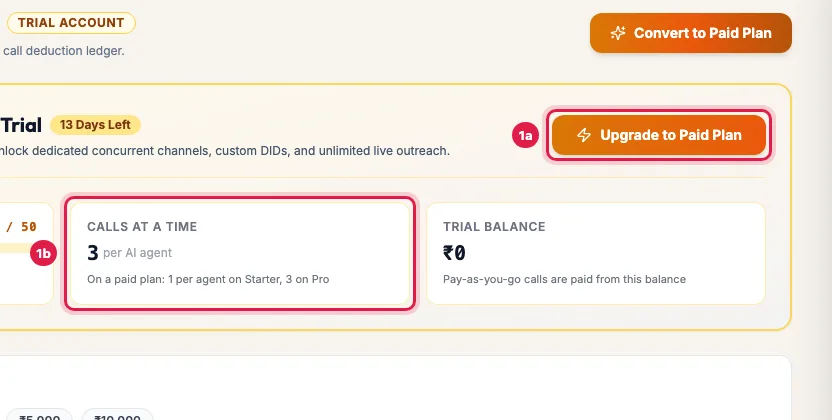
Wallet during the trial: calls used, calls at a time, and Upgrade to Paid Plan In Convert Trial Account to Paid Plan, choose Starter (each AI agent makes 1 call at a time) or Pro (3 at a time), shown per agent per month, and set How many AI agents?.
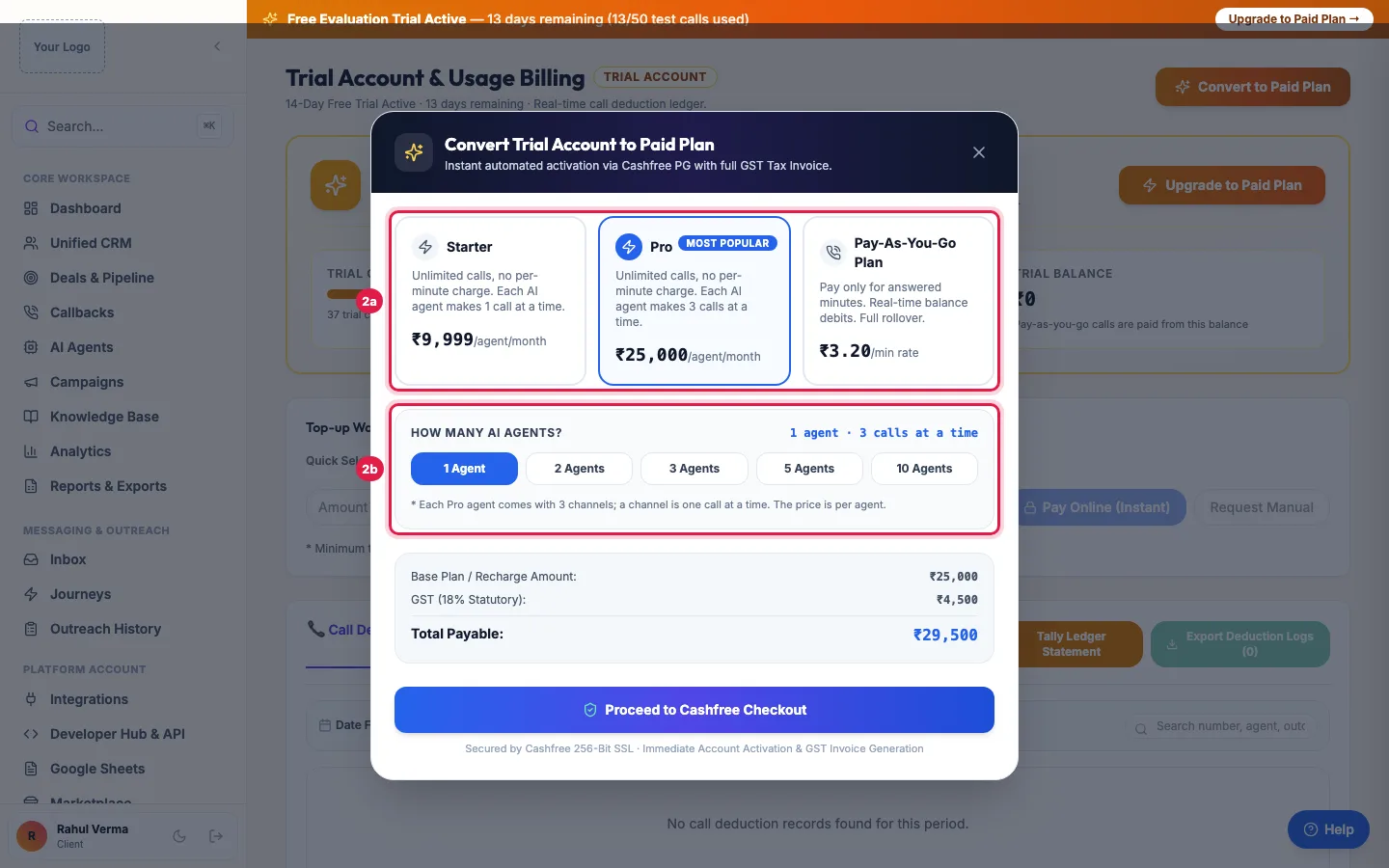
Choose Starter, Pro or Pay-As-You-Go, and how many AI agents you want Or choose Pay-As-You-Go Plan and pick a first wallet recharge under Select Initial Wallet Recharge Amount (or type your own).
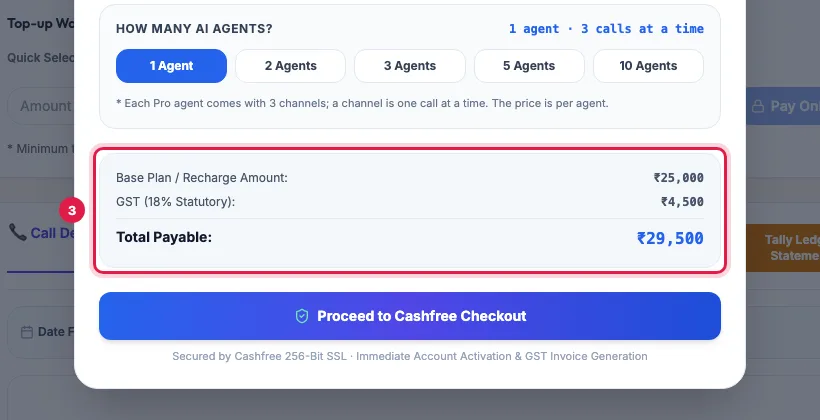
Total Payable with 18% GST, and the checkout button Check Base Plan / Recharge Amount, GST (18% Statutory) and Total Payable, then click the checkout button.
Pay by card, UPI or net banking in the payment window. Keep the window open until it confirms.
Once the payment is confirmed the plan is active: the trial bar goes away, everything you set up stays, and paused campaigns continue. The GST invoice is in Billing.
What changes when you pay
- Your agents call as many people at once as your plan allows: 1 per agent on Starter, 3 on Pro.
- The trial's day and call limits end.
- You can buy your own phone numbers in DID Numbers: during the trial, agents call from a shared trial number. Make your number the agent's Primary DID so calls show it.
- Add-ons can be bought in the Marketplace, and more AI agents can be added.
What stays
Your agents with their prompts, voices and outcomes, your leads and groups, calls, recordings and transcripts, campaigns, knowledge base and settings. Nothing is set up again.
If the trial already ended
When the trial ends, the menu shows only Subscription, Wallet, Billing, Support and Settings, and campaigns pause. Upgrade the same way from Wallet; the rest of the menu comes back and paused campaigns carry on.
Example: A coaching institute goes live after the trial
Bright Future Classes tests its admissions agent over the trial, with 22 connected calls. For the admission season it chooses Pro with 1 AI agent, pays online, and buys a number with easy digits in DID Numbers. The agent now calls three parents at a time, and the same leads, scripts and campaigns carry on.
Tips
- Add your GSTIN in Settings → Profile & Compliance before paying, so it is printed on the invoice.
- If the payment window closes before it confirms, open Wallet: a pending payment shows Complete Payment and Verify & Credit Wallet.
Frequently asked questions
Will I lose my agents or leads?
No. Everything you set up in the trial stays.
I paid but the account still shows the trial.
Refresh Wallet after a minute. If a pending payment is shown, click Verify & Credit Wallet. If it has still not changed, raise a ticket with the payment reference.
Can I upgrade before the trial ends?
Yes, at any time. The paid plan starts when the payment is confirmed.
Do I need a new number after upgrading?
To show your own number, buy one in DID Numbers and make it the agent's Primary DID.
Trial khatam ho gaya, ab kya kare?
Open Wallet and click Upgrade to Paid Plan. Everything you set up is waiting.
Can I pay by bank transfer?
The plan window takes online payment. For a bank transfer, raise a ticket and the team will help.
Questions this guide answers
- How do I buy an AI calling plan after the trial?
- Will I lose my setup when the trial ends?
- What happens when the AI calling free trial ends?
- Do I get my own phone number after upgrading?
Related guides
- Pay as You Go or Unlimited: How to Choose How You Pay for AI Calling: On Billing, Choose how you pay shows two cards with the prices for your account: Pay as you go, where answered minutes are paid from your…
- AI Calling Agent Pricing Explained: Per Agent Plans or Pay as You Go: Monthly plans are priced per AI agent, with no per-minute charge: Starter gives each AI agent 1 channel and Pro gives each AI agent 3…
- How to Recharge Your AI Calling Wallet: Open Wallet, pick a Quick Select amount or type one, and click Pay Online (Instant). You pay the amount plus 18% GST, and the amount you…
- How to Renew Your AI Calling Plan: Your plan renews by itself on the renewal date when your wallet holds enough. To renew or extend yourself, open Subscription and click…
- AI Calling Free Trial: What Is Included: The free trial runs 3 days from your first connected call, or 25 connected calls, whichever comes first. Setup days do not count: make…
- How to Buy a Phone Number (DID) for Your AI Calling Agent: Open DID Numbers in the menu (the DID Phone Number Marketplace), search by digits or area code, click Buy Number, and pay from your wallet…