How to Give Your AI Calling Agent a Phone Number
In short: AI Agents → Edit on the agent → Telephony DID & Concurrency: choose the Primary DID and click Save Changes. That number is the caller ID on the agent's calls and answers calls made to it.
A step-by-step guide for BookAICall, an AI voice agent platform that makes and answers phone calls for businesses in Hindi, English, Hinglish and other Indian languages. Updated .
Steps
Open AI Agents and click Edit on the agent's card.
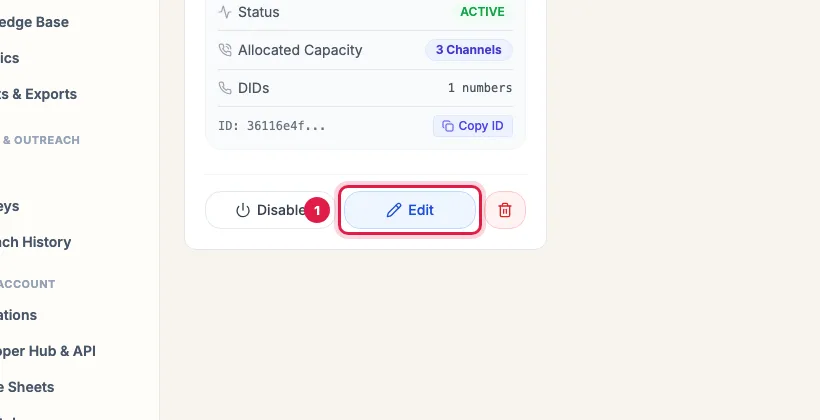
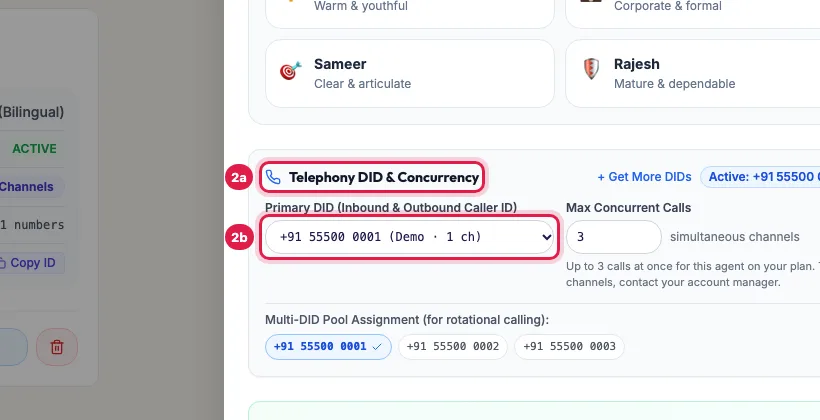
Edit on the agent's card In the panel, scroll to Telephony DID & Concurrency and choose your number under Primary DID (Inbound & Outbound Caller ID). The badge next to + Get More DIDs shows the number in use.
Telephony DID & Concurrency: choose the Primary DID Click Save Changes at the bottom of the panel, then test with one call to your own phone.
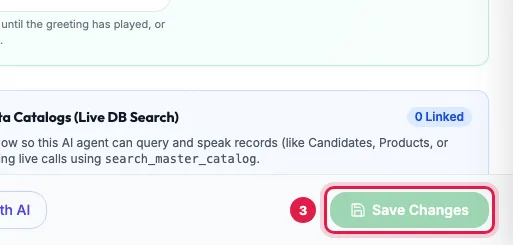
Save Changes at the bottom of the agent's panel
What the Primary DID does
- Outgoing: campaigns and Call AI calls from this agent show this number.
- Incoming: calls to this number are answered by this agent, 24x7 (see "Make an agent answer incoming calls").
- The drop-down lists the numbers your account can use, with their channels; Demo marks a shared trial number.
- + Get More DIDs opens DID Numbers to buy another number.
Several numbers on one agent
When you have more than one number, Multi-DID Pool Assignment appears below: tick the numbers the agent should use for outgoing calls. Each call then goes out on the least busy of them, and calls to any of them reach this agent. The Primary DID is always in the pool.
Max Concurrent Calls
Next to the number, Max Concurrent Calls is how many calls this agent makes at once (its channels). It is 3 per agent on the Pro plan, 1 on Starter, and up to 10 that you choose yourself on pay as you go. You can lower it; to add channels on a monthly plan, contact your account manager.
One number, one incoming agent
Two agents may use the same number for outgoing calls. For incoming calls one call reaches one agent: the one that called that person in the last 7 days, otherwise the agent saved most recently. Give each agent that answers calls its own number.
Example: Two agents, two numbers
Sharma Properties owns two numbers. Priya, who calls website enquiries, gets the first as her Primary DID; Neha, who answers buyers calling the office line, gets the second. Rahul ticks both numbers in Priya's Multi-DID Pool Assignment for her campaigns, but leaves Neha with only her own number, so every incoming call to it reaches Neha.
Tips
- After changing the number, call yourself once: the caller ID you see is the new Primary DID.
- Calls already in progress keep the number they started on.
Frequently asked questions
It says No dedicated phone numbers assigned to your account
Buy a number first: click Buy DID from Marketplace, or open DID Numbers in the menu.
On the free trial, which number do my calls come from?
A shared trial number, marked Demo in the list. Buy your own number from DID Numbers when you want one that is only yours.
Can two agents share a number?
For outbound, yes. For inbound, a call reaches only one agent, so give each inbound agent its own number.
How do I connect a phone number to an AI agent?
Open the agent with Edit, choose the number under Primary DID (Inbound & Outbound Caller ID) and click Save Changes.
Agent ka number kaise badlein?
Choose another number under Primary DID in the agent's panel and click Save Changes. New calls use it at once.
What does -- None (Dynamic Pool Rotation) -- mean?
No Primary DID: outgoing calls use the numbers ticked in the pool, or any number your account owns. Choose a Primary DID so callers always see the same number.
Questions this guide answers
- How do I connect a phone number to an AI agent?
- Which number does an AI calling agent call from?
- Can two AI agents share one phone number?
Related guides
- How to Buy a Phone Number (DID) for Your AI Calling Agent: Open DID Numbers in the menu (the DID Phone Number Marketplace), search by digits or area code, click Buy Number, and pay from your wallet…
- Set Up an AI Receptionist to Answer Incoming Calls 24x7: Make your number the agent's Primary DID and every call to it is answered by that agent, day and night. The agent greets the caller…
- How to Run an AI Calling Campaign: Automate Outbound Sales Calls: Campaigns → New Campaign: name it, choose the AI agent, set the retry rules, pick the lead group and click Create & Launch. The agent…
- Can AI Calls Show Our Own Mobile or Office Number?: No. An AI agent's calls show one of your numbers from DID Numbers, because a call can only show a number on the phone line it is made…